Licenses Data Center
Licenses combines identity, holder and status information in compact rows. Use All licenses, Expiring or Revoked with Search and Filters to find records. The title stays in the application header.
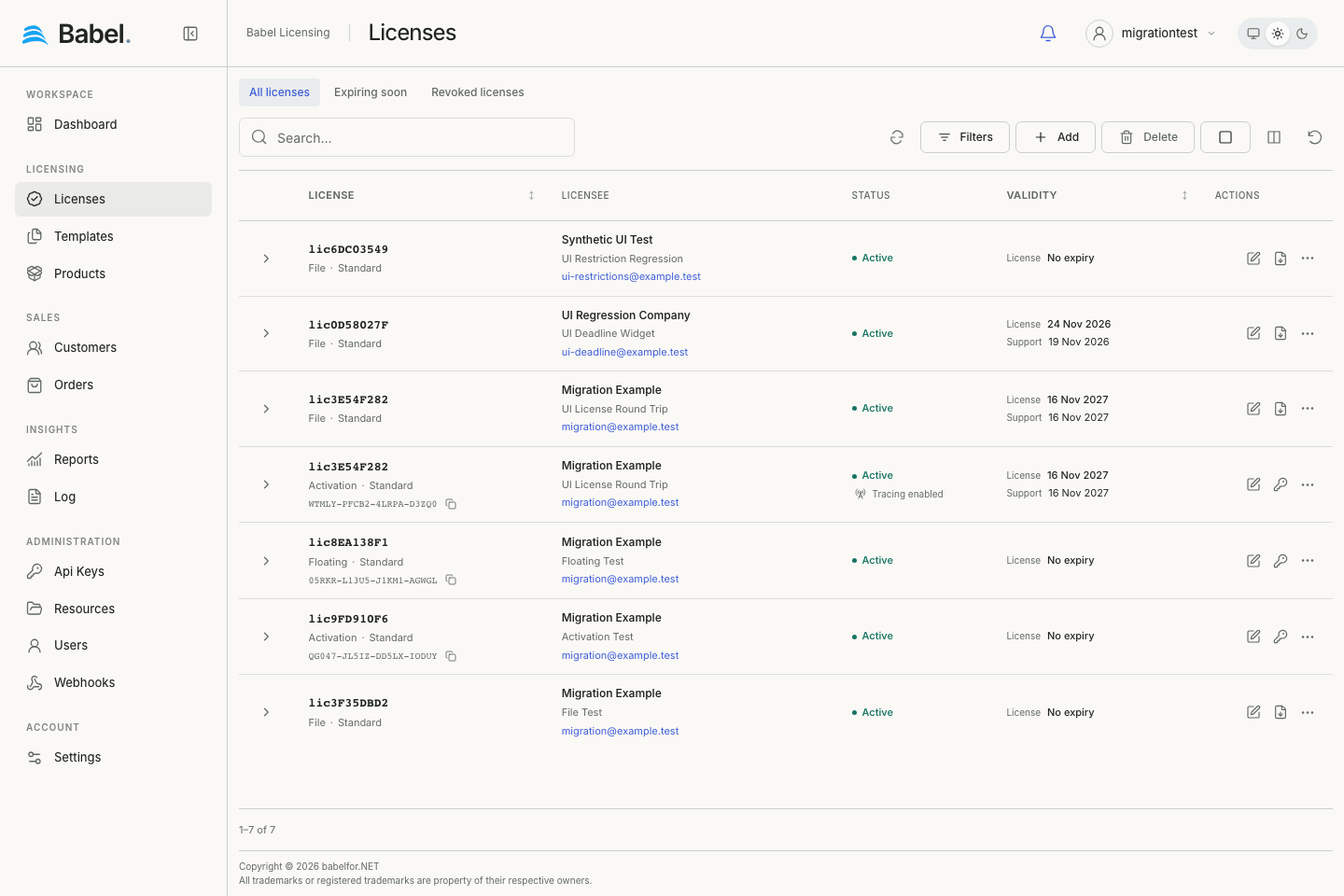
Updated web interface with fictional demonstration data. Screenshots use English labels.
Main Features
Default cells group the license ID, mode/type, holder and validity information. Additional fields remain available through Columns. More rows load while scrolling. Row actions open the editor, download file licenses or manage tokens; the overflow menu offers other permitted actions, including revocation, tracing and deletion. See Working with Records for grouping, loaded-record selection and layout preferences.
License Details and Activity
Expand the row chevron to open License, Activity, Customer and Order details. These are read-only, with links to related editors. Long descriptions and the generated license key remain collapsed until needed; the key is fetched when opened. Activity shows available event details and geographic points, with navigation between events. Missing customer/order relations do not create fake records.
Search and Filter Capabilities
Open Filters above the table to combine field/operator conditions with All/Any/Exclude and nested groups. The filter panel is below the toolbar, not a separate right sidebar. Quick views, search and conditions work together. Refresh reloads the current result; Clear filters removes conditions. The editor below uses searchable lists for templates, customers, products and signing keys.
Editing a License
The Edit License screen allows you to create or modify an existing license’s details and settings. This screen is divided into several sections that control different aspects of the license.
License Template
At the top of the form, you can select the license template that will define the base parameters for this license. In the example, “ACME Charting 1.8.0.0 Template” is selected. A template provides predefined settings that serve as a starting point for the license.
License Information
This section contains the core license identifiers:
- License Id: The unique identifier for this license (e.g., “lic929CEF80”)
- User Key: The activation key that end-users will enter to activate their software (e.g., “PSLGJ-QF7WM-I6JWK-UWCTK”).
Terms
This section defines the operational parameters of the license:
- Mode: Determines how the license is deployed:
- Activation: The license is activated on specific machines
- Floating: Multiple machines can share the license
- File: The license is distributed as a file
- Sites: The number of installations or activations permitted (50 in the example)
- License Type: Categorizes the license (e.g., “Server”)
- Format: The format in which the license is issued (e.g., “Ascii”)
- Issue Date: When the license was created (2024-11-14 17:12:58)
- Expire Date: When the license will expire (2024-12-14 17:13:00)
- Support Expire Date: When technical support for this license ends
- Revoked: Toggle to revoke the license, preventing further use
- Trace: Toggle to enable tracking of license usage and activities
- Description: An optional field for additional notes about the license
Licensee
This section captures information about the license holder:
- Select a customer: Dropdown to choose from existing customers
- Name: The individual’s name associated with the license
- Company: The organization name (Lumenbyte)
- Email: Contact email for the licensee (contact@lumenbyte.example.com)
Properties
This tabbed section includes details about the components covered by the license:
ASSEMBLIES Tab
Lists the software assemblies included in this license with their details:
- Name: Assembly name (analysis, charting, web)
- Version: Software version (1.8.0.0)
- Culture: Localization setting (neutral)
- Public Key Token: Cryptographic identifier (45cd17b5db21e42)
Other available tabs include:
- COMPONENTS
- FIELDS
- FEATURES
Restrictions
This section allows you to add and configure limitations for the license:
- TRIAL: Restricts the license to a trial period
- Expire Days: How many days the trial will last (30)
- Run Instances: Limits simultaneous installations
- Run Count: Maximum number of times the software can be launched
- Run Time: Maximum duration the software can be used
- USAGE: (Available but not currently configured)
- Terms: Additional licensing terms and conditions
Action Buttons
The buttons at the bottom of the screen save or discard your changes:
- SAVE: Commits all changes to the license
- CANCEL: Discards changes and returns to the previous screen
This screen provides comprehensive control over license configuration, allowing administrators to precisely define how software can be used, for how long, and by whom.
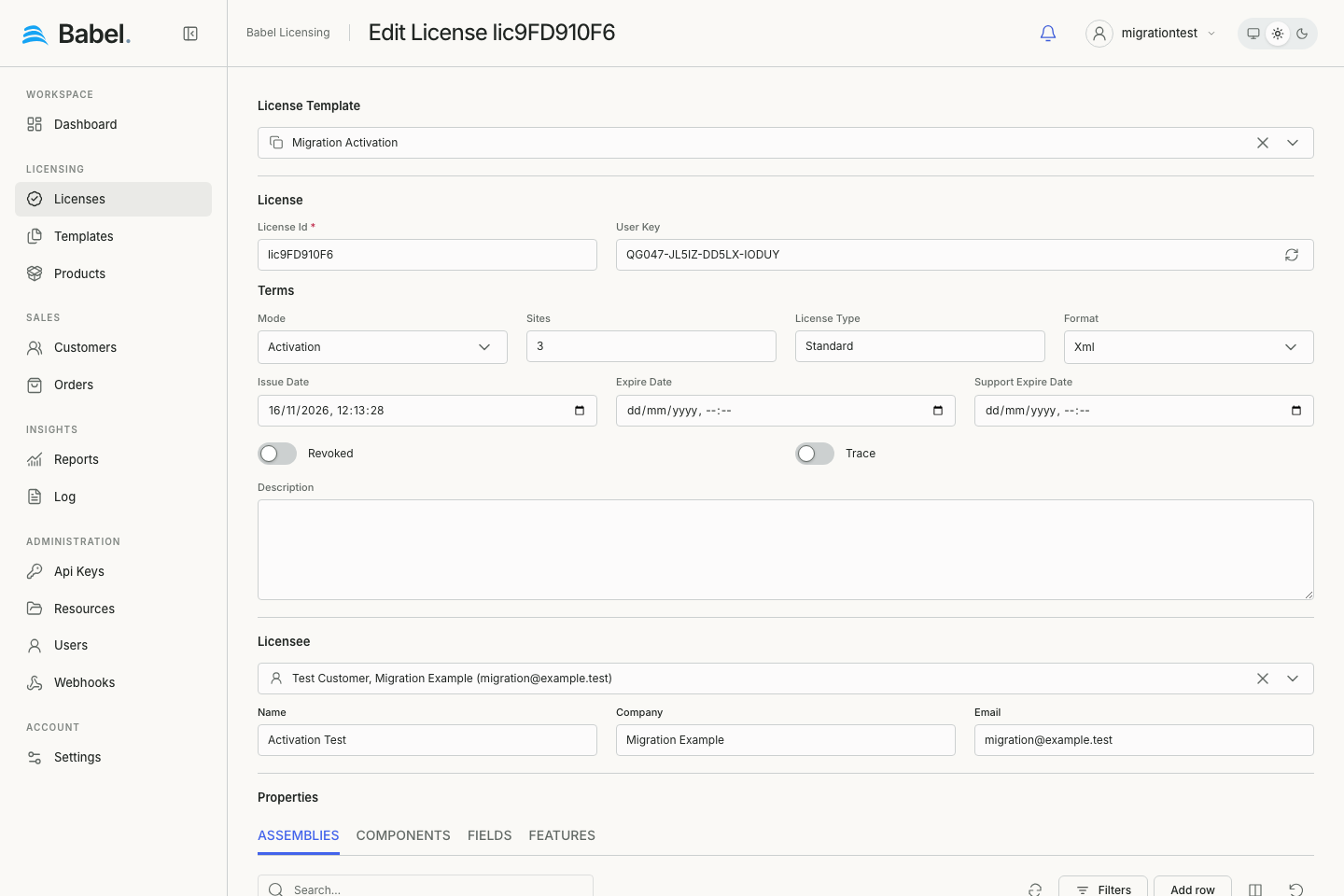
Updated web interface with fictional demonstration data. Screenshots use English labels.
Tips for Efficient License Management
These suggestions help you find licenses quickly and notice problems early:
- Use the filter panel to quickly locate licenses by customer, expiration date, or license mode
- Enable activity tracking (pin icon) for important licenses to monitor their usage
- Regularly review the activity logs to detect any unusual or unauthorized usage patterns
- Check the Sites column to ensure you’re not exceeding your licensed capacity
- Use the Type filter to group licenses by environment (Server, Cloud, Enterprise, Corporate)
- Monitor Expire Date and Support Expire Date to plan for renewals
- Use the Revoke function to immediately disable licenses when needed
The Babel Licensing Web Application makes it easy to maintain control over your software licenses while providing valuable insights into how they are being utilized across your organization.
Template defaults
When creating a license from a template, its licensing mode (File, Activation or Floating) is applied along with the template dates. Review the mode and the issue, expiry and support dates before saving; changing the mode does not reset the populated dates.