Package Setup
How to make the Babel.Obfuscator package available to your builds, reference it from a project, activate the license and verify the first obfuscated build.
Hosting the Package
The Babel NuGet packages are not published on nuget.org. Every build that references Babel.Obfuscator must be able to restore it from a feed you control:
- A private feed such as Azure Artifacts, GitHub Packages, GitLab, MyGet or a self-hosted NuGet server. This is the right choice for build servers and teams. The GitHub Actions example shows how to push the package to GitHub Packages and how to authenticate the restore step with a token.
- A local folder registered as a package source, which is enough for a single developer machine.
Both options are described step by step in Install. Whichever you choose, keep the feed configuration in a NuGet.config file next to the solution, so that dotnet restore finds the package on every machine, CI agents included:
<?xml version="1.0" encoding="utf-8"?>
<configuration>
  <packageSources>
    <add key="nuget.org" value="https://api.nuget.org/v3/index.json" />
    <add key="babel" value="https://nuget.pkg.github.com/YOUR_ORG/index.json" />
  </packageSources>
</configuration>
Adding the Package Reference
From Visual Studio
Right-click the project in Solution Explorer, choose Manage NuGet Packages…, select the package source that hosts the Babel packages and install Babel.Obfuscator. Visual Studio adds a PackageReference with the correct metadata to the project file.
From the dotnet CLI
dotnet add package Babel.ObfuscatorBy editing the project file
Add the following item to the .csproj or .vbproj file:
<ItemGroup>
  <PackageReference Include="Babel.Obfuscator" Version="12.0.0">
    <PrivateAssets>all</PrivateAssets>
    <IncludeAssets>runtime; build; native; contentfiles; analyzers; buildtransitive</IncludeAssets>
  </PackageReference>
</ItemGroup>
The two metadata elements matter:
PrivateAssetsset toallmarks the package as a development dependency, so it is not propagated to the projects or packages that reference yours.IncludeAssetsbrings in thebuildassets, which is where the package’s.propsand.targetsfiles live. Withoutbuildin the list the Babel task is never wired into the project and nothing is obfuscated.
If you write the PackageReference by hand, always include the metadata above. Referencing the package without it can add the Babel tools as a reference of your assembly and leave the build unobfuscated.
Several projects in one solution
To obfuscate several projects without repeating the reference, put it in a Directory.Build.props file at the root of the repository. A condition keeps test projects and other non-shipping projects out:
<Project>
  <ItemGroup Condition="!$(MSBuildProjectName.EndsWith('.Tests'))">
    <PackageReference Include="Babel.Obfuscator" Version="12.0.0">
      <PrivateAssets>all</PrivateAssets>
      <IncludeAssets>runtime; build; native; contentfiles; analyzers; buildtransitive</IncludeAssets>
    </PackageReference>
  </ItemGroup>
</Project>
If you use Central Package Management , declare the version once with a PackageVersion item in Directory.Packages.props and drop the Version attribute from the PackageReference.
Activating the License
The Babel task needs a valid license every time it runs. The package looks for one in this order:
- The
BabelLicenseproperty, when set in the project. - A
babel.licensesfile in the project folder or in any parent folder. Copying the license file next to the solution file is therefore enough for every project in the solution.
BabelLicense accepts the same values as the --license command line switch: the path of a license file, a license key, or a floating license user key:
<PropertyGroup>
  <!-- A license file -->
  <BabelLicense>$(MSBuildThisFileDirectory)build\babel.licenses</BabelLicense>

  <!-- or a license key held in an environment variable (a build server secret) -->
  <BabelLicense>$(BABEL_LICENSE)</BabelLicense>

  <!-- or a floating license user key -->
  <BabelLicense>floating:P1N1J-EH5VA-VGSFU-7EOK8</BabelLicense>
</PropertyGroup>
On build servers keep the key out of the repository: store it as a secret, expose it to the build step as an environment variable and reference that variable from BabelLicense, as the GitHub Actions example does. Floating licenses are described in Product Activation.
A license file is tied to a product version. When you update the package to a new version, install the license file that came with that version. Since version 11.8, a license that is provided explicitly but is not valid for the version being run stops the build with an error instead of silently falling back to evaluation mode.
Evaluation mode
When no license is found, Babel runs in evaluation mode: only symbol renaming is applied, and the obfuscated assembly stops working after a short period, as reported by warning W00000 in the build log. To make sure such an assembly never leaves the build server, turn that warning into an error:
<PropertyGroup>
  <BabelWarningsAsErrors>W00000</BabelWarningsAsErrors>
</PropertyGroup>
Building and Verifying
Build the project as usual, from Visual Studio, dotnet build or msbuild. The Babel log is written to the build output at the verbosity set by VerboseLevel (1 by default).
dotnet build -c Release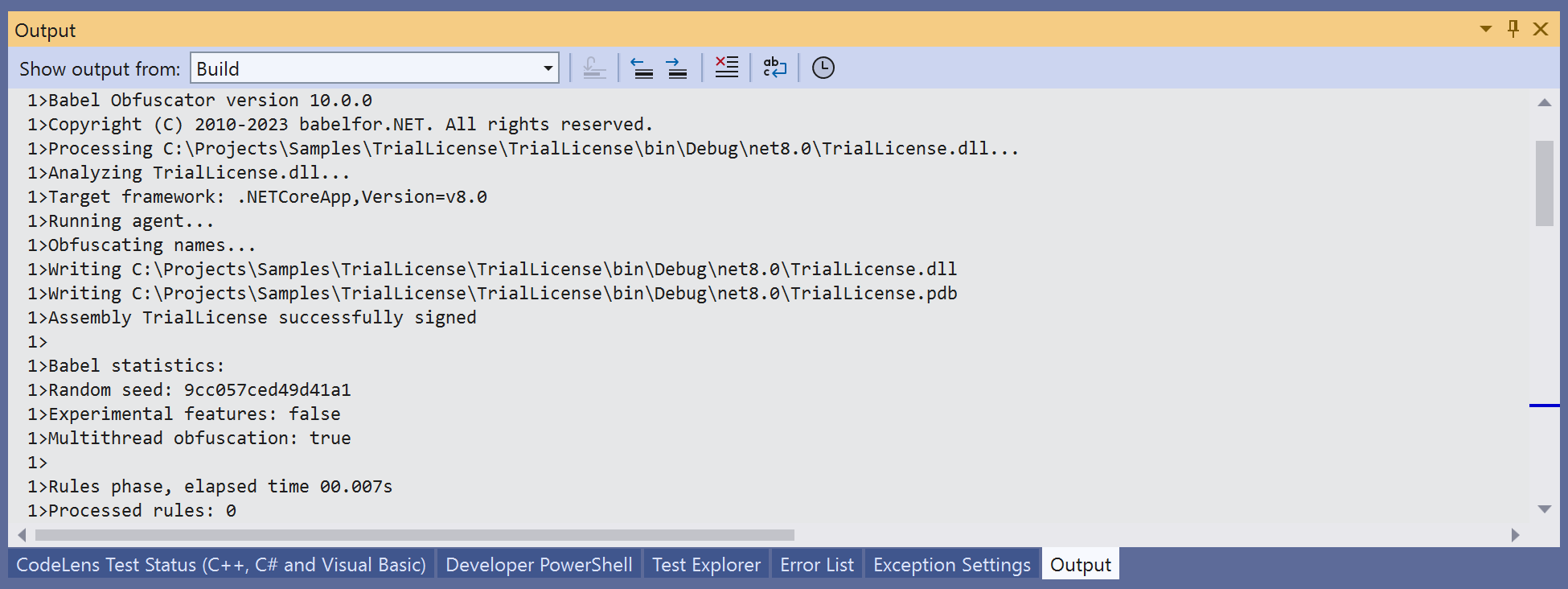
Babel Obfuscator Visual Studio Output
To see exactly how the package invokes Babel, set BabelProvideCommandLineArgs to true: the full command line is written to the log and stored in the @(BabelCommandLineArgs) item, which is useful to reproduce a build problem with the command line tool. GenerateLogFile writes the complete obfuscation log to a file next to the target assembly, or to the path set by BabelLogFile.
Confirm that the output is obfuscated by opening the built assembly with a decompiler, or by reading the statistics printed at the end of the Babel log. Babel processes the assembly the compiler writes to the intermediate obj folder, so the copies in bin and in the publish folder are all obfuscated. See Build Pipeline.
Disabling Obfuscation for a Configuration
Obfuscation is rarely wanted in Debug builds. Set BabelEnabled to false in the Debug configuration and the package skips every Babel step, publish adjustments included:
<PropertyGroup Condition="'$(Configuration)' == 'Debug'">
  <BabelEnabled>false</BabelEnabled>
</PropertyGroup>
The same property can be switched from the command line for a one-off unobfuscated build:
dotnet build -c Release -p:BabelEnabled=falseUpdating the Package
Every Babel release ships a new package version together with a new license file. To update:
Push the new package
Push the new Babel.Obfuscator package to your feed.
Bump the version
Bump the Version attribute of the PackageReference, or the PackageVersion entry.
Replace the license file
Replace babel.licenses with the file received with the new version.
Keep Babel.Obfuscator and Babel.Obfuscator.Tool at the same version when you use both.