API Keys Data Center
The Babel Licensing Service provides an API key management system that allows users to securely generate, manage, and control API keys for accessing the Babel Licensing Service Web API Interface. API keys serve as authentication tokens that grant applications and services controlled access to licensing resources.
Listing API Keys
To begin, navigate to the API Keys section by clicking on the corresponding icon in the left-hand navigation bar. This sidebar provides access to various administrative features, including API Keys.
The API Keys section provides an overview of all existing API keys, displaying key details such as:
- API Key Name – A user-friendly identifier for the key.
- Key – The generated key used for API authentication.
- Creation Date – When the key was generated.
- Expiration Date – When the key will automatically expire.
- Owner User – The user associated with the API key.
- Revoked Status – Indicates whether the key has been disabled.
- Permissions – Defines the access level (Read, Write, Delete, Create).
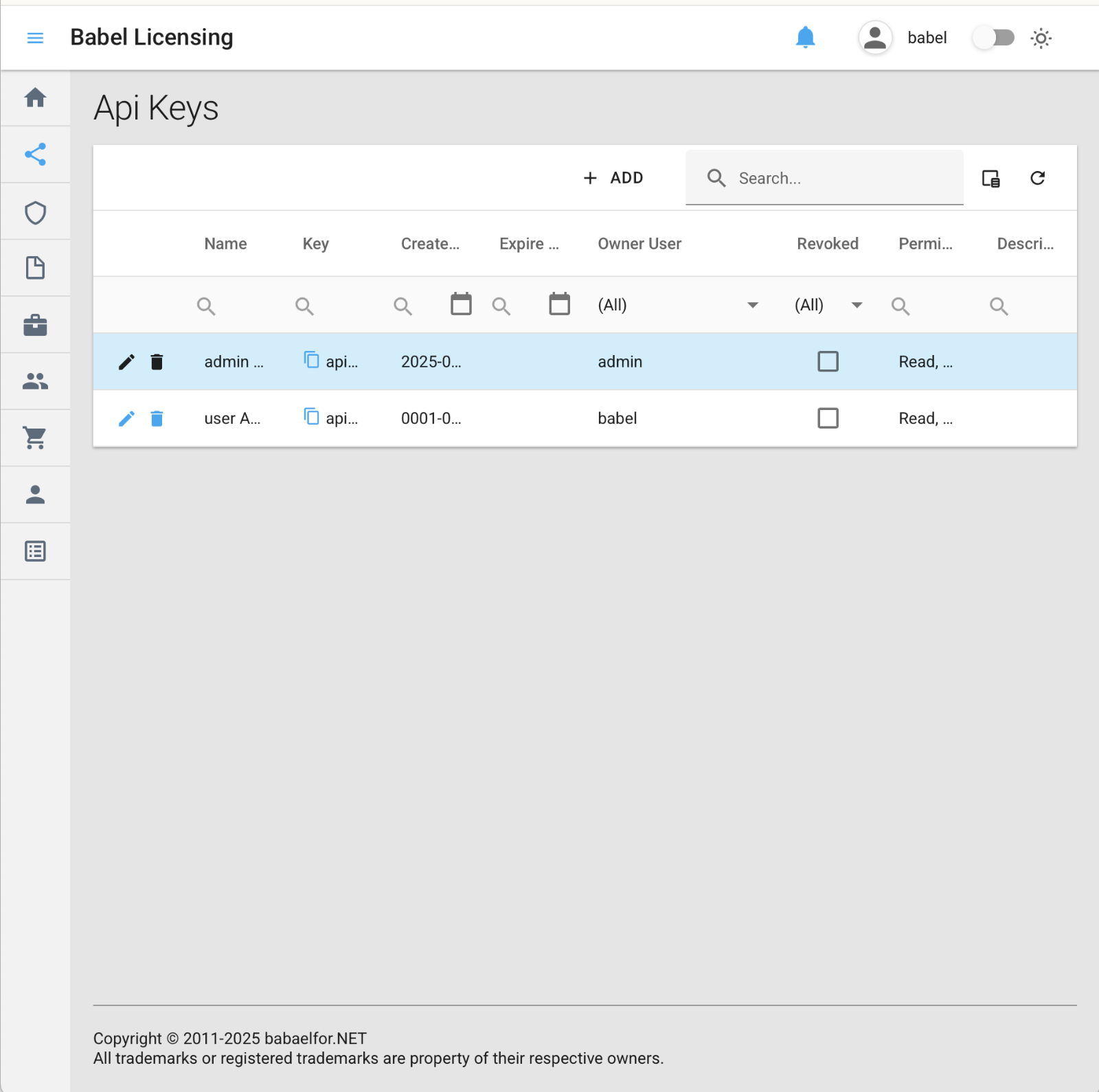
API Key Listing
Creating and Editing API Keys
Editing an API key updates its details, permissions, and security settings.
Open the key for editing
Locate the API key in the grid and click the pencil (edit) icon on the corresponding row. This opens the Edit API Key page, where the selected key’s information is displayed and ready for modification.
.png)
Edit API Key
Update the key’s details
The Edit API Key page allows you to update the following information:
- Owner – Change the user who owns the API key.
- API Key Name – Update the name for easier identification.
- Key – View the generated API key (cannot be manually edited, but can be regenerated).
- Client Secret – Optionally set or update the client secret for additional security.
- Created Date – Displays when the key was originally generated.
- Expiration Date – Set a new expiration date or extend the key’s validity.
- Revocation Toggle – Enable or disable the key’s access by toggling its revoked status.
- Permissions – Adjust the key’s access level by selecting or removing the following rights:
- Read – Allows retrieval of data.
- Write – Grants permission to modify data.
- Delete – Enables removal of data.
- Create – Allows creating new resources.
- Description – Add a note or explanation for future reference.
Save or cancel
Click the SAVE button to update the API key, or click CANCEL to discard the modifications.