License Activation
License activation is a commonly used method to control the distribution and usage of software licenses. Babel Licensing uses license activation to distribute and activate licenses for your .NET applications securely. This page shows how to create a license on the Babel Licensing Service with Babel Desktop, and how to configure a client .NET application to activate it with the Babel Licensing library.
Prerequisites
To enable license activation functionality in Babel Licensing Service, follow these steps. First, ensure that Babel Licensing Service is up and running on your server according to the instructions provided in the Getting Started section. Then, create a test product and a corresponding template license by referring to the instructions provided below. This will establish the foundation for generating activation licenses.
Next, you’ll need to download the license activation client source code from GitHub. This client code will be used to integrate license activation capabilities into your .NET application.
git clone https://github.com/babelfornet/license-activation-console-example.gitThe creation of an activation license for this example requires setting up a proper license template in the Babel Licensing system. This template serves as the blueprint for all licenses you’ll generate, ensuring consistency and proper configuration.
Creating an Activation License
Babel Desktop connects to the Babel Licensing Service and lets you create and configure licenses for your applications. You can specify various details for the license, such as the licensee, the expiration date, and allowed features. Additionally, you can set activation restrictions, such as the maximum number of activations.
To register an activation license in Babel Desktop, follow these steps:
Connect to the service
Open Babel Desktop and click the icon of your Babel Licensing Service profile in the activity bar. Generating licenses requires a Local test profile with Local management, so run Babel Desktop on the service machine; for a remote service use the web application or the Management API.
Generate a license
Open the Licenses view and choose Generate license on the toolbar.
Select the template and signature key
In the Template group, select the license Template created in the previous paragraph (see License Templates) and the Signature key. When no signature key is selected, the key of the template, or of its product, is used.
Set the mode to Activation
In the Terms group, set Mode to Activation.
Set the number of activations
In Sites, enter the number of activations available for this license.
Generate the user key
In the License information group, press the Generate button at the right end of the User key field. This user key will be used to activate the license on a specific machine.
Enter the licensee and license details
Enter the licensee information (a licensee name or company is required) and any additional Fields, Features or Restrictions you want for this license.
Select the format
Select the license Format: XML, XML signature, ASCII or Base32.
Save the license
Save the form. The service generates and signs the license.
The public key extracted from the Keys.snk file, which is necessary for license validation, is already configured in the example source code.
The newly registered activation license will now appear in the licenses grid with a unique license key and other relevant information. With the Data Center edition you can also create activation licenses on the Licenses page of the web application.
Once the activation license is registered, the customer can activate the license on their machine by providing the user key and, if applicable, the machine ID. The Babel Licensing Service will validate the information and issue a license token tied to that specific machine, allowing the software to run. Each activation counts against the token limit of the service; see License Tokens.
Configuring a Client
Once the license is created on the Babel Licensing Service, you need to configure your client .NET application to activate the license. This involves integrating the Babel Licensing library into your application and implementing the necessary code to activate the license. The Babel Licensing library provides a set of APIs and methods that streamline the license activation workflow and ensure secure license validation.
To open the license activation sample project, follow these steps:
Open the solution
Navigate to the location where the license activation sample project is stored and double-click on the ClientActivation.sln solution file to open it in your preferred Integrated Development Environment (IDE), such as Visual Studio.
Check the client library reference
Once the project is open, ensure that the Babel Licensing client library is referenced correctly. If the reference is missing, please refer to the Client Components paragraph to configure a local NuGet repository.
Build the solution
After ensuring the correct references, build the solution by selecting the “Build” or “Rebuild” option from the IDE’s menu.
Run the application
Once the solution is successfully built, you can run the application in debug configuration by pressing the “Start Debugging” button or using the keyboard shortcut specific to your IDE (e.g., F5 in Visual Studio). The license activation sample application will launch, allowing you to interact with the licensing functionality and test the license activation process.
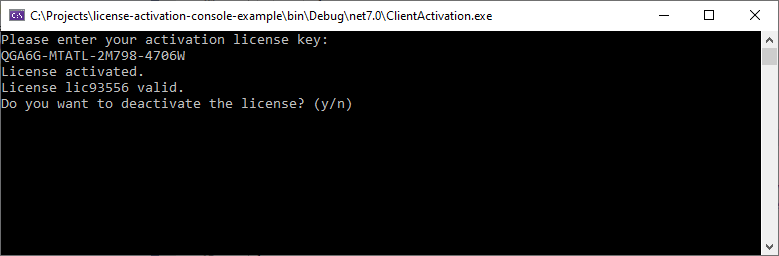
License Activation Console
Enter the activation key
Enter the activation key generated for the license and press ENTER.
If the activation key is valid and matches the one set for the license, the license will be successfully activated.
You can now deactivate the license or close the application by pressing “n”.
Close or deactivate the application
Press “n” then ENTER to close the application.
If you restart the application, you will see that the license is still active. This is because the client has been configured to maintain a local cache of the license information. The client will only contact the server once every 5 days to perform remote license validation. This caching mechanism allows the application to continue functioning even if the connection to the server is temporarily unavailable.
Follows the complete license activation example source code:
using Babel.Licensing;

// Create a new configuration object
BabelLicensingConfiguration config = new BabelLicensingConfiguration() {
    // Set the service URL
    ServiceUrl = "http://localhost:5005",

    // Set the public key used to verify the license signature
    SignatureProvider = RSASignature.FromKeys("MIGfMA0GCSqGSIb3DQEBAQUAA4GNADCBiQKBgQDE1VRiIdr6fiVZKve7NVgjIvGdRiRx0Mjjm+Yzf6tLbzFnxLs0fat5EoRcubxx0QQQDfydsJBE/fc7cwRWSrE2xK6X4Eb4W8O47pCMjqvTQZfDqQywEZJrLlxpp9hlKz6FDYX4SagrjmP1gdw8olo+n+IBz8ubkNxRhvycikxuDQIDAQAB"),

    // Set a unique client ID
    ClientId = "my app client id"
};

// Create the client object used to communicate with the server
BabelLicensing client = new BabelLicensing(config);

// Use BabelServiceLicenseProvider to cache a local copy of the license for offline use
BabelServiceLicenseProvider provider = new BabelServiceLicenseProvider(client) {
    // Refresh the license by contacting the server every 5 days
    // If set to TimeSpan.Zero, the license will be validated every time on the server
    LicenseRefreshInterval = TimeSpan.FromDays(5)
};

// Register the license provider with BabelLicenseManager
BabelLicenseManager.RegisterLicenseProvider(typeof(Program), provider);

// Check if the user key was set
if (provider.UserKey == null)
{
    // If the user key was not entered, the license has not been activated yet.

    // Ask the user to activate the license
    Console.WriteLine("Please enter your activation license key: ");
    string? userKey = Console.ReadLine();

    try
    {
        await client.ActivateLicenseAsync(userKey, typeof(Program));

        Console.WriteLine("License activated.");
    }
    catch (Exception ex)
    {
        Console.WriteLine($"Could not activate license: {ex.Message}");
        return;
    }
}

try
{
    // Validate the license
    // This will contact the server to validate the license if the local copy is expired
    // You can customize the validation interval using the LicenseValidationInterval property
    var license = await BabelLicenseManager.ValidateAsync(typeof(Program));

    Console.WriteLine($"License {license.Id} valid.");

    // Ask to deactivate the license
    Console.WriteLine("Do you want to deactivate the license? (y/n)");
    string? answer = Console.ReadLine();

    if (answer?.ToLower() == "y")
    {
        try
        {
            await client.DeactivateLicenseAsync(provider.UserKey);
            Console.WriteLine("License deactivated.");
        }
        catch (Exception ex)
        {
            Console.WriteLine($"Could not deactivate license: {ex.Message}");
        }
    }
}
catch (Exception ex)
{
    Console.WriteLine($"License not valid: {ex.Message}");
    return;
}
The BabelLicensing class is instantiated to communicate with the licensing server. The public key to validate the license is assigned in the service configuration, as well as the URL to communicate with the service.
Then, an instance of the BabelServiceLicenseProvider class is instantiated and registered with the BabelLicenseManager. This is responsible for caching a local copy of the license for offline use. The LicenseRefreshInterval property is set to determine how often the license should be refreshed from the server.
The code checks if the user key (activation license key) was entered. If it’s not set, it means the license has not been activated yet.
If the user key is not set, the code prompts the user to enter the activation license key and attempts to activate the license by contacting the server.
The code then proceeds to validate the license using the ValidateAsync method of the BabelLicenseManager. This method checks the validity of the license, and if the local copy of the license is expired, it contacts the server for validation.
After validating the license, the code prompts the user to confirm whether they want to deactivate the license. If the user confirms the deactivation, the code calls the DeactivateLicenseAsync method of the BabelLicensing client to deactivate the license.
Overall, the provided code demonstrates how to interact with the Babel Licensing client library to handle license activation, validation, and deactivation in a client application.
The license activation process provides several benefits, such as enhanced security, as it ensures that only authorized users can activate and use the licensed software. It also enables you to track and manage license activations, providing valuable insights into the usage patterns of your application. By leveraging the License Activation feature in Babel Licensing, you can ensure compliance with licensing terms and maintain control over the distribution and usage of your software.
To use license activation, create the licenses with Babel Desktop or the web application and configure your client application to activate them. The service then enforces license compliance and helps protect your intellectual property.