Web Application Data Center
The Babel Licensing Data Center edition unlocks an administrative web interface for managing the Babel Licensing Service.
The web application is part of the single Babel Licensing Service package. It is unlocked by a Data Center license; with a Server license, opening the service address in a browser shows an upgrade page, and licenses can be managed with Babel Desktop. To upgrade from Server to Data Center, replace the service license file (babel.licenses) and restart the service; there is nothing to reinstall.
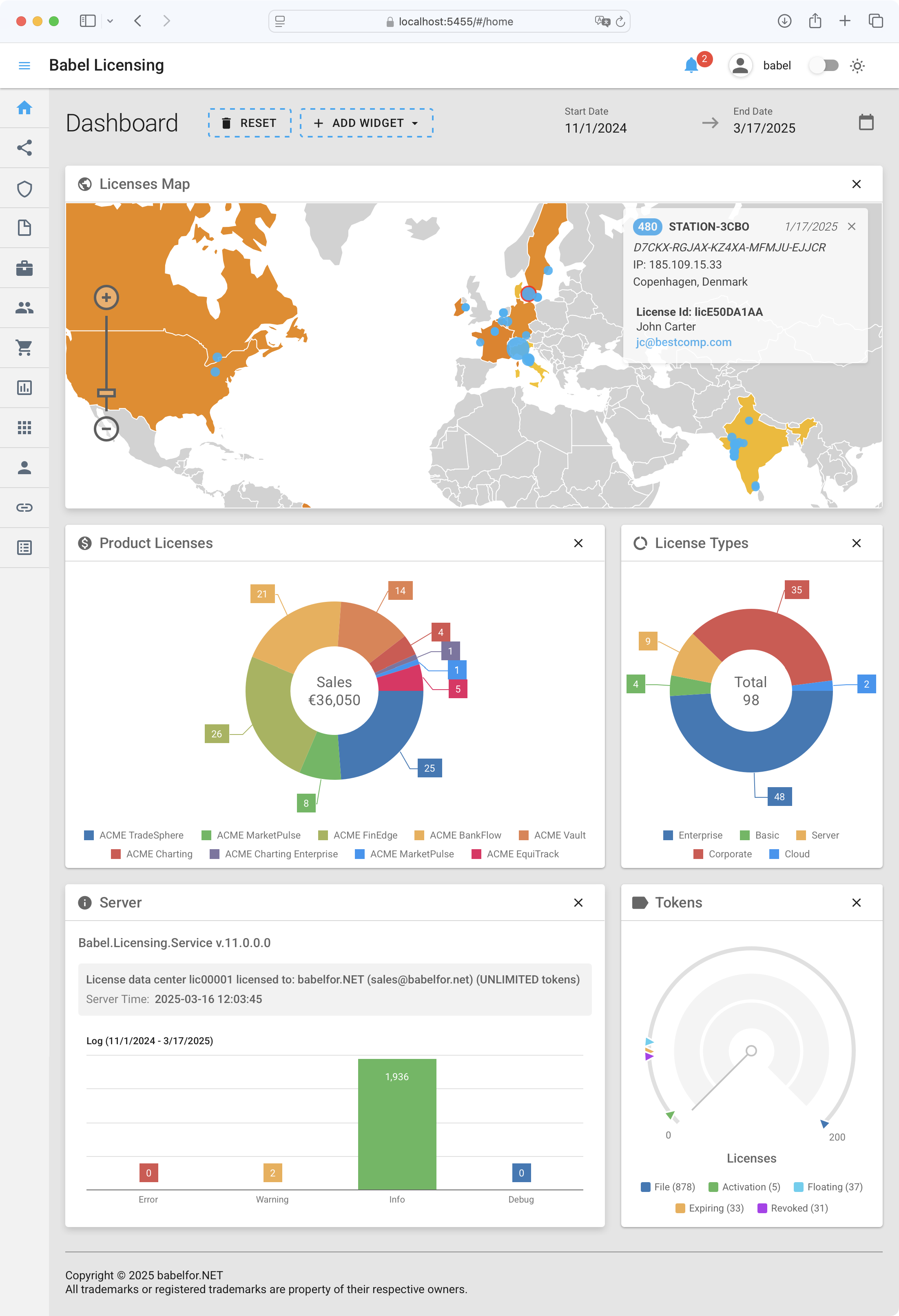
Babel Web Dashboard
Software Application Overview
The web application covers all licensing operations, with role-based access control and live data views.
Dashboard
The Dashboard provides at-a-glance insights through customizable widgets. Monitor global license distribution on an interactive map, view sales metrics by product with pie charts, analyze license type distribution, check server status, and manage license tokens. The date range selector limits the data to a chosen period, so you can compare trends over time. Read more
API Keys
Create and manage API credentials that allow external applications to securely communicate with your Babel Licensing Service. Control integration permissions, revoke compromised keys, and monitor API usage through this section. Read more
Licenses
The core module of the application where you can view, create, edit, and manage all software licenses. The intuitive grid layout displays key license information including status, type, expiration, and customer details. Perform actions such as revoking licenses, enabling license tracing, generating license files, and managing license tokens directly from this interface. Read more
Templates
Streamline license creation by defining reusable license templates with pre-configured parameters. Set common license terms, features, restrictions, and formats once, then apply them when issuing new licenses. Read more
Products
Register and organize your software products with detailed information, version tracking, and associated license templates. Upload product images, configure signing keys, and analyze sales performance to effectively manage your product portfolio. Read more
Customers
Maintain comprehensive customer records including contact information, purchase history, and license assignments. The customer management interface helps you track relationships, provide appropriate support, and identify opportunities for renewals or upgrades.
Orders
Track all license purchases and assignments through an organized order management system. View transaction details, process new orders, and generate financial reports to maintain accurate records of license sales and distribution. Read more
Reports (Exception Reports)
Access and analyze application exception reports submitted from licensed software. This diagnostic tool helps identify issues in your software by presenting detailed information about crashes and errors experienced by end users. Read more
Resources
Access and manage various assets used throughout the Babel Licensing Service including digital signature keys, encryption certificates, email templates and documentation files. Store HTML email templates for customer notifications, manage the signature keys used for license validation, and keep other files the service needs in one place. Read more
Users
Manage administrative access to the web application by creating user accounts with appropriate role-based permissions. Roles control who can reach sensitive licensing functions and information.
Webhooks
Configure automatic notifications to external systems when specific licensing events occur. Use webhooks to keep your CRM, support system or other business applications in sync with the licensing service. Read more
Log
Review detailed activity logs that record all actions performed within the application. Search, filter, and export logs for troubleshooting, security auditing, or compliance purposes. Read more