ライセンス使用状況レポート
ライセンス使用状況レポートは、アプリケーションがライセンスされた機能、フィールド、制限をどのように使用しているかを詳しく示します。ライセンスの使用状況の追跡を有効にすると、機能の採用状況を監視し、コンプライアンスを検証し、ライセンス戦略についてデータに基づいて判断できます。
概要
Babel Licensing ライブラリには、ライセンスの構成要素へのアクセスを自動的に監視する強力な追跡システムが含まれています。
- 機能の使用状況:どの機能が、どのくらいの頻度で、どのメンバーを通じてアクセスされたかを追跡します
- フィールドへのアクセス:どのライセンスフィールドが読み取られたかと、その値を監視します
- 制限の検証:制限のチェックと検証結果を記録します
- 自動収集:使用状況データは、コードを変更することなく透過的に取得されます
- スマートマージ:サーバー側の処理がレポートを結合し、包括的な分析を可能にします
コンソールアプリケーションのサンプル
実用的なサンプルから始めるには、console-licensing-report-example リポジトリをクローンします。このサンプルは、Babel のレポート機能を使ってライセンスの使用状況を追跡し、ライセンス使用状況レポートを送信する方法を示します。
Git クライアントを開く
お好みの Git クライアントまたはコマンドラインを開きます。
リポジトリをクローンする
次のコマンドを実行して、GitHub リポジトリをクローンします。
git clone https://github.com/babelfornet/console-licensing-report-example.gitプロジェクトディレクトリに移動する
リポジトリをクローンしたら、プロジェクトディレクトリに移動します。
cd console-licensing-report-exampleサンプルを確認して実行する
これで、サンプルコードを確認して実行する準備が整いました。
console-licensing-report-example は、Babel Licensing のクライアントライブラリをアプリケーションに組み込み、ライセンスの使用状況を追跡して、ライセンス使用状況レポートを Babel Licensing Service に送信する方法を示します。コードの内容は次のとおりです。
- BabelReporting と BabelLicensing の初期化:サンプルコードは、レポートを送信するための
BabelReportingオブジェクトと、ライセンスを検証するためのBabelLicensingオブジェクトの両方を初期化します。
private BabelReporting CreateReportingClient()
{
    var reporting = new BabelReporting();

    reporting.Configuration.ClientId = ClientId;
    reporting.Configuration.ServiceUrl = ServiceUrl;
    reporting.Configuration.UseHttp(http => {
        http.Timeout = TimeSpan.FromSeconds(3);
        http.Handler = new HttpClientHandler() {
            ServerCertificateCustomValidationCallback = (message, cert, chain, errors) => true
        };
    });

    reporting.BeforeSendReport += (s, e) => {
        e.Report.Properties.Add("cmdline", Environment.CommandLine);
        e.Report.Properties.Add("username", Environment.UserName);
    };

    return reporting;
}

private BabelLicensing CreateLicensingClient()
{
    var config = new BabelLicensingConfiguration()
    {
        ServiceUrl = ServiceUrl,
        SignatureProvider = RSASignature.FromKeys(PublicKey),
        ClientId = ClientId
    };

    config.UseHttp(http => {
        http.Timeout = TimeSpan.FromSeconds(10);
        http.Handler = new HttpClientHandler()
        {
            ServerCertificateCustomValidationCallback = (message, cert, chain, errors) => true
        };
    });

    // Register custom license factory to handle MemoryRestriction
    config.LicenseFactory = new CustomLicenseFactory();

    return new BabelLicensing(config);
}-
ユーザーキーと公開キー:サンプルコードは、クライアントを認可するためのユーザーキー(
UserKey)と、ライセンスの署名を検証するための公開キー(PublicKey)を使用します。必ず有効なキーに置き換えてください。ユーザーキーを生成するには、フローティングライセンスまたはライセンスアクティベーションの説明を参照してください。 -
追跡を伴うライセンスの検証:このサンプルは、フローティングライセンスを検証し、その機能、フィールド、制限にアクセスする方法を示します。
LicenseUsageTrackingが有効な場合、すべてのアクセスが自動的に追跡されます。
private async Task ValidateLicenseAsync()
{
    try
    {
        // Acquire floating license
        var requestResult = await _licensing.RequestFloatingLicenseAsync(UserKey, typeof(Program));
        Console.WriteLine($"Floating license {requestResult.License.Id} acquired.");

        try
        {
            // Validate the license (this will be tracked)
            var result = await _licensing.ValidateLicenseAsync(UserKey, typeof(Program));
            var license = result.License;

            Console.WriteLine($"License validated: {license.Id}");

            foreach (var feature in license.Features)
            {
                Console.WriteLine($" Feature: {feature.Name} - {feature.Description}");
            }

            foreach (var field in license.Fields)
            {
                Console.WriteLine($" Field: {field.Name} = {field.Value}");
            }

            foreach (var restriction in license.Restrictions)
            {
                Console.WriteLine($" Restriction: {restriction.Name}");
            }

            // Simulate multiple accesses to demonstrate tracking
            var reportingFeature = license.Features.FirstOrDefault(f => f.Name == "Reporting");
            var field2Field = license.Fields.FirstOrDefault(f => f.Name == "field2");

            for (int i = 0; i < 5; i++)
            {
                var _ = reportingFeature?.Data;
                var __ = field2Field?.Value;
            }

            Console.WriteLine($"\nLicense validation completed.");
        }
        finally
        {
            // Always release the floating license when done
            await _licensing.ReleaseFloatingLicenseAsync(UserKey);
            Console.WriteLine("Floating license released.");
        }
    }
    catch (Exception ex)
    {
        Console.WriteLine($"Error validating license: {ex.Message}");
    }
}- ライセンス使用状況レポートの送信:
SendLicenseReportAsyncメソッドは、蓄積された追跡データを Babel Licensing Service に送信します。
private async Task SendLicenseReportAsync()
{
    var result = await _reporting.SendLicenseReportAsync(UserKey);
    if (result.IsError)
    {
        Console.WriteLine($"Error sending LicenseReport: {result.Error}");
        return;
    }
    Console.WriteLine("LicenseReport sent.");
}- カスタムライセンスファクトリ:このサンプルには、ライセンスでカスタムの制限の種類を扱う方法を示すために、カスタムの
MemoryRestrictionクラスとCustomLicenseFactoryが含まれています。
class MemoryRestriction : Restriction, ILicenseSerializable
{
    public override string Name => "Memory";
    public long TotalMemory { get; set; }

    public override ValidationResult Validate(ILicenseContext context, Type type, object instance)
    {
        ISystemInformation sys = (ISystemInformation)context.GetService(typeof(ISystemInformation));

        long totalMem = ToMegabytes(sys.TotalPhysicalMemory);
        if (totalMem < TotalMemory)
            return ValidationResult.Invalid;

        return base.Validate(context, type, instance);
    }

    private static long ToMegabytes(long bytes)
    {
        return bytes / 1024 / 1024;
    }

    // ILicenseSerializable implementation...
}

class CustomLicenseFactory : ILicenseFactory
{
    public Restriction CreateRestriction(string type)
    {
        string[] tokens = type.Split(':');
        string restriction = tokens[0];

        switch (restriction)
        {
            case "Memory":
                var memory = new MemoryRestriction();
                if (tokens.Length > 1)
                    memory.TotalMemory = long.Parse(tokens[1]);
                return memory;
            default:
                return null!;
        }
    }

    // Other ILicenseFactory methods...
}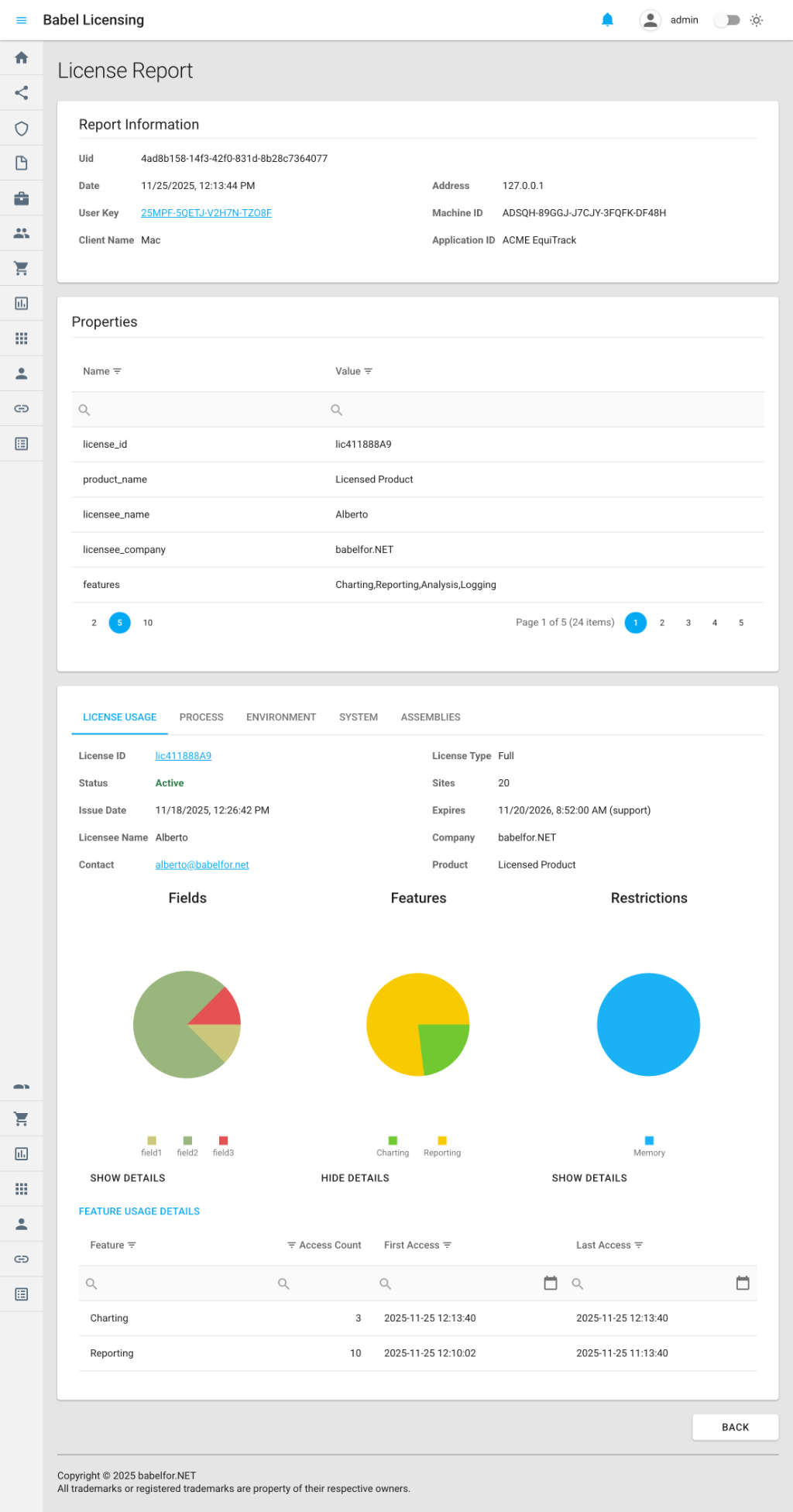
ライセンス使用状況レポートの例
console-licensing-report-example は、ライセンスの使用状況を追跡して Babel Licensing Service にレポートを送信する方法を実際に示します。ライセンスの追跡をアプリケーションに組み込むことで、機能の採用状況を監視し、コンプライアンスを検証し、ライセンス戦略についてデータに基づいて判断できます。
ライセンスの追跡の有効化
ライセンスの使用状況の追跡を始めるには、ライセンスを検証する前に追跡を有効にします。
using Babel.Licensing.Reports;

// Enable tracking (must be called before license validation)
LicenseUsageTracking.Enable();

// Validate your license as usual
var license = licenseManager.Validate(key, type);

// Use licensed features - access is automatically tracked
var reportingFeature = license.Features["Reporting"];
var data = reportingFeature.Data;

var versionField = license.Fields["Version"];
var version = versionField.Value;
ライセンス使用状況レポートの送信
追跡を有効にしたら、Babel Licensing Service にレポートを送信できます。
using Babel.Licensing.Services;

// Initialize the reporting service
var reporting = new BabelReporting();
reporting.Configuration.ServiceUrl = "https://licensing.example.com";
reporting.Configuration.ClientId = "MyApplication";

// Send the license report
var result = await reporting.SendLicenseReportAsync(userKey);

if (result.Success)
{
    Console.WriteLine($"Report sent successfully: {result.ReportUid}");
}
else
{
    Console.WriteLine($"Failed to send report: {result.Error?.Message}");
}
追跡される内容
機能へのアクセスの追跡
ライセンスでアクセスされた機能ごとに、情報が追跡されます。
// This access is automatically tracked
var feature = license.Features["Reporting"];
var data = feature.Data; // Tracked: get_Data on Reporting feature追跡される情報:
- 機能の名前と ID
- アクセスされたメンバー(
get_Data、get_IsEnabledなど) - アクセス回数
- 最初のアクセスのタイムスタンプ
- 最後のアクセスのタイムスタンプ
- アクセスの合計期間(最初のアクセスから最後のアクセスまでの時間)
フィールドへのアクセスの追跡
ライセンスから読み取られたフィールドごとに、情報が追跡されます。
// This access is automatically tracked
var field = license.Fields["Version"];
var value = field.Value; // Tracked: get_Value on Version field追跡される情報:
- フィールド名
- フィールドの値(プライバシー保護のため、12 文字に切り詰められます)
- アクセスされたメンバー(
get_Valueなど) - アクセス回数とタイムスタンプ
制限の検証の追跡
チェックされた制限ごとに、情報が追跡されます。
// This validation is automatically tracked
var validation = license.Restrictions.Validate();追跡される情報:
- 制限の名前と種類
- 検証結果(Pass/Fail)
- アクセスされたメンバー
- アクセス回数とタイムスタンプ
レポートの内容
各ライセンス使用状況レポートは、主に 3 つのセクションで構成されます。
1. ライセンスのメタデータ
追跡対象のライセンスに関する基本情報です。
{
  "license_id": "L-ABC-123",
  "license_type": "Standard",
  "issue_date": "2025-01-15",
  "expire_date": "2026-01-15",
  "support_expire_date": "2025-07-15",
  "licensee_name": "John Smith",
  "licensee_company": "ACME Corporation",
  "product_name": "EquiTrack",
  "product_version": "2.0"
}
2. 使用状況の追跡データ
追跡されたすべての構成要素の、詳細なアクセス統計です。
{
  "features": [
    {
      "id": "F-001",
      "name": "Reporting",
      "members": [
        {
          "member": "get_Data",
          "access_count": 15,
          "first_access": "2025-01-20T10:30:00Z",
          "last_access": "2025-01-20T14:45:00Z",
          "access_time": "04:15:00"
        }
      ]
    }
  ],
  "fields": [
    {
      "name": "Version",
      "value": "2.0.1",
      "members": [
        {
          "member": "get_Value",
          "access_count": 3,
          "first_access": "2025-01-20T10:00:00Z"
        }
      ]
    }
  ],
  "restrictions": [
    {
      "name": "MachineLock",
      "type": "Hardware",
      "members": [
        {
          "member": "Validate",
          "access_count": 1,
          "validation_result": "Pass",
          "first_access": "2025-01-20T10:00:00Z"
        }
      ]
    }
  ]
}
3. 環境情報とシステム情報
アプリケーションとコンピューターに関するコンテキストです(設定可能)。
- アプリケーションの名前、バージョン、読み込まれたアセンブリ
- オペレーティングシステムの詳細
- ハードウェア情報(CPU、メモリ、ディスク)
- ネットワークアダプター
- 環境変数(フィルター済み)
- 実行中のプロセス(オプション)
構成オプション
ライセンス使用状況レポートに含めるデータをカスタマイズします。
var reporting = new BabelReporting();

// Configure license report options
reporting.Configuration.LicenseReportOptions = new LicenseReportOptions
{
    // What to track
    CollectFeaturesAccess = true,
    CollectFieldsAccess = true,
    CollectRestrictionsAccess = true,

    // Filter specific members (optional)
    CollectMembers = new List<string> { "get_Data", "get_IsEnabled" },

    // Environment information
    Environment = new EnvironmentReportOptions
    {
        CollectApplicationInformation = true,
        CollectLoadedAssemblies = true,
        CollectEnvironmentVariables = false,
        CollectProcessInformation = false
    },

    // System information
    System = new SystemReportOptions
    {
        CollectSystemInformation = true,
        CollectOsInformation = true,
        CollectProcessorInformation = true,
        CollectMemoryInformation = true,
        CollectDiskInformation = false,
        CollectDisplayInformation = false,
        CollectNetworkInformation = false
    },

    // Output options
    Formatted = true,  // Pretty-print JSON
    EncryptionKey = "my-secret-key"  // Optional encryption
};
追跡データの管理
追跡の状態を確認する
if (LicenseUsageTracking.IsEnabled)
{
    Console.WriteLine("License tracking is active");
}
追跡された情報にアクセスする
// Get all tracked licenses
foreach (var info in LicenseUsageTracking.TrackedLicenses)
{
    Console.WriteLine($"License: {info.LicenseId}");
    Console.WriteLine($"Product: {info.ProductName} v{info.ProductVersion}");

    // Feature access details
    foreach (var feature in info.TrackedFeatures)
    {
        Console.WriteLine($"  Feature {feature.Name}:");
        Console.WriteLine($"    Accesses: {feature.AccessCount}");
        Console.WriteLine($"    First: {feature.FirstAccessTime}");
        Console.WriteLine($"    Last: {feature.LastAccessTime}");
    }

    // Field access details
    foreach (var field in info.TrackedFields)
    {
        Console.WriteLine($"  Field {field.Name}: {field.AccessCount} accesses");
    }

    // Restriction validation details
    foreach (var restriction in info.TrackedRestrictions)
    {
        Console.WriteLine($"  Restriction {restriction.Name}: {restriction.AccessCount} checks");
    }
}
特定のライセンスの追跡情報を取得する
var trackingInfo = LicenseUsageTracking.GetTrackingInfo("L-ABC-123");
if (trackingInfo != null)
{
    Console.WriteLine($"Tracking {trackingInfo.TrackedFeatures.Count()} features");
}
追跡データを消去する
// Clear all tracked data without disabling tracking
LicenseUsageTracking.Clear();
追跡を無効にする
// Disable tracking and clear all data
LicenseUsageTracking.Disable();
レポートのカスタマイズ
BeforeSendReport イベントを使用して、ライセンス使用状況レポートにカスタムプロパティを追加します。
reporting.BeforeSendReport += (s, e) =>
{
    // Add custom metadata
    e.Report.Properties.Add("application_mode", "production");
    e.Report.Properties.Add("user_count", activeUsers);
    e.Report.Properties.Add("deployment_id", deploymentId);

    // Cancel sending if needed
    if (shouldSkipReport)
    {
        e.Cancel = true;
    }
};
レポートのマージ
Babel Licensing Service は、同じクライアントとコンピューターから届いたライセンス使用状況レポートを自動的にマージします。これにより、次のことが実現します。
- 累積統計:アクセス回数が合算されます
- 時系列の保持:最も早い最初のアクセスと、最も遅い最後のアクセスが保持されます
- 履歴分析:時間の経過に伴う使用パターンの全体像がわかります
- ストレージの効率化:ライセンス、コンピューター、クライアントの組み合わせごとに、包括的なレポートが 1 つだけ保存されます
新しいレポートが届くと、サーバーは次の処理を行います。
- 同じライセンス ID、マシン ID、クライアント ID の既存のレポートを特定します
- 追跡データを、構成要素の名前とメンバーごとにマージします
- アクセス回数を累積します
- アクセス時刻の範囲を更新します
- メタデータを最新の値に更新します
エラー処理
レポートの送信に失敗した場合に、適切に対処します。
reporting.AfterSendReport += (s, e) =>
{
    if (e.Error != null)
    {
        // Log the error
        logger.LogError(e.Error, "Failed to send license report");

        // Store report locally for retry
        SaveReportForRetry(e.Report);
    }
    else
    {
        logger.LogInformation($"Report sent: {e.Result.ReportUid}");
    }
};

var result = await reporting.SendLicenseReportAsync(userKey);
ベストプラクティス
1. 早い段階で有効にする
最初からすべてのアクセスを取得できるように、ライセンスを検証する前に追跡を有効にします。
// GOOD: Enable before validation
LicenseUsageTracking.Enable();
var license = licenseManager.Validate(key, type);

// BAD: Enable after validation (misses initial access)
var license = licenseManager.Validate(key, type);
LicenseUsageTracking.Enable();
2. 定期的に送信する
一定の間隔で、またはアプリケーションの終了時にレポートを送信します。
// Option 1: Periodic reporting
var timer = new Timer(async _ =>
{
    if (LicenseUsageTracking.IsEnabled)
    {
        await reporting.SendLicenseReportAsync(userKey);
        LicenseUsageTracking.Clear();  // Reset for next period
    }
}, null, TimeSpan.FromHours(1), TimeSpan.FromHours(1));

// Option 2: On application shutdown
AppDomain.CurrentDomain.ProcessExit += async (s, e) =>
{
    await reporting.SendLicenseReportAsync(userKey);
};
3. データ収集を最小限にする
レポートサイズとネットワーク使用量を抑えるために、必要なデータだけを収集します。
reporting.Configuration.LicenseReportOptions = new LicenseReportOptions
{
    CollectFeaturesAccess = true,   // Essential
    CollectFieldsAccess = false,    // Skip if not needed
    CollectRestrictionsAccess = true,  // For compliance

    System = new SystemReportOptions
    {
        CollectSystemInformation = true,
        CollectDiskInformation = false,  // Skip to reduce size
        CollectDisplayInformation = false
    }
};
4. オフラインの状況に対応する
サーバーに到達できないときは、レポートをローカルに保存します。
var result = await reporting.SendLicenseReportAsync(userKey);

if (!result.Success)
{
    // Serialize and store report
    var reportJson = JsonSerializer.Serialize(result.Report);
    await File.WriteAllTextAsync("pending-reports/report-" + Guid.NewGuid() + ".json", reportJson);
}
5. 機密データを保護する
機密情報を含むレポートには、暗号化を使用します。
reporting.Configuration.EncryptionKey = Configuration["Reporting:EncryptionKey"];
reporting.Configuration.LicenseReportOptions.EncryptionKey = reporting.Configuration.EncryptionKey;
例:完全なライセンス追跡
実際のアプリケーションでのライセンス追跡を示す、包括的な例を次に示します。
using Babel.Licensing;
using Babel.Licensing.Reports;
using Babel.Licensing.Services;

public class LicenseManager
{
    private readonly BabelReporting _reporting;
    private readonly Timer _reportTimer;

    public LicenseManager(IConfiguration configuration)
    {
        // Initialize reporting service
        _reporting = new BabelReporting();
        _reporting.Configuration.ServiceUrl = configuration["Licensing:ServiceUrl"];
        _reporting.Configuration.ClientId = "EquiTrack v2.0";
        _reporting.Configuration.EncryptionKey = configuration["Licensing:EncryptionKey"];

        // Configure what to track
        _reporting.Configuration.LicenseReportOptions = new LicenseReportOptions
        {
            CollectFeaturesAccess = true,
            CollectFieldsAccess = true,
            CollectRestrictionsAccess = true,
            Environment = new EnvironmentReportOptions
            {
                CollectApplicationInformation = true,
                CollectLoadedAssemblies = true
            },
            System = new SystemReportOptions
            {
                CollectSystemInformation = true,
                CollectOsInformation = true,
                CollectProcessorInformation = true,
                CollectMemoryInformation = true
            },
            Formatted = false  // Compact JSON for network efficiency
        };

        // Add custom properties before sending
        _reporting.BeforeSendReport += (s, e) =>
        {
            e.Report.Properties.Add("environment", configuration["Environment"]);
            e.Report.Properties.Add("version", Assembly.GetExecutingAssembly().GetName().Version.ToString());
        };

        // Handle send results
        _reporting.AfterSendReport += (s, e) =>
        {
            if (e.Error != null)
            {
                Logger.Error($"Failed to send license report: {e.Error.Message}");
            }
            else
            {
                Logger.Info($"License report sent: {e.Result.ReportUid}");
            }
        };

        // Send reports every 24 hours
        _reportTimer = new Timer(
            async _ => await SendLicenseReportAsync(),
            null,
            TimeSpan.FromHours(24),
            TimeSpan.FromHours(24)
        );
    }

    public ILicense ValidateLicense(string userKey, LicenseKeyTypes keyType)
    {
        // Enable tracking before validation
        LicenseUsageTracking.Enable();

        // Validate license
        var licenseManager = new BabelLicensing();
        var license = licenseManager.Validate(userKey, keyType);

        return license;
    }

    public async Task SendLicenseReportAsync()
    {
        if (!LicenseUsageTracking.IsEnabled)
            return;

        try
        {
            var result = await _reporting.SendLicenseReportAsync(_userKey);

            if (result.Success)
            {
                // Clear tracking data after successful send
                LicenseUsageTracking.Clear();
            }
        }
        catch (Exception ex)
        {
            Logger.Error($"Exception sending license report: {ex.Message}");
        }
    }

    public void Shutdown()
    {
        // Send final report on shutdown
        SendLicenseReportAsync().Wait(TimeSpan.FromSeconds(10));

        // Cleanup
        _reportTimer?.Dispose();
        LicenseUsageTracking.Disable();
    }
}
サーバー側での分析
レポートが Babel Licensing Service に届いたら、次のことができます。
- 機能の採用状況の監視:最も頻繁に使用されている機能を確認します
- 使われていない機能の特定:一度もアクセスされていない機能を見つけます
- 使用パターンの追跡:アクセスの時刻と頻度を分析します
- コンプライアンスの検証:制限がチェックされていることを確認します
- ライセンス戦略の立案:機能のパッケージ構成について、データに基づいて判断します
レポートは完全なメタデータとともに保存され、Babel Licensing Service の API でクエリを実行したり、管理インターフェイスで表示したりできます。
関連項目
- 例外レポート:クラッシュとエラーのレポートを送信する
- カスタムレポート:独自のレポートの種類を作成する
- フローティングライセンス:レポート用のユーザーキーを生成する
- ライセンスアクティベーション:追跡のためにライセンスをアクティベートする