MAUI でのライセンスアクティベーション
このガイドでは、Babel Licensing を使って .NET MAUI アプリケーションにライセンスアクティベーションを実装する方法を説明します。この方法では、ライセンスを特定のデバイスに安全に紐付けられるため、ソフトウェアがライセンス条件に従ってのみ使用されるようになります。この実装パターンに従うと、プラットフォーム固有のデバイス情報を活用しながら、複数のプラットフォームで一貫して動作する堅牢なライセンス管理システムを構築できます。
前提条件
始める前に、次のものがそろっていることを確認してください。
- .NET MAUI ワークロードをインストールした Visual Studio 2022
- Babel.Licensing NuGet パッケージ(バージョン 11.0.0 以降)
- 実行中の Babel Licensing Service のインスタンス(ローカルまたはサーバー上)
- .NET MAUI アプリケーション開発の基本的な知識
- Babel Licensing の Server エディションまたは Data Center エディションのライセンス
サンプルプロジェクト
完全なサンプルプロジェクトは、次のコマンドで GitHub からダウンロードできます。
git clone https://github.com/babelfornet/maui-licensed-app.gitこのリポジトリには、サポートされるすべてのプラットフォームで Babel Licensing を統合した、実装済みの MAUI アプリケーションが含まれています。
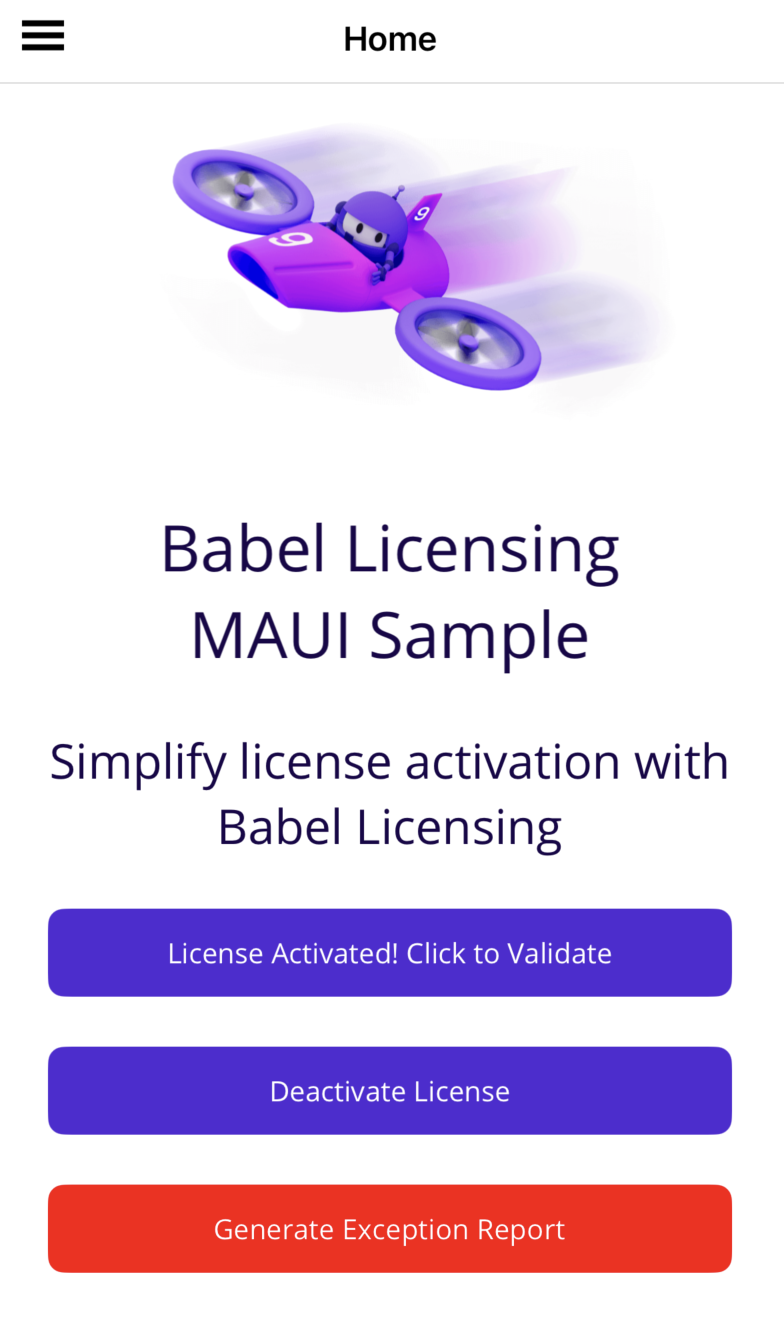
ライセンスされた MAUI アプリケーション
MAUI でライセンスアクティベーションを使う理由
MAUI(Multi-platform App UI)を使うと、開発者は単一のコードベースからクロスプラットフォームアプリケーションを構築できます。ただし、ライセンス管理を実装するときは、各プラットフォームに固有の特性を考慮する必要があります。ライセンスアクティベーションは、次の理由から MAUI アプリケーションに特に適しています。
- デバイス固有の紐付け:ライセンスは、アプリケーションが実行される特定のデバイスに紐付けられるため、複数のデバイスでの不正な使用を防げます。
- オフラインでの動作:一度アクティベートすれば、アプリケーションはサーバーに常時接続しなくても動作できるため、モバイルアプリケーションに最適です。
- クロスプラットフォームの互換性:このライセンスモデルは、異なるプラットフォーム(Android、iOS、Windows、MacCatalyst)で一貫して動作します。
プロジェクト構造のセットアップ
MauiLicApp サンプルは、MAUI アプリケーションに Babel Licensing を実装するための、整理された構成を示しています。
MauiLicensedApp/
├── Licensing/                 # Core licensing implementation
│   ├── BabelLicensingExtensions.cs
│   ├── ISystemInformation.cs
│   └── LicensingService.cs
├── Platforms/                 # Platform-specific implementations
│   ├── Android/
│   ├── iOS/
│   ├── MacCatalyst/
│   └── Windows/
├── Reporting/                 # Exception reporting functionality
│   └── BabelReportingExtensions.cs
└── MauiProgram.cs             # Application initialization
この構造では、必要な箇所でプラットフォーム固有の実装を保ちながら、ライセンス管理に関する部分をアプリケーションのほかの部分から分離しています。
SystemInformation 基底クラスの実装
このクロスプラットフォームのライセンス管理システムの中核は、SystemInformationBase 抽象クラスです。このクラスは、ライセンスアクティベーションに必要なシステム情報を収集するための、プラットフォームに依存しないインターフェイスを定義します。
public abstract class SystemInformationBase : ISystemInformation
{
    public abstract string DeviceId { get; }
    public abstract string DeviceManufacturer { get; }
    public abstract string DeviceModel { get; }
    public abstract string OsVersion { get; }
    // Additional system properties...
}
このクラスは Babel Licensing の ISystemInformation インターフェイスを実装しており、ライセンス管理システムとの互換性を確保しながら、プラットフォーム間で一貫した抽象化を提供します。
プラットフォーム固有のシステム情報
MAUI アプリケーションでは、次の理由から、SystemInformationBase のプラットフォーム固有の実装が欠かせません。
- ハードウェアへのアクセス方法の違い:ハードウェア情報にアクセスするための API とメソッドは、プラットフォームごとに異なります。たとえば、Android は
Build.SERIALまたはSettings.Secure.ANDROID_IDを使用し、iOS はUIDevice.CurrentDevice.IdentifierForVendorを使用します。 - セキュリティ上の制約:モバイルプラットフォームは、特定のシステム情報へのアクセスを制約する、それぞれ異なるセキュリティモデルを持っています。プラットフォーム固有の実装であれば、これらの制約に適切に対処できます。
- 一意の識別子:信頼性が高く永続的なデバイス識別子を生成する方法は、プラットフォームによって異なります。Windows で機能する方法は、iOS や Android では機能しません。
- 機能の可用性:あるプラットフォームで取得できるハードウェア情報が、別のプラットフォームでは取得できないことがあり、その場合はプラットフォーム固有の代替手段が必要です。
実際の各プラットフォームでの実装は、次のとおりです。
Android での実装
Android での実装は、Android 固有の API を利用してシステム情報を収集します。
public class SystemInformation : SystemInformationBase
{
    public override string DeviceId
    {
        get
        {
            try
            {
                return Settings.Secure.GetString(_context.ContentResolver,
                    Settings.Secure.AndroidId) ?? string.Empty;
            }
            catch (Exception)
            {
                return string.Empty;
            }
        }
    }

    public override string DeviceManufacturer => Build.Manufacturer ?? string.Empty;

    // Other implementations...
}
iOS での実装
iOS での実装は、iOS 固有の API を使用します。
public class SystemInformation : SystemInformationBase
{
    public override string DeviceId
    {
        get
        {
            try
            {
                return UIDevice.CurrentDevice?.IdentifierForVendor?.AsString() ?? string.Empty;
            }
            catch (Exception)
            {
                return string.Empty;
            }
        }
    }

    public override string DeviceManufacturer => "Apple";

    // Other implementations...
}
Windows での実装
Windows での実装は、Windows Management Instrumentation(WMI)を使用してシステム情報を収集します。
public class SystemInformation : SystemInformationBase
{
    public override string SystemUuid
    {
        get
        {
            try
            {
                using var searcher = new ManagementObjectSearcher(
                    "SELECT UUID FROM Win32_ComputerSystemProduct");
                foreach (var obj in searcher.Get())
                {
                    return obj["UUID"]?.ToString() ?? string.Empty;
                }
                return string.Empty;
            }
            catch (Exception)
            {
                return string.Empty;
            }
        }
    }

    // Other implementations...
}
プラットフォーム固有の実装の登録
各プラットフォームは、アプリケーションの起動時に、固有の SystemInformation 実装を登録する必要があります。通常、これはプラットフォーム固有のエントリポイントで行います。
Android の場合(MainApplication.cs)
[Application]
public class MainApplication : MauiApplication
{
    public MainApplication(IntPtr handle, JniHandleOwnership ownership)
        : base(handle, ownership)
    {
        // Register the SystemInformation service for licensing
        LicenseServices.Current.AddService(typeof(ISystemInformation),
            new SystemInformation());
    }

    protected override MauiApp CreateMauiApp() => MauiProgram.CreateMauiApp();
}
iOS の場合(Program.cs)
public class Program
{
    static void Main(string[] args)
    {
        // Register the SystemInformation service for licensing
        LicenseServices.Current.AddService(typeof(ISystemInformation),
            new SystemInformation());

        UIApplication.Main(args, null, typeof(AppDelegate));
    }
}
Windows の場合(App.xaml.cs)
public partial class App : MauiWinUIApplication
{
    protected override void OnLaunched(LaunchActivatedEventArgs args)
    {
        // Register the SystemInformation service for licensing
        LicenseServices.Current.AddService(typeof(ISystemInformation),
            new SystemInformation());

        base.OnLaunched(args);
    }
}
MAUI での Babel Licensing の設定
プラットフォーム固有の実装を用意したら、MAUI アプリケーション用に Babel Licensing を設定する必要があります。これには、MAUI の依存関係の挿入システムと統合する拡張メソッドを使用します。
public static MauiAppBuilder UseBabelLicensing(
    this MauiAppBuilder builder,
    Action<BabelLicensingConfiguration>? configureClient = null)
{
    // Register platform-specific system information service
    builder.Services.AddSingleton<SystemInformationBase>(serviceProvider =>
    {
        return LicenseServices.Current.GetService(typeof(ISystemInformation))
            as SystemInformationBase ??
        throw new InvalidOperationException("SystemInformation service not registered.");
    });

    // Create the BabelLicensing configuration
    var config = new BabelLicensingConfiguration {
        // Set the default client ID
        ClientId = AppInfo.Current.Name,
        // Set the machine ID using system UUID and name
        MachineId = new HardwareId(
            HardwareComponents.SystemUuid |
            HardwareComponents.SystemName).ToMachineKey(),
        // Set the signature provider with public key for license verification
        SignatureProvider = RSASignature.FromKeys("PUBLIC_KEY_HERE")
    };

    // Apply custom configuration
    configureClient?.Invoke(config);

    // Register services
    builder.Services.AddSingleton<BabelLicensing>(/* ... */);
    builder.Services.AddSingleton<BabelServiceLicenseProvider>(/* ... */);

    return builder;
}
次に、この拡張メソッドを MauiProgram.cs で使用して、ライセンス管理の構成を適用します。
public static MauiApp CreateMauiApp()
{
    // Configure BabelLicensing service URL
    string babelHttpServiceUrl = "https://your-license-server:5455";

    var builder = MauiApp.CreateBuilder();
    builder
        .UseMauiApp<App>()
        .UseBabelLicensing(config => {
            config.ServiceUrl = babelHttpServiceUrl;
        })
        .UseBabelReporting(config => {
            config.ServiceUrl = babelHttpServiceUrl;
        })
        .ConfigureFonts(fonts => { /* ... */ });

    // Register the LicensingService for dependency injection
    builder.Services.AddSingleton<LicensingService>();

    return builder.Build();
}
LicensingService の作成
LicensingService クラスは、アプリケーション全体で使うライセンス操作のための、簡潔なインターフェイスを提供します。
public class LicensingService
{
    private readonly BabelLicensing _client;
    private readonly BabelServiceLicenseProvider _licenseProvider;

    public LicensingService(BabelLicensing client, BabelServiceLicenseProvider licenseProvider)
    {
        _client = client;
        _licenseProvider = licenseProvider;
    }

    public BabelLicensing Client => _client;
    public bool IsLicensed => BabelLicenseManager.IsLicensed(typeof(BabelLicensingExtensions));
    public string? UserKey => _licenseProvider.UserKey;

    public async Task ActivateLicenseAsync(string userKey)
    {
        await _client.ActivateLicenseAsync(userKey, typeof(BabelLicensingExtensions));
    }

    public async Task DeactivateLicenseAsync()
    {
        if (!string.IsNullOrEmpty(UserKey))
        {
            await _client.DeactivateLicenseAsync(UserKey);
        }
    }

    public async Task<ILicense> ValidateLicenseAsync()
    {
        return await BabelLicenseManager.ValidateAsync(typeof(BabelLicensingExtensions));
    }
}
このサービスは、Babel Licensing の API を、アプリケーション固有のシンプルなインターフェイスの背後にカプセル化します。ライセンス管理の機能を必要とする任意のページやビューモデルに挿入できます。
UI でのライセンスアクティベーションの実装
ライセンス管理の基盤が整ったら、UI にライセンスアクティベーションを実装できます。次は MainPage.xaml.cs の例です。
private async void OnActivateClicked(object sender, EventArgs e)
{
    try
    {
        if (_licensingService.IsLicensed)
        {
            // If licensed, validate the license
            var license = await _licensingService.ValidateLicenseAsync();
            ActivateBtn.Text = $"License valid: {license.Id}";

            // Show system information
            await DisplayAlert("System Info",
                $"Device: {_systemInfo.DeviceManufacturer} {_systemInfo.DeviceModel}\n" +
                $"OS: {_systemInfo.OperatingSystem} {_systemInfo.OsVersion}\n" +
                $"System: {_systemInfo.SystemName}\n" +
                $"UUID: {_systemInfo.SystemUuid}",
                "OK");
        }
        else
        {
            // If not licensed, prompt for activation
            string userKey = await DisplayPromptAsync("License Activation",
                "Enter your license key:",
                accept: "Activate",
                cancel: "Cancel");

            if (!string.IsNullOrEmpty(userKey))
            {
                try
                {
                    await _licensingService.ActivateLicenseAsync(userKey);
                    await DisplayAlert("Success", "License activated successfully!", "OK");
                    UpdateLicenseStatus();
                }
                catch (Exception ex)
                {
                    await DisplayAlert("Activation Failed",
                        $"Could not activate license: {ex.Message}", "OK");
                }
            }
        }
    }
    catch (Exception ex)
    {
        await DisplayAlert("Error", $"License operation failed: {ex.Message}", "OK");
    }
}
この実装では、ユーザーがライセンスキーを入力してアプリケーションをアクティベートできます。アクティベートすると、ライセンスはデバイスに紐付けられ、以降のアプリケーションの起動時に検証できます。
例外レポートの追加
Babel Licensing は例外レポートもサポートしており、BabelReportingExtensions クラスを使って MAUI アプリケーションに統合できます。
public static void ReportUnhandledException(this Exception ex)
{
    try
    {
        var task = Task.Run(async () =>
        {
            try
            {
                await ex.SendReportAsync();
            }
            catch (Exception innerEx)
            {
                Debug.WriteLine($"Failed to report exception: {innerEx.Message}");
            }
        });

        task.Wait(TimeSpan.FromSeconds(5));
    }
    catch (Exception reportEx)
    {
        Debug.WriteLine($"Failed to report exception: {reportEx.Message}");
    }
}
この機能は、アプリケーションの未処理例外のハンドラーに登録できます。
// In App.xaml.cs
private void SetupExceptionHandling()
{
    AppDomain.CurrentDomain.UnhandledException += (sender, args) =>
    {
        var ex = args.ExceptionObject as Exception;
        ex?.ReportUnhandledException();
    };
}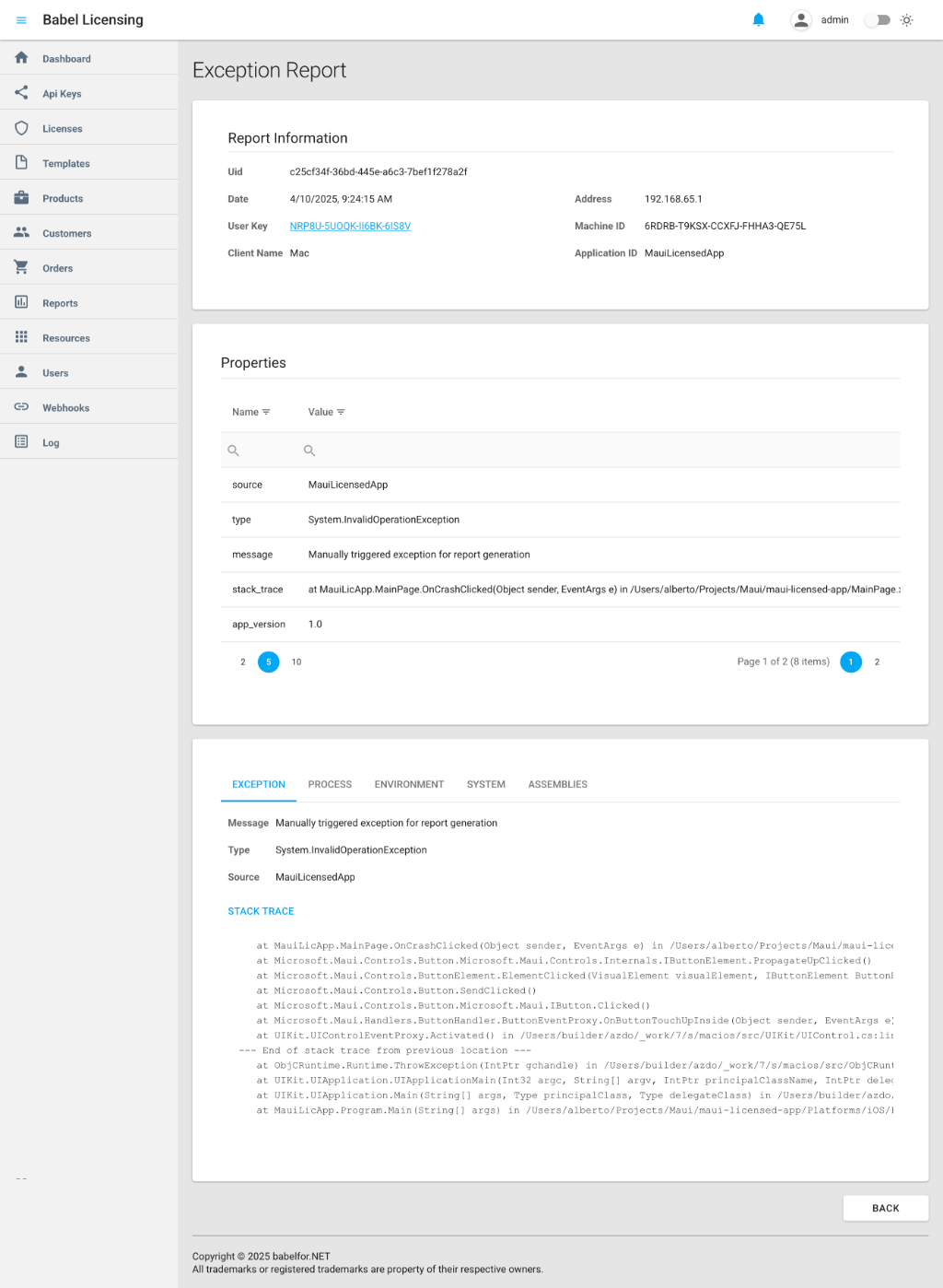
例外レポート
MAUI でのライセンスアクティベーションのベストプラクティス
MAUI アプリケーションでライセンス管理を円滑に運用するには、次の点に注意してください。
- エラー処理:ネットワーク操作とライセンス操作に対して、包括的なエラー処理を実装します。接続が断続的になることがあるモバイルアプリケーションでは、特に重要です。
- 段階的な機能縮小:接続の問題でライセンスの検証に失敗した場合は、アプリケーションを完全にブロックするのではなく、猶予期間または限定的な機能を提供します。
- UI でのフィードバック:ライセンスの状態を UI ではっきりと示し、ライセンスがアクティブなのか、期限切れなのか、無効なのかがすぐにわかるようにします。
- テスト:対象のすべてのプラットフォームでライセンス管理の実装をテストし、デバイス間で動作が一貫していることを確認します。
まとめ
Babel Licensing を使って .NET MAUI アプリケーションにライセンスアクティベーションを実装するには、一貫したライセンス管理を保ちながら、プラットフォームごとの違いに対処する計画的な取り組みが必要です。プラットフォームに依存しない抽象化とプラットフォーム固有の実装を組み合わせることで、安全なライセンスアクティベーションに必要なシステム情報を確実に収集できます。
「MauiLicApp」サンプルは、Android、iOS、Windows、MacCatalyst の各プラットフォームで動作する包括的な実装を示しています。このパターンと、このガイドで説明したベストプラクティスに従うことで、堅牢なライセンス管理システムによって MAUI アプリケーションを効果的に保護できます。
この方法により、アプリケーションがライセンス条件に従ってのみ使用されるようになり、同時に、サポートされるすべてのプラットフォームで、正規のユーザーに支障のない使用環境を提供できます。