Rapports personnalisés
En plus des rapports d’exception et des rapports d’utilisation de licence intégrés, Babel Licensing vous permet de créer des rapports personnalisés, adaptés aux besoins propres à votre application. Les rapports personnalisés vous permettent d’envoyer n’importe quelles données structurées à votre Babel Licensing Service pour les collecter, les analyser et les surveiller de façon centralisée.
Vue d’ensemble
Les rapports personnalisés sont utiles dans les cas suivants :
- Événements de sécurité : détecter et signaler les tentatives de piratage potentielles, les accès non autorisés ou les comportements suspects
- Indicateurs de l’application : suivre vos propres indicateurs de performances ou d’utilisation de l’application
- Événements métier : signaler les événements ou les jalons métier importants
- Diagnostics : envoyer des données de diagnostic personnalisées pour le dépannage
- Pistes d’audit : créer des journaux d’audit pour répondre aux exigences de conformité
Exemple d’application console
Pour commencer par un exemple pratique, clonez le dépôt console-custom-report-example, qui montre comment créer et envoyer des rapports personnalisés avec les fonctionnalités de Babel Reporting.
Ouvrir un client Git
Ouvrez votre client Git habituel ou la ligne de commande.
Cloner le dépôt
Clonez le dépôt GitHub en exécutant la commande suivante :
git clone https://github.com/babelfornet/console-custom-report-example.gitAccéder au répertoire du projet
Une fois le dépôt cloné, accédez au répertoire du projet :
cd console-custom-report-exampleExplorer et exécuter l’exemple
Vous pouvez maintenant explorer et exécuter le code de l’exemple.
L’exemple console-custom-report-example montre comment intégrer la bibliothèque cliente Babel Licensing à votre application pour créer des rapports personnalisés et les envoyer au Babel Licensing Service. Voici le détail du code :
- Initialisation de BabelReporting : le code de l’exemple initialise un objet
BabelReportinget le configure avec l’URL du service et l’identifiant du client.
private BabelReporting CreateReportingClient()
{
    var reporting = new BabelReporting();

    reporting.Configuration.ClientId = ClientId;
    reporting.Configuration.ServiceUrl = ServiceUrl;
    reporting.Configuration.UseHttp(http => {
        http.Timeout = TimeSpan.FromSeconds(3);
        http.Handler = new HttpClientHandler() {
            ServerCertificateCustomValidationCallback = (message, cert, chain, errors) => true
        };
    });

    reporting.BeforeSendReport += (s, e) => {
        e.Report.Properties.Add("cmdline", Environment.CommandLine);
        e.Report.Properties.Add("username", Environment.UserName);
    };

    return reporting;
}-
Clé utilisateur : le code de l’exemple utilise une clé utilisateur (
UserKey) qui autorise le client à envoyer des rapports. Veillez à la remplacer par une clé utilisateur valide. Pour générer une clé utilisateur, reportez-vous aux sections Licence flottante ou Activation de licence. -
Classe de rapport personnalisé : la classe
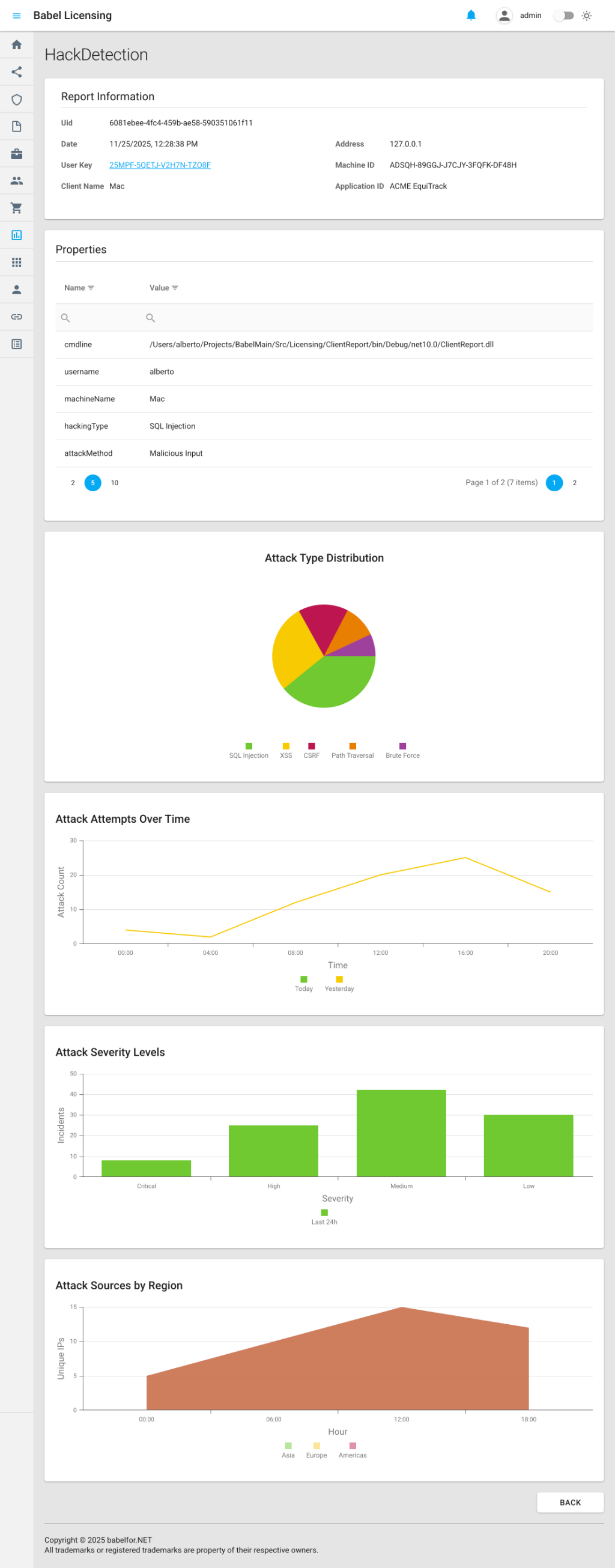
HackDetectionReporthérite deReportet définit des propriétés personnalisées pour le suivi des événements de sécurité. Elle utiliseReportPlotpour créer des graphiques interactifs, affichés dans l’application web :
class HackDetectionReport : Report
{
    public string HackingType { get; set; } = "unknown";
    public string AttackMethod { get; set; } = "unknown";
    public string HackDetails { get; set; } = "no_details";

    public HackDetectionReport() : base("HackDetection") { }

    public override void Build()
    {
        // Add custom hack detection information
        Properties.Add("machineName", Environment.MachineName);
        Properties.Add("hackingType", HackingType);
        Properties.Add("attackMethod", AttackMethod);
        Properties.Add("hackDetails", HackDetails);

        // Add attack distribution pie chart
        var attackDistribution = new ReportPlot(ReportPlotType.Pie, "Attack Type Distribution")
            .SetHeight(400)
            .AddSeries("Attacks", new List<object>
            {
                new { type = "SQL Injection", count = 45 },
                new { type = "XSS", count = 32 },
                new { type = "CSRF", count = 18 },
                new { type = "Path Traversal", count = 12 },
                new { type = "Brute Force", count = 8 }
            });
        attackDistribution.Series[0].ArgumentField = "type";
        attackDistribution.Series[0].ValueField = "count";
        Properties.Add("attackDistribution", attackDistribution.ToDictionary());

        // Add attack timeline line chart
        var attackTimeline = new ReportPlot(ReportPlotType.Line, "Attack Attempts Over Time")
            .SetAxisTitles("Time", "Attack Count")
            .SetHeight(350)
            .AddSeries("Today", new List<object>
            {
                new { hour = "00:00", attempts = 5 },
                new { hour = "04:00", attempts = 3 },
                new { hour = "08:00", attempts = 15 },
                new { hour = "12:00", attempts = 28 },
                new { hour = "16:00", attempts = 22 },
                new { hour = "20:00", attempts = 18 }
            })
            .AddSeries("Yesterday", new List<object>
            {
                new { hour = "00:00", attempts = 4 },
                new { hour = "04:00", attempts = 2 },
                new { hour = "08:00", attempts = 12 },
                new { hour = "12:00", attempts = 20 },
                new { hour = "16:00", attempts = 25 },
                new { hour = "20:00", attempts = 15 }
            });
        attackTimeline.Series[0].ArgumentField = "hour";
        attackTimeline.Series[0].ValueField = "attempts";
        attackTimeline.Series[1].ArgumentField = "hour";
        attackTimeline.Series[1].ValueField = "attempts";
        Properties.Add("attackTimeline", attackTimeline.ToDictionary());

        // Add severity bar chart
        var severityChart = new ReportPlot(ReportPlotType.Bar, "Attack Severity Levels")
            .SetAxisTitles("Severity", "Incidents")
            .SetHeight(350)
            .AddSeries("Last 24h", new List<object>
            {
                new { severity = "Critical", incidents = 8 },
                new { severity = "High", incidents = 25 },
                new { severity = "Medium", incidents = 42 },
                new { severity = "Low", incidents = 30 }
            });
        severityChart.Series[0].ArgumentField = "severity";
        severityChart.Series[0].ValueField = "incidents";
        Properties.Add("severityChart", severityChart.ToDictionary());

        // Add IP source area chart
        var ipSourceChart = new ReportPlot(ReportPlotType.Area, "Attack Sources by Region")
            .SetAxisTitles("Hour", "Unique IPs")
            .SetHeight(350)
            .AddSeries("Asia", new List<object>
            {
                new { hour = "00:00", ips = 12 },
                new { hour = "06:00", ips = 18 },
                new { hour = "12:00", ips = 25 },
                new { hour = "18:00", ips = 22 }
            })
            .AddSeries("Europe", new List<object>
            {
                new { hour = "00:00", ips = 8 },
                new { hour = "06:00", ips = 15 },
                new { hour = "12:00", ips = 20 },
                new { hour = "18:00", ips = 18 }
            })
            .AddSeries("Americas", new List<object>
            {
                new { hour = "00:00", ips = 5 },
                new { hour = "06:00", ips = 10 },
                new { hour = "12:00", ips = 15 },
                new { hour = "18:00", ips = 12 }
            });
        ipSourceChart.Series[0].ArgumentField = "hour";
        ipSourceChart.Series[0].ValueField = "ips";
        ipSourceChart.Series[1].ArgumentField = "hour";
        ipSourceChart.Series[1].ValueField = "ips";
        ipSourceChart.Series[2].ArgumentField = "hour";
        ipSourceChart.Series[2].ValueField = "ips";
        Properties.Add("ipSourceChart", ipSourceChart.ToDictionary());

        base.Build();
    }
}-
Événement BeforeSendReport : l’exemple s’abonne à l’événement
BeforeSendReport, qui permet d’ajouter des propriétés supplémentaires aux rapports avant leur envoi. Ce gestionnaire d’événement ajoute des propriétés personnalisées telles quecmdline(la ligne de commande) etusername(le nom de l’utilisateur actuel). -
Envoi du rapport : la méthode
SendAsyncenvoie le rapport personnalisé au Babel Licensing Service :
private async Task SendHackDetectionReportAsync()
{
    var hackReport = new HackDetectionReport
    {
        HackingType = "SQL Injection",
        AttackMethod = "Malicious Input",
        HackDetails = "Detected SQL keywords in user input"
    };
    await _reporting.SendAsync(UserKey, hackReport);
    Console.WriteLine("HackDetectionReport sent.");
}
Exemple de rapport personnalisé
L’exemple console-custom-report-example montre concrètement comment créer des types de rapports personnalisés et les envoyer au Babel Licensing Service. En intégrant des rapports personnalisés à vos applications, vous pouvez suivre les événements de sécurité, les indicateurs de l’application, les événements métier et toute autre donnée structurée utile à votre application.
Créer un rapport personnalisé
Pour créer un rapport personnalisé, héritez de la classe de base Report :
using Babel.Licensing.Reports;

public class HackDetectionReport : Report
{
    // Custom properties for your report
    public string HackingType { get; set; } = "unknown";
    public string AttackMethod { get; set; } = "unknown";
    public string HackDetails { get; set; } = "no_details";

    // Constructor: specify report name
    public HackDetectionReport() : base("HackDetection")
    {
    }

    // Build method: populate report properties
    public override void Build()
    {
        // Add custom properties to the report
        Properties.Add("machine_name", Environment.MachineName);
        Properties.Add("hacking_type", HackingType);
        Properties.Add("attack_method", AttackMethod);
        Properties.Add("detection_details", HackDetails);
        Properties.Add("detected_at", DateTime.UtcNow);

        // Call base to generate final JSON structure
        base.Build();
    }
}
Classe de base Report
La classe Report constitue la base de tous les rapports :
Propriétés principales
- Name : identifiant unique du type de rapport (par exemple « HackDetection », « PerformanceMetrics »)
- Content : données du rapport sérialisées en JSON (générées par
Build()) - Version : version du format du rapport (actuellement « 1.0 »)
- Date : horodatage de création du rapport
- Encrypted : indicateur qui signale si le contenu est chiffré
- Properties : dictionnaire des données clé-valeur personnalisées
Méthodes principales
- Build() : substituez cette méthode pour renseigner vos propriétés personnalisées
- Create(string report, string password) : désérialise un rapport à partir de JSON
- FromException(Exception ex, ExceptionReportOptions options) : méthode de fabrique pour les rapports d’exception
Envoyer des rapports personnalisés
Une fois votre classe de rapport personnalisé créée, envoyez le rapport avec BabelReporting :
using Babel.Licensing.Services;

// Initialize reporting service
var reporting = new BabelReporting();
reporting.Configuration.ServiceUrl = "https://licensing.example.com";
reporting.Configuration.ClientId = "MyApplication";

// Create and configure your custom report
var hackReport = new HackDetectionReport
{
    HackingType = "SQL Injection",
    AttackMethod = "Malicious Input",
    HackDetails = "Detected SQL keywords in user input: ' OR '1'='1"
};

// Send the report
var result = await reporting.SendAsync(userKey, hackReport);

if (result.Success)
{
    Console.WriteLine($"Report sent: {result.ReportUid}");
}
else
{
    Console.WriteLine($"Failed: {result.Error?.Message}");
}
Exemples concrets
Exemple 1 : rapport d’événement de sécurité
Détectez et signalez les menaces de sécurité potentielles :
public class SecurityEventReport : Report
{
    public string EventType { get; set; }
    public string Severity { get; set; }
    public string SourceIP { get; set; }
    public string UserAgent { get; set; }
    public string RequestPath { get; set; }
    public Dictionary<string, string> AdditionalData { get; set; }

    public SecurityEventReport() : base("SecurityEvent")
    {
        AdditionalData = new Dictionary<string, string>();
    }

    public override void Build()
    {
        Properties.Add("event_type", EventType);
        Properties.Add("severity", Severity);
        Properties.Add("source_ip", SourceIP);
        Properties.Add("user_agent", UserAgent);
        Properties.Add("request_path", RequestPath);
        Properties.Add("timestamp", DateTime.UtcNow);
        Properties.Add("machine_id", GetMachineId());

        // Add all additional data
        foreach (var kvp in AdditionalData)
        {
            Properties.Add(kvp.Key, kvp.Value);
        }

        base.Build();
    }

    private string GetMachineId()
    {
        // Implementation to get unique machine identifier
        return Environment.MachineName;
    }
}

// Usage
public async Task ReportSuspiciousLogin(string ipAddress, string userAgent)
{
    var report = new SecurityEventReport
    {
        EventType = "SuspiciousLogin",
        Severity = "High",
        SourceIP = ipAddress,
        UserAgent = userAgent,
        RequestPath = "/api/auth/login"
    };

    report.AdditionalData.Add("failed_attempts", "5");
    report.AdditionalData.Add("time_window", "60s");

    await _reporting.SendAsync(_userKey, report);
}
Exemple 2 : rapport d’indicateurs de performances
Suivez les indicateurs de performances de l’application :
public class PerformanceMetricsReport : Report
{
    public double AverageResponseTime { get; set; }
    public double PeakResponseTime { get; set; }
    public int TotalRequests { get; set; }
    public int FailedRequests { get; set; }
    public double CpuUsage { get; set; }
    public double MemoryUsage { get; set; }
    public TimeSpan Uptime { get; set; }

    public PerformanceMetricsReport() : base("PerformanceMetrics")
    {
    }

    public override void Build()
    {
        Properties.Add("average_response_time_ms", AverageResponseTime);
        Properties.Add("peak_response_time_ms", PeakResponseTime);
        Properties.Add("total_requests", TotalRequests);
        Properties.Add("failed_requests", FailedRequests);
        Properties.Add("error_rate", CalculateErrorRate());
        Properties.Add("cpu_usage_percent", CpuUsage);
        Properties.Add("memory_usage_mb", MemoryUsage);
        Properties.Add("uptime_hours", Uptime.TotalHours);
        Properties.Add("collection_time", DateTime.UtcNow);

        base.Build();
    }

    private double CalculateErrorRate()
    {
        if (TotalRequests == 0) return 0;
        return (double)FailedRequests / TotalRequests * 100;
    }
}

// Usage with periodic reporting
public class MetricsCollector
{
    private readonly BabelReporting _reporting;
    private readonly Timer _timer;
    private readonly PerformanceMonitor _monitor;

    public MetricsCollector(BabelReporting reporting, string userKey)
    {
        _reporting = reporting;
        _monitor = new PerformanceMonitor();

        // Report metrics every hour
        _timer = new Timer(async _ =>
        {
            var metrics = _monitor.GetCurrentMetrics();
            var report = new PerformanceMetricsReport
            {
                AverageResponseTime = metrics.AvgResponseTime,
                PeakResponseTime = metrics.PeakResponseTime,
                TotalRequests = metrics.TotalRequests,
                FailedRequests = metrics.FailedRequests,
                CpuUsage = metrics.CpuUsage,
                MemoryUsage = metrics.MemoryUsage,
                Uptime = metrics.Uptime
            };

            await _reporting.SendAsync(userKey, report);
        }, null, TimeSpan.FromHours(1), TimeSpan.FromHours(1));
    }
}
Exemple 3 : rapport d’événement métier
Suivez les événements métier importants :
public class BusinessEventReport : Report
{
    public string EventCategory { get; set; }
    public string EventAction { get; set; }
    public string UserId { get; set; }
    public string EntityType { get; set; }
    public string EntityId { get; set; }
    public decimal? TransactionAmount { get; set; }
    public Dictionary<string, object> Metadata { get; set; }

    public BusinessEventReport() : base("BusinessEvent")
    {
        Metadata = new Dictionary<string, object>();
    }

    public override void Build()
    {
        Properties.Add("event_category", EventCategory);
        Properties.Add("event_action", EventAction);
        Properties.Add("user_id", UserId);
        Properties.Add("entity_type", EntityType);
        Properties.Add("entity_id", EntityId);
        Properties.Add("timestamp", DateTime.UtcNow);

        if (TransactionAmount.HasValue)
        {
            Properties.Add("transaction_amount", TransactionAmount.Value);
        }

        // Add metadata
        foreach (var kvp in Metadata)
        {
            Properties.Add(kvp.Key, kvp.Value);
        }

        base.Build();
    }
}

// Usage
public async Task ReportPurchase(string userId, string orderId, decimal amount)
{
    var report = new BusinessEventReport
    {
        EventCategory = "Sales",
        EventAction = "Purchase",
        UserId = userId,
        EntityType = "Order",
        EntityId = orderId,
        TransactionAmount = amount
    };

    report.Metadata.Add("payment_method", "CreditCard");
    report.Metadata.Add("currency", "USD");

    await _reporting.SendAsync(_userKey, report);
}
Exemple 4 : rapport de diagnostic
Envoyez des informations de diagnostic détaillées :
public class DiagnosticReport : Report
{
    public string Component { get; set; }
    public string Status { get; set; }
    public string ErrorMessage { get; set; }
    public Dictionary<string, string> ConfigurationSettings { get; set; }
    public Dictionary<string, string> HealthChecks { get; set; }

    public DiagnosticReport() : base("Diagnostic")
    {
        ConfigurationSettings = new Dictionary<string, string>();
        HealthChecks = new Dictionary<string, string>();
    }

    public override void Build()
    {
        Properties.Add("component", Component);
        Properties.Add("status", Status);
        Properties.Add("error_message", ErrorMessage ?? "None");
        Properties.Add("timestamp", DateTime.UtcNow);
        Properties.Add("application_version", GetApplicationVersion());

        // Add configuration settings
        var configJson = JsonSerializer.Serialize(ConfigurationSettings);
        Properties.Add("configuration", configJson);

        // Add health check results
        var healthJson = JsonSerializer.Serialize(HealthChecks);
        Properties.Add("health_checks", healthJson);

        base.Build();
    }

    private string GetApplicationVersion()
    {
        return Assembly.GetExecutingAssembly().GetName().Version.ToString();
    }
}

// Usage
public async Task ReportDatabaseConnectionIssue()
{
    var report = new DiagnosticReport
    {
        Component = "Database",
        Status = "Error",
        ErrorMessage = "Connection timeout after 30 seconds"
    };

    report.ConfigurationSettings.Add("connection_string", "Server=***;Database=***");
    report.ConfigurationSettings.Add("timeout", "30");
    report.ConfigurationSettings.Add("retry_count", "3");

    report.HealthChecks.Add("database_ping", "Failed");
    report.HealthChecks.Add("dns_resolution", "Success");
    report.HealthChecks.Add("network_connectivity", "Success");

    await _reporting.SendAsync(_userKey, report);
}
Ajouter les informations d’environnement et les informations système
Vous pouvez enrichir vos rapports personnalisés avec des informations d’environnement et des informations système grâce aux collecteurs intégrés :
using Babel.Licensing.Reports;
using Babel.Licensing.Reports.Collectors;

public class EnhancedCustomReport : Report
{
    private readonly EnvironmentReportOptions _envOptions;
    private readonly SystemReportOptions _sysOptions;

    public string CustomData { get; set; }

    public EnhancedCustomReport() : base("EnhancedCustom")
    {
        // Configure what environment/system info to collect
        _envOptions = new EnvironmentReportOptions
        {
            CollectApplicationInformation = true,
            CollectLoadedAssemblies = true,
            CollectEnvironmentVariables = false
        };

        _sysOptions = new SystemReportOptions
        {
            CollectOsInformation = true,
            CollectProcessorInformation = true,
            CollectMemoryInformation = true
        };
    }

    public override void Build()
    {
        // Add your custom properties
        Properties.Add("custom_data", CustomData);

        // Add environment information
        var envCollector = new EnvironmentCollector(Properties, _envOptions);
        envCollector.Collect();

        // Add system information
        var sysCollector = new SystemCollector(Properties, _sysOptions);
        sysCollector.Collect();

        base.Build();
    }
}
Ajouter des graphiques aux rapports
Les rapports personnalisés peuvent contenir des graphiques interactifs, affichés automatiquement dans l’application web Babel Licensing. Utilisez la classe ReportPlot pour créer des visualisations des données de vos rapports.
Types de graphiques
L’énumération ReportPlotType prend en charge quatre types de graphiques :
- Pie : affiche des données de répartition sous forme de graphique en secteurs
- Line : montre les tendances dans le temps avec des graphiques en courbes
- Bar : compare des données par catégorie avec des graphiques à barres
- Area : visualise des données cumulées avec des graphiques en aires
Créer un graphique en secteurs
Les graphiques en secteurs conviennent bien pour montrer la répartition entre catégories :
using Babel.Licensing.Reports;

// Create a pie chart for attack type distribution
var attackDistribution = new ReportPlot(ReportPlotType.Pie, "Attack Type Distribution")
    .SetHeight(400)
    .AddSeries("Attacks", new List<object>
    {
        new { type = "SQL Injection", count = 45 },
        new { type = "XSS", count = 32 },
        new { type = "CSRF", count = 18 },
        new { type = "Path Traversal", count = 12 },
        new { type = "Brute Force", count = 8 }
    });

// Configure which fields to use for the chart
attackDistribution.Series[0].ArgumentField = "type";  // Category labels
attackDistribution.Series[0].ValueField = "count";    // Values

// Add to report properties
Properties.Add("attackDistribution", attackDistribution.ToDictionary());
Créer un graphique en courbes
Les graphiques en courbes conviennent bien pour montrer les tendances dans le temps :
// Create a line chart comparing attack attempts over time
var attackTimeline = new ReportPlot(ReportPlotType.Line, "Attack Attempts Over Time")
    .SetAxisTitles("Time", "Attack Count")
    .SetHeight(350)
    .AddSeries("Today", new List<object>
    {
        new { hour = "00:00", attempts = 5 },
        new { hour = "04:00", attempts = 3 },
        new { hour = "08:00", attempts = 15 },
        new { hour = "12:00", attempts = 28 },
        new { hour = "16:00", attempts = 22 },
        new { hour = "20:00", attempts = 18 }
    })
    .AddSeries("Yesterday", new List<object>
    {
        new { hour = "00:00", attempts = 4 },
        new { hour = "04:00", attempts = 2 },
        new { hour = "08:00", attempts = 12 },
        new { hour = "12:00", attempts = 20 },
        new { hour = "16:00", attempts = 25 },
        new { hour = "20:00", attempts = 15 }
    });

// Configure field mappings for each series
attackTimeline.Series[0].ArgumentField = "hour";
attackTimeline.Series[0].ValueField = "attempts";
attackTimeline.Series[1].ArgumentField = "hour";
attackTimeline.Series[1].ValueField = "attempts";

Properties.Add("attackTimeline", attackTimeline.ToDictionary());
Créer un graphique à barres
Les graphiques à barres se prêtent bien à la comparaison de catégories distinctes :
// Create a bar chart for severity levels
var severityChart = new ReportPlot(ReportPlotType.Bar, "Attack Severity Levels")
    .SetAxisTitles("Severity", "Incidents")
    .SetHeight(350)
    .AddSeries("Last 24h", new List<object>
    {
        new { severity = "Critical", incidents = 8 },
        new { severity = "High", incidents = 25 },
        new { severity = "Medium", incidents = 42 },
        new { severity = "Low", incidents = 30 }
    });

severityChart.Series[0].ArgumentField = "severity";
severityChart.Series[0].ValueField = "incidents";

Properties.Add("severityChart", severityChart.ToDictionary());
Créer un graphique en aires
Les graphiques en aires sont utiles pour montrer des données cumulées sur plusieurs séries :
// Create an area chart for attack sources by region
var ipSourceChart = new ReportPlot(ReportPlotType.Area, "Attack Sources by Region")
    .SetAxisTitles("Hour", "Unique IPs")
    .SetHeight(350)
    .AddSeries("Asia", new List<object>
    {
        new { hour = "00:00", ips = 12 },
        new { hour = "06:00", ips = 18 },
        new { hour = "12:00", ips = 25 },
        new { hour = "18:00", ips = 22 }
    })
    .AddSeries("Europe", new List<object>
    {
        new { hour = "00:00", ips = 8 },
        new { hour = "06:00", ips = 15 },
        new { hour = "12:00", ips = 20 },
        new { hour = "18:00", ips = 18 }
    })
    .AddSeries("Americas", new List<object>
    {
        new { hour = "00:00", ips = 5 },
        new { hour = "06:00", ips = 10 },
        new { hour = "12:00", ips = 15 },
        new { hour = "18:00", ips = 12 }
    });

// Configure field mappings for all series
foreach (var series in ipSourceChart.Series)
{
    series.ArgumentField = "hour";
    series.ValueField = "ips";
}

Properties.Add("ipSourceChart", ipSourceChart.ToDictionary());
Référence de l’API ReportPlot
Constructeur
new ReportPlot(ReportPlotType type, string title)Méthodes
| Méthode | Description |
|---|---|
SetHeight(int height) | Définit la hauteur du graphique en pixels |
SetAxisTitles(string xAxis, string yAxis) | Définit les titres des axes X et Y |
AddSeries(string name, List<object> data) | Ajoute une série de données au graphique |
ToDictionary() | Convertit le graphique en dictionnaire pour les propriétés du rapport |
Propriétés des séries
| Propriété | Description |
|---|---|
ArgumentField | Nom du champ des objets de données utilisé pour les valeurs de l’axe X (catégories) |
ValueField | Nom du champ des objets de données utilisé pour les valeurs de l’axe Y (mesures) |
Exemple complet avec plusieurs graphiques
Voici une classe de rapport personnalisé complète, qui contient plusieurs visualisations :
public class SecurityDashboardReport : Report
{
    public SecurityDashboardReport() : base("SecurityDashboard") { }

    public override void Build()
    {
        // Basic properties
        Properties.Add("generated_at", DateTime.UtcNow);
        Properties.Add("machine_name", Environment.MachineName);

        // Pie chart: Attack distribution
        var attackTypes = new ReportPlot(ReportPlotType.Pie, "Attack Types")
            .SetHeight(400)
            .AddSeries("Types", GetAttackTypeData());
        attackTypes.Series[0].ArgumentField = "type";
        attackTypes.Series[0].ValueField = "count";
        Properties.Add("attackTypes", attackTypes.ToDictionary());

        // Line chart: Attacks over time
        var timeline = new ReportPlot(ReportPlotType.Line, "Attack Timeline")
            .SetAxisTitles("Time", "Attacks")
            .SetHeight(350)
            .AddSeries("Attacks", GetTimelineData());
        timeline.Series[0].ArgumentField = "time";
        timeline.Series[0].ValueField = "count";
        Properties.Add("timeline", timeline.ToDictionary());

        // Bar chart: Severity breakdown
        var severity = new ReportPlot(ReportPlotType.Bar, "Severity Distribution")
            .SetAxisTitles("Level", "Count")
            .SetHeight(350)
            .AddSeries("Severity", GetSeverityData());
        severity.Series[0].ArgumentField = "level";
        severity.Series[0].ValueField = "count";
        Properties.Add("severity", severity.ToDictionary());

        base.Build();
    }

    private List<object> GetAttackTypeData() => new List<object>
    {
        new { type = "SQL Injection", count = 45 },
        new { type = "XSS", count = 32 },
        new { type = "CSRF", count = 18 }
    };

    private List<object> GetTimelineData() => new List<object>
    {
        new { time = "08:00", count = 15 },
        new { time = "12:00", count = 28 },
        new { time = "16:00", count = 22 }
    };

    private List<object> GetSeverityData() => new List<object>
    {
        new { level = "Critical", count = 8 },
        new { level = "High", count = 25 },
        new { level = "Medium", count = 42 }
    };
}
Lorsque ce rapport est consulté dans l’application web Babel Licensing, tous les graphiques sont affichés sous forme de visualisations interactives, ce qui vous permet d’analyser visuellement les données de votre rapport personnalisé.
Chiffrement des rapports
Protégez par chiffrement les données sensibles de vos rapports personnalisés :
var reporting = new BabelReporting();
reporting.Configuration.EncryptionKey = "your-secret-encryption-key";

var report = new SecurityEventReport
{
    EventType = "DataBreach",
    Severity = "Critical",
    // ... sensitive data
};

// Report will be automatically encrypted before transmission
var result = await reporting.SendAsync(userKey, report);
Le serveur doit être configuré avec la même clé de chiffrement pour déchiffrer le rapport.
Personnaliser avant l’envoi
Modifiez n’importe quel rapport (rapports personnalisés compris) avant son envoi :
reporting.BeforeSendReport += (s, e) =>
{
    // Add global properties to all reports
    e.Report.Properties.Add("environment", "production");
    e.Report.Properties.Add("region", "us-east-1");
    e.Report.Properties.Add("deployment_id", DeploymentId);

    // Add conditional logic
    if (e.Report.Name == "SecurityEvent")
    {
        e.Report.Properties.Add("security_version", SecurityFrameworkVersion);
    }

    // Validate before sending
    if (!IsValidReport(e.Report))
    {
        e.Cancel = true;  // Don't send invalid reports
    }
};
Structure des rapports
Tous les rapports suivent la même structure JSON :
{
  "name": "HackDetection",
  "version": "1.0",
  "date": "2025-01-22T10:30:00Z",
  "encrypted": false,
  "content": {
    "properties": {
      "machine_name": "DESKTOP-ABC123",
      "hacking_type": "SQL Injection",
      "attack_method": "Malicious Input",
      "detection_details": "Detected SQL keywords in user input",
      "detected_at": "2025-01-22T10:30:00Z"
    }
  }
}
Traitement côté serveur
Lorsque votre rapport personnalisé arrive au Babel Licensing Service :
- Validation : le nom et le contenu du rapport sont validés
- Déchiffrement : le contenu chiffré est déchiffré avec la clé configurée
- Analyse : les propriétés sont extraites du contenu
- Stockage : le rapport est stocké dans la base de données avec ses métadonnées
- Indexation : les propriétés sont indexées pour permettre la recherche
- Webhooks : des événements
ReportCreatedsont distribués pour les intégrations externes
Vous pouvez interroger les rapports personnalisés au moyen de l’API du Babel Licensing Service :
GET /api/reports?name=HackDetection&from=2025-01-01&to=2025-01-31Bonnes pratiques
1. Choisir des noms de rapport explicites
Donnez à vos types de rapports des noms descriptifs et cohérents :
// GOOD: Clear and specific
public class UserAuthenticationFailureReport : Report
{
    public UserAuthenticationFailureReport() : base("UserAuthFailure") { }
}

// BAD: Generic and unclear
public class CustomReport1 : Report
{
    public CustomReport1() : base("Report1") { }
}
2. Inclure des horodatages
Incluez toujours des horodatages pour l’analyse temporelle :
public override void Build()
{
    Properties.Add("timestamp", DateTime.UtcNow);
    Properties.Add("event_time", eventOccurredAt);
    base.Build();
}
3. Ajouter des informations de contexte
Incluez assez de contexte pour que le rapport soit exploitable :
Properties.Add("user_id", userId);
Properties.Add("session_id", sessionId);
Properties.Add("request_id", requestId);
Properties.Add("correlation_id", correlationId);
4. Utiliser des données structurées
Préférez les données structurées au texte libre pour faciliter l’analyse :
// GOOD: Structured
Properties.Add("response_time_ms", 1250);
Properties.Add("status_code", 200);
Properties.Add("endpoint", "/api/users");

// BAD: Unstructured
Properties.Add("message", "Request to /api/users took 1250ms and returned 200");
5. Gérer proprement les erreurs
Ne laissez pas l’échec d’un rapport perturber le fonctionnement de l’application :
try
{
    var report = new CustomReport { /* ... */ };
    await _reporting.SendAsync(_userKey, report);
}
catch (Exception ex)
{
    // Log error but don't throw
    _logger.LogWarning(ex, "Failed to send custom report");
}
6. Regrouper les événements liés
Au lieu d’envoyer de nombreux rapports séparés, regroupez les événements liés :
public class BatchEventReport : Report
{
    public List<EventData> Events { get; set; } = new List<EventData>();

    public BatchEventReport() : base("BatchEvent") { }

    public override void Build()
    {
        Properties.Add("event_count", Events.Count);
        Properties.Add("events", JsonSerializer.Serialize(Events));
        Properties.Add("batch_time", DateTime.UtcNow);
        base.Build();
    }
}
7. Nettoyer les données sensibles
N’incluez jamais de mots de passe, de clés API ni d’informations personnelles identifiables :
public override void Build()
{
    // GOOD: Sanitized
    Properties.Add("username", SanitizeUsername(username));
    Properties.Add("email", HashEmail(email));

    // BAD: Sensitive data
    // Properties.Add("password", password);  // NEVER DO THIS
    // Properties.Add("credit_card", cardNumber);  // NEVER DO THIS

    base.Build();
}

private string SanitizeUsername(string username)
{
    // Return first 3 chars + asterisks
    if (username.Length <= 3) return "***";
    return username.Substring(0, 3) + new string('*', username.Length - 3);
}
Exemple complet
Voici un exemple complet qui associe des rapports personnalisés à une gestion des erreurs et à une configuration appropriées :
using Babel.Licensing.Reports;
using Babel.Licensing.Services;
using Microsoft.Extensions.Logging;

public class ApplicationReportingService
{
    private readonly BabelReporting _reporting;
    private readonly ILogger<ApplicationReportingService> _logger;
    private readonly string _userKey;

    public ApplicationReportingService(
        IConfiguration configuration,
        ILogger<ApplicationReportingService> logger)
    {
        _logger = logger;
        _userKey = configuration["Licensing:UserKey"];

        _reporting = new BabelReporting();
        _reporting.Configuration.ServiceUrl = configuration["Licensing:ServiceUrl"];
        _reporting.Configuration.ClientId = "EquiTrack v2.0";
        _reporting.Configuration.EncryptionKey = configuration["Licensing:EncryptionKey"];

        _reporting.BeforeSendReport += OnBeforeSendReport;
        _reporting.AfterSendReport += OnAfterSendReport;
    }

    private void OnBeforeSendReport(object sender, BeforeSendReportEventArgs e)
    {
        // Add global context to all reports
        e.Report.Properties["application_version"] = GetApplicationVersion();
        e.Report.Properties["environment"] = GetEnvironment();
    }

    private void OnAfterSendReport(object sender, AfterSendReportEventArgs e)
    {
        if (e.Error != null)
        {
            _logger.LogError(e.Error, "Failed to send {ReportType} report", e.Report.Name);
        }
        else
        {
            _logger.LogInformation("Sent {ReportType} report: {ReportId}",
                e.Report.Name, e.Result.ReportUid);
        }
    }

    public async Task ReportSecurityEvent(
        string eventType,
        string severity,
        string details)
    {
        try
        {
            var report = new SecurityEventReport
            {
                EventType = eventType,
                Severity = severity,
                SourceIP = GetClientIpAddress(),
                UserAgent = GetUserAgent(),
                RequestPath = GetCurrentRequestPath()
            };

            report.AdditionalData["details"] = details;

            var result = await _reporting.SendAsync(_userKey, report);

            if (!result.Success)
            {
                _logger.LogWarning("Security event report failed: {Error}",
                    result.Error?.Message);
            }
        }
        catch (Exception ex)
        {
            _logger.LogError(ex, "Exception sending security event report");
        }
    }

    private string GetApplicationVersion() =>
        Assembly.GetExecutingAssembly().GetName().Version.ToString();

    private string GetEnvironment() =>
        Environment.GetEnvironmentVariable("ASPNETCORE_ENVIRONMENT") ?? "Production";

    private string GetClientIpAddress() => /* implementation */;
    private string GetUserAgent() => /* implementation */;
    private string GetCurrentRequestPath() => /* implementation */;
}
Rubriques connexes
- Rapports d’exception : les rapports d’exception intégrés
- Rapports d’utilisation de licence : suivre l’utilisation des licences
- Licence flottante : générer des clés utilisateur pour les rapports