Tools
Stack Decoder
Babel Obfuscator can make obfuscated stack trace readable using the XML mapping files produced during the obfuscation process. When an obfuscated assembly crashes, getting helpful information from the exception stack trace is difficult because it usually contains the obfuscated method names. To deobfuscate the stack trace, you can select the Stack Decoder option in the Tools navigation group.
- Open Stack Decoder view
- In the XML Map File grid, browse for one or more XML map files generated for the assembly that has raised the exception.
- Paste the obfuscated stack trace into the Obfuscated Stack Trace text box
- Optionally tick Hide Babel generated frames to remove the frames Babel itself inserted (see Dynamic Proxy frames below)
- Click the Deobfuscate Stack Trace button
The translated stack trace will be shown in the Deobfuscated Stack Trace text area.
If you have opened a project file, the grid will be populated with all the XML Map Out files configured and any XML Map In file stored in the Input Grid for all target assemblies..
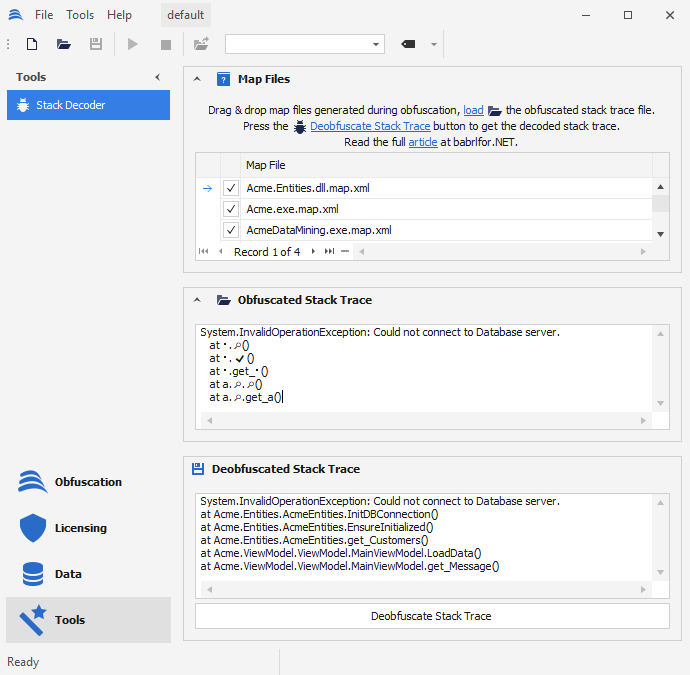
Babel UI Deobfuscated Stack Trace
It is important to note that the XML mapping file should be kept secure, as it can be used to reverse-engineer the original code.
When overloaded renaming has been enabled for the obfuscated assembly, it is possible to have many correspondences for each symbol presented in the obfuscated stack trace:
Acme.ViewModel.ViewModel.MainViewModel.LoadData()
   => Acme.ViewModel.ViewModel.MainViewModel.CloseWindow()
   => Acme.ViewModel.ViewModel.MainViewModel.CleanUp()
Acme.ViewModel.ViewModel.MainViewModel.get_Message()
In this case, the deobfuscated stack trace will present all the possible methods that were renamed with the same obfuscated name as the child elements of the parent method.
It is recommended not to use overloading renaming if you want a clear and consistent mapping between the obfuscated stack symbols and the method names in your code. This will ensure that the correspondence between the two is maintained, making it easier to debug and understand the obfuscated code.
Unicode Normalization
When the Unicode renaming option is enabled in Babel Obfuscator, obfuscated symbols are replaced with unprintable characters in the obfuscated stack trace. To preserve information about the obfuscated names in the stack trace, you can save the obfuscated stack trace to a text file that supports the Unicode character set, such as UTF-8.
To deobfuscate the stack trace, you can then use the text file along with the mapping file generated by Babel Obfuscator to translate the unprintable characters back to their original names. This allows you to locate the exact line of code that caused the error or exception, even with the Unicode renaming option enabled.
Dynamic Proxy frames
When Dynamic Proxy is enabled, Babel routes eligible calls through generated bridge methods, each of which appears as an extra frame in the stack trace. The Stack Decoder annotates these frames with the method the bridge stands in for:
   at Acme.Backup.ZipReader.OpenZip(System.String filename)
   at (System.String ) -> proxy for System.IO.Compression.ZipFile::OpenRead
   at Acme.Backup.BackupReader.IsBackupFile(System.String path)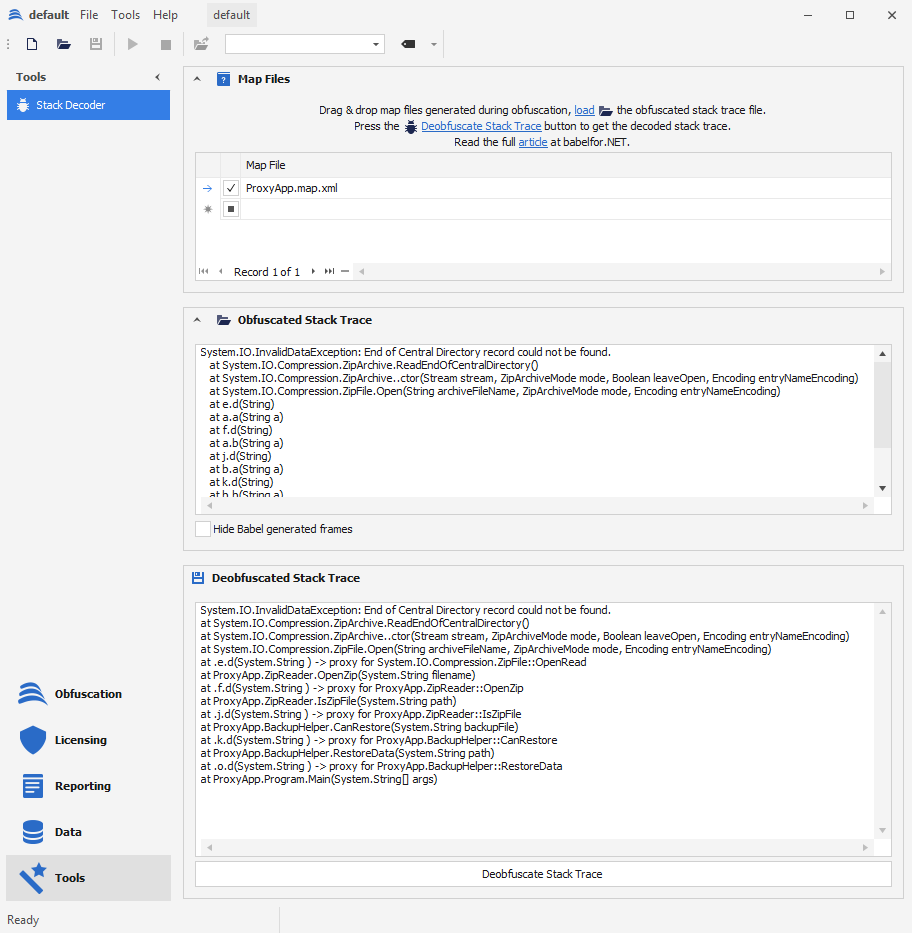
Each dynamic proxy frame names the method it stands in for
Tick the Hide Babel generated frames check box to drop these bridge frames, along with the anonymous run-time frames they call through, leaving only your own call chain. This matches the --stacktrace frames=user option of the command line tool. Leaving the box unchecked (the default) keeps every frame. See Decoding Stack Traces for a full description.
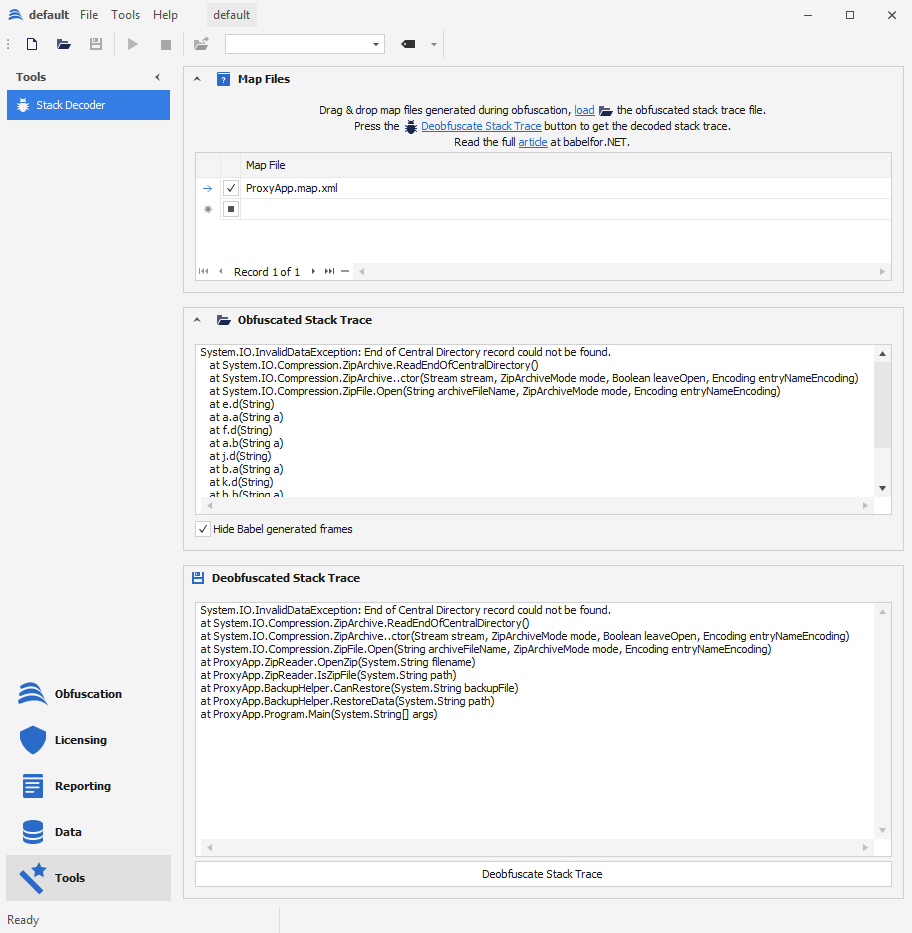
With the check box ticked only the call chain as written in the source is left
Deobfuscate Stack From Command Line
The Babel Command Line Interface (CLI) tool can deobfuscate stack traces by utilizing the XML mapping file and the obfuscated stack trace as inputs. The Babel CLI tool will subsequently substitute the obfuscated names within the stack trace with the original names, thus rendering the information more comprehensible.
babel --stacktrace StackTrace.txt --mapin Acme.exe.map.xml --mapin Acme.Entities.dll.map.xmlThe file “StackTrace.txt” contains the exception stack trace that needs to be deobfuscated. It holds the names of the methods and classes in the stack trace in their obfuscated form. It is important to note that the StackTrace.txt file should support Unicode characters to prevent the loss of information that may occur due to obfuscated names. This ensures that all relevant information is retained and can be properly decoded during the deobfuscation process.
Using PDB Files
The PDB (Program Database) files can be used to include the line numbers from the source code in the deobfuscated stack trace. To do this, you need to enable the generation of PDB files when obfuscating an assembly. By adding a password, you can encrypt the source file names to ensure that the original file names are not disclosed to the user. The obfuscated stack trace will show encrypted source file information instead of the original file name.
System.Exception: (0x80131904): A network-related or instance-specific error occurred while establishing a connection to the server.
   at System.Data.SqlClient.SqlConnection.Open()
   at b.a(String g)
   at c.b() in <GFpQHv9iwQzX1Zmh+… >:line 21
   at c.a(String h)
   at Acme.ViewModel.MainViewModel.get_Message() in <GFpQHv9iwQzX1Zmh+… >:line 28
The decoded stack trace produced by Babel Obfuscator will contain the original, decrypted file names, as opposed to the obfuscated or encrypted file names found in the original exception stack trace. This makes it easier for developers to identify the source of any errors or exceptions that occur during the application’s runtime. By including the original file names in the decoded stack trace, developers are able to locate and resolve any issues quickly, improving the overall stability and reliability of the application.
System.Exception: (0x80131904): A network-related or instance-specific error occurred while establishing a connection to the server.
at System.Data.SqlClient.SqlConnection.Open()
at Acme.Entities.DatabaseContext.ConnectToDatabase(System.String connectionString)
at Acme.ViewModel.RS.CheckResourceLoaded() in C:AcmeAcme.ViewModelRS.cs:line 21
at Acme.ViewModel.RS.GetString(System.String name)
at Acme.ViewModel.MainViewModel.get_Message() in C:AcmeAcme.ViewModelViewModelMainViewModel.cs:line 28