Report di licenza
I report di licenza mostrano in dettaglio come la tua applicazione usa le funzionalità, i campi e le restrizioni della licenza. Abilitando il tracciamento dell’utilizzo delle licenze puoi monitorare l’adozione delle funzionalità, verificare la conformità e prendere decisioni basate sui dati per la strategia di licensing.
Panoramica
La libreria Babel Licensing comprende un efficace sistema di tracciamento che monitora automaticamente l’accesso ai componenti della licenza:
- Utilizzo delle funzionalità: traccia a quali funzionalità si accede, con quale frequenza e tramite quali membri
- Accesso ai campi: monitora quali campi della licenza vengono letti e i loro valori
- Convalida delle restrizioni: registra i controlli delle restrizioni e i risultati della convalida
- Raccolta automatica: i dati di utilizzo vengono acquisiti in modo trasparente, senza modifiche al codice
- Unione intelligente: la logica lato server combina i report per un’analisi completa
Esempio di applicazione console
Per iniziare con un esempio pratico, clona il repository console-licensing-report-example, che mostra come tracciare l’utilizzo delle licenze e inviare i report di licenza con le funzionalità di Babel Reporting.
Apri un client Git
Apri il client Git che preferisci o la riga di comando.
Clona il repository
Clona il repository GitHub eseguendo il comando seguente:
git clone https://github.com/babelfornet/console-licensing-report-example.gitVai alla cartella del progetto
Una volta clonato il repository, vai alla cartella del progetto:
cd console-licensing-report-exampleEsplora ed esegui l’esempio
Ora puoi esplorare ed eseguire il codice di esempio.
console-licensing-report-example mostra come integrare la libreria client di Babel Licensing nella tua applicazione per tracciare l’utilizzo delle licenze e inviare i report di licenza al Babel Licensing Service. Ecco il codice passo per passo:
- Inizializzazione di BabelReporting e BabelLicensing: il codice di esempio inizializza sia un oggetto
BabelReportingper l’invio dei report sia un oggettoBabelLicensingper la convalida della licenza.
private BabelReporting CreateReportingClient()
{
    var reporting = new BabelReporting();

    reporting.Configuration.ClientId = ClientId;
    reporting.Configuration.ServiceUrl = ServiceUrl;
    reporting.Configuration.UseHttp(http => {
        http.Timeout = TimeSpan.FromSeconds(3);
        http.Handler = new HttpClientHandler() {
            ServerCertificateCustomValidationCallback = (message, cert, chain, errors) => true
        };
    });

    reporting.BeforeSendReport += (s, e) => {
        e.Report.Properties.Add("cmdline", Environment.CommandLine);
        e.Report.Properties.Add("username", Environment.UserName);
    };

    return reporting;
}

private BabelLicensing CreateLicensingClient()
{
    var config = new BabelLicensingConfiguration()
    {
        ServiceUrl = ServiceUrl,
        SignatureProvider = RSASignature.FromKeys(PublicKey),
        ClientId = ClientId
    };

    config.UseHttp(http => {
        http.Timeout = TimeSpan.FromSeconds(10);
        http.Handler = new HttpClientHandler()
        {
            ServerCertificateCustomValidationCallback = (message, cert, chain, errors) => true
        };
    });

    // Register custom license factory to handle MemoryRestriction
    config.LicenseFactory = new CustomLicenseFactory();

    return new BabelLicensing(config);
}-
Chiave utente e chiave pubblica: il codice di esempio usa una chiave utente (
UserKey) per autorizzare il client e una chiave pubblica (PublicKey) per verificare la firma della licenza. Ricorda di sostituirle con chiavi valide. Per generare una chiave utente, vedi i paragrafi Licenza flottante o Attivazione della licenza. -
Convalida della licenza con tracciamento: l’esempio mostra come convalidare una licenza flottante e accedere alle sue funzionalità, ai suoi campi e alle sue restrizioni. Quando
LicenseUsageTrackingè abilitato, ogni accesso viene tracciato automaticamente:
private async Task ValidateLicenseAsync()
{
    try
    {
        // Acquire floating license
        var requestResult = await _licensing.RequestFloatingLicenseAsync(UserKey, typeof(Program));
        Console.WriteLine($"Floating license {requestResult.License.Id} acquired.");

        try
        {
            // Validate the license (this will be tracked)
            var result = await _licensing.ValidateLicenseAsync(UserKey, typeof(Program));
            var license = result.License;

            Console.WriteLine($"License validated: {license.Id}");

            foreach (var feature in license.Features)
            {
                Console.WriteLine($" Feature: {feature.Name} - {feature.Description}");
            }

            foreach (var field in license.Fields)
            {
                Console.WriteLine($" Field: {field.Name} = {field.Value}");
            }

            foreach (var restriction in license.Restrictions)
            {
                Console.WriteLine($" Restriction: {restriction.Name}");
            }

            // Simulate multiple accesses to demonstrate tracking
            var reportingFeature = license.Features.FirstOrDefault(f => f.Name == "Reporting");
            var field2Field = license.Fields.FirstOrDefault(f => f.Name == "field2");

            for (int i = 0; i < 5; i++)
            {
                var _ = reportingFeature?.Data;
                var __ = field2Field?.Value;
            }

            Console.WriteLine($"\nLicense validation completed.");
        }
        finally
        {
            // Always release the floating license when done
            await _licensing.ReleaseFloatingLicenseAsync(UserKey);
            Console.WriteLine("Floating license released.");
        }
    }
    catch (Exception ex)
    {
        Console.WriteLine($"Error validating license: {ex.Message}");
    }
}- Invio del report di licenza: il metodo
SendLicenseReportAsyncinvia al Babel Licensing Service i dati di tracciamento accumulati:
private async Task SendLicenseReportAsync()
{
    var result = await _reporting.SendLicenseReportAsync(UserKey);
    if (result.IsError)
    {
        Console.WriteLine($"Error sending LicenseReport: {result.Error}");
        return;
    }
    Console.WriteLine("LicenseReport sent.");
}- Factory di licenze personalizzata: l’esempio comprende una classe
MemoryRestrictionpersonalizzata e unaCustomLicenseFactory, per mostrare come gestire i tipi di restrizione personalizzati nelle tue licenze:
class MemoryRestriction : Restriction, ILicenseSerializable
{
    public override string Name => "Memory";
    public long TotalMemory { get; set; }

    public override ValidationResult Validate(ILicenseContext context, Type type, object instance)
    {
        ISystemInformation sys = (ISystemInformation)context.GetService(typeof(ISystemInformation));

        long totalMem = ToMegabytes(sys.TotalPhysicalMemory);
        if (totalMem < TotalMemory)
            return ValidationResult.Invalid;

        return base.Validate(context, type, instance);
    }

    private static long ToMegabytes(long bytes)
    {
        return bytes / 1024 / 1024;
    }

    // ILicenseSerializable implementation...
}

class CustomLicenseFactory : ILicenseFactory
{
    public Restriction CreateRestriction(string type)
    {
        string[] tokens = type.Split(':');
        string restriction = tokens[0];

        switch (restriction)
        {
            case "Memory":
                var memory = new MemoryRestriction();
                if (tokens.Length > 1)
                    memory.TotalMemory = long.Parse(tokens[1]);
                return memory;
            default:
                return null!;
        }
    }

    // Other ILicenseFactory methods...
}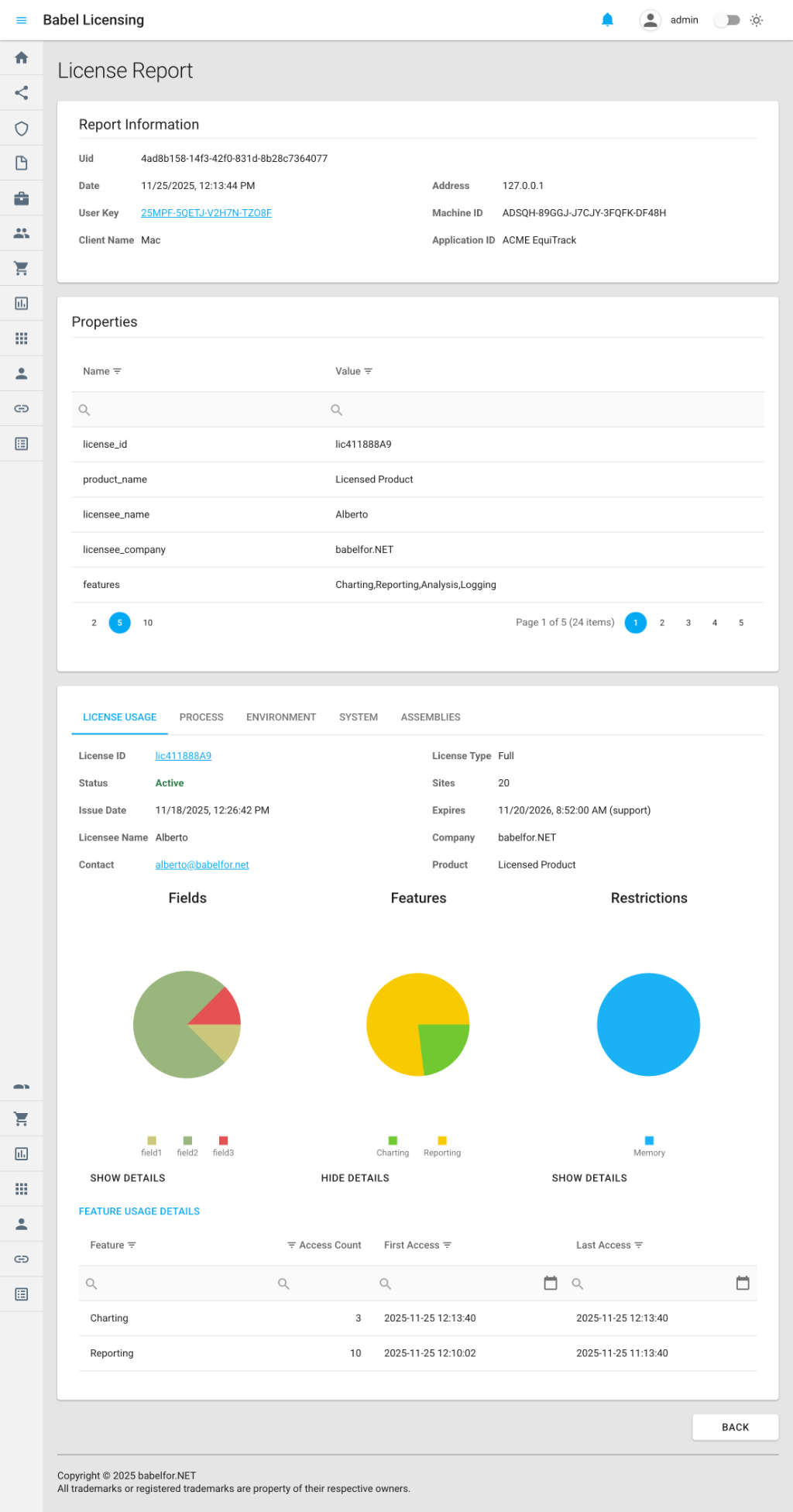
Esempio di report di licenza
console-licensing-report-example è una dimostrazione pratica di come tracciare l’utilizzo delle licenze e inviare i report al Babel Licensing Service. Integrando il tracciamento delle licenze nelle tue applicazioni puoi monitorare l’adozione delle funzionalità, verificare la conformità e prendere decisioni basate sui dati per la tua strategia di licensing.
Abilitare il tracciamento delle licenze
Per iniziare a tracciare l’utilizzo delle licenze, abilita il tracciamento prima di convalidare la licenza:
using Babel.Licensing.Reports;

// Enable tracking (must be called before license validation)
LicenseUsageTracking.Enable();

// Validate your license as usual
var license = licenseManager.Validate(key, type);

// Use licensed features - access is automatically tracked
var reportingFeature = license.Features["Reporting"];
var data = reportingFeature.Data;

var versionField = license.Fields["Version"];
var version = versionField.Value;
Inviare i report di licenza
Dopo aver abilitato il tracciamento, puoi inviare i report al tuo Babel Licensing Service:
using Babel.Licensing.Services;

// Initialize the reporting service
var reporting = new BabelReporting();
reporting.Configuration.ServiceUrl = "https://licensing.example.com";
reporting.Configuration.ClientId = "MyApplication";

// Send the license report
var result = await reporting.SendLicenseReportAsync(userKey);

if (result.Success)
{
    Console.WriteLine($"Report sent successfully: {result.ReportUid}");
}
else
{
    Console.WriteLine($"Failed to send report: {result.Error?.Message}");
}
Che cosa viene tracciato
Tracciamento dell’accesso alle funzionalità
Per ogni funzionalità della licenza a cui si accede:
// This access is automatically tracked
var feature = license.Features["Reporting"];
var data = feature.Data;  // Tracked: get_Data on Reporting feature
Informazioni tracciate:
- Nome e ID della funzionalità
- Membro a cui si accede (per esempio
get_Data,get_IsEnabled) - Numero di accessi
- Timestamp del primo accesso
- Timestamp dell’ultimo accesso
- Durata totale dell’accesso (tempo tra il primo e l’ultimo accesso)
Tracciamento dell’accesso ai campi
Per ogni campo letto dalla licenza:
// This access is automatically tracked
var field = license.Fields["Version"];
var value = field.Value;  // Tracked: get_Value on Version field
Informazioni tracciate:
- Nome del campo
- Valore del campo (troncato a 12 caratteri per motivi di privacy)
- Membro a cui si accede (per esempio
get_Value) - Numero di accessi e timestamp
Tracciamento della convalida delle restrizioni
Per ogni restrizione controllata:
// This validation is automatically tracked
var validation = license.Restrictions.Validate();
Informazioni tracciate:
- Nome e tipo della restrizione
- Risultato della convalida (Pass/Fail)
- Membro a cui si accede
- Numero di accessi e timestamp
Contenuto del report
Ogni report di licenza comprende tre sezioni principali:
1. Metadati della licenza
Le informazioni di base sulla licenza tracciata:
{
  "license_id": "L-ABC-123",
  "license_type": "Standard",
  "issue_date": "2025-01-15",
  "expire_date": "2026-01-15",
  "support_expire_date": "2025-07-15",
  "licensee_name": "John Smith",
  "licensee_company": "ACME Corporation",
  "product_name": "EquiTrack",
  "product_version": "2.0"
}
2. Dati di tracciamento dell’utilizzo
Le statistiche di accesso dettagliate di tutti i componenti tracciati:
{
  "features": [
    {
      "id": "F-001",
      "name": "Reporting",
      "members": [
        {
          "member": "get_Data",
          "access_count": 15,
          "first_access": "2025-01-20T10:30:00Z",
          "last_access": "2025-01-20T14:45:00Z",
          "access_time": "04:15:00"
        }
      ]
    }
  ],
  "fields": [
    {
      "name": "Version",
      "value": "2.0.1",
      "members": [
        {
          "member": "get_Value",
          "access_count": 3,
          "first_access": "2025-01-20T10:00:00Z"
        }
      ]
    }
  ],
  "restrictions": [
    {
      "name": "MachineLock",
      "type": "Hardware",
      "members": [
        {
          "member": "Validate",
          "access_count": 1,
          "validation_result": "Pass",
          "first_access": "2025-01-20T10:00:00Z"
        }
      ]
    }
  ]
}
3. Informazioni sull’ambiente e di sistema
Il contesto dell’applicazione e del computer (configurabile):
- Nome e versione dell’applicazione e assembly caricati
- Dettagli del sistema operativo
- Informazioni sull’hardware (CPU, memoria, disco)
- Schede di rete
- Variabili d’ambiente (filtrate)
- Processi in esecuzione (facoltativo)
Opzioni di configurazione
Personalizza i dati che vengono inclusi nei tuoi report di licenza:
var reporting = new BabelReporting();

// Configure license report options
reporting.Configuration.LicenseReportOptions = new LicenseReportOptions
{
    // What to track
    CollectFeaturesAccess = true,
    CollectFieldsAccess = true,
    CollectRestrictionsAccess = true,

    // Filter specific members (optional)
    CollectMembers = new List<string> { "get_Data", "get_IsEnabled" },

    // Environment information
    Environment = new EnvironmentReportOptions
    {
        CollectApplicationInformation = true,
        CollectLoadedAssemblies = true,
        CollectEnvironmentVariables = false,
        CollectProcessInformation = false
    },

    // System information
    System = new SystemReportOptions
    {
        CollectSystemInformation = true,
        CollectOsInformation = true,
        CollectProcessorInformation = true,
        CollectMemoryInformation = true,
        CollectDiskInformation = false,
        CollectDisplayInformation = false,
        CollectNetworkInformation = false
    },

    // Output options
    Formatted = true,  // Pretty-print JSON
    EncryptionKey = "my-secret-key"  // Optional encryption
};
Gestire i dati tracciati
Controlla lo stato del tracciamento
if (LicenseUsageTracking.IsEnabled)
{
    Console.WriteLine("License tracking is active");
}
Accedi alle informazioni tracciate
// Get all tracked licenses
foreach (var info in LicenseUsageTracking.TrackedLicenses)
{
    Console.WriteLine($"License: {info.LicenseId}");
    Console.WriteLine($"Product: {info.ProductName} v{info.ProductVersion}");

    // Feature access details
    foreach (var feature in info.TrackedFeatures)
    {
        Console.WriteLine($"  Feature {feature.Name}:");
        Console.WriteLine($"    Accesses: {feature.AccessCount}");
        Console.WriteLine($"    First: {feature.FirstAccessTime}");
        Console.WriteLine($"    Last: {feature.LastAccessTime}");
    }

    // Field access details
    foreach (var field in info.TrackedFields)
    {
        Console.WriteLine($"  Field {field.Name}: {field.AccessCount} accesses");
    }

    // Restriction validation details
    foreach (var restriction in info.TrackedRestrictions)
    {
        Console.WriteLine($"  Restriction {restriction.Name}: {restriction.AccessCount} checks");
    }
}
Ottieni il tracciamento di una licenza specifica
var trackingInfo = LicenseUsageTracking.GetTrackingInfo("L-ABC-123");
if (trackingInfo != null)
{
    Console.WriteLine($"Tracking {trackingInfo.TrackedFeatures.Count()} features");
}
Cancella i dati di tracciamento
// Clear all tracked data without disabling tracking
LicenseUsageTracking.Clear();
Disabilita il tracciamento
// Disable tracking and clear all data
LicenseUsageTracking.Disable();
Personalizzare i report
Aggiungi proprietà personalizzate ai tuoi report di licenza con l’evento BeforeSendReport:
reporting.BeforeSendReport += (s, e) =>
{
    // Add custom metadata
    e.Report.Properties.Add("application_mode", "production");
    e.Report.Properties.Add("user_count", activeUsers);
    e.Report.Properties.Add("deployment_id", deploymentId);

    // Cancel sending if needed
    if (shouldSkipReport)
    {
        e.Cancel = true;
    }
};
Unione dei report
Il Babel Licensing Service unisce automaticamente i report di licenza che provengono dallo stesso client e dallo stesso computer. In questo modo ottieni:
- Statistiche cumulative: i conteggi degli accessi vengono sommati
- Conservazione della cronologia: vengono mantenuti il primo accesso più remoto e l’ultimo accesso più recente
- Analisi storica: schemi di utilizzo completi nel tempo
- Efficienza di archiviazione: un unico report completo per ogni combinazione di licenza, computer e client
Quando arriva un nuovo report, il server:
- Individua i report esistenti con lo stesso ID licenza, ID computer e ID client
- Unisce i dati di tracciamento per nome del componente e membro
- Somma i numeri di accessi
- Aggiorna gli intervalli di tempo degli accessi
- Aggiorna i metadati con i valori più recenti
Gestione degli errori
Gestisci in modo controllato gli errori di invio dei report:
reporting.AfterSendReport += (s, e) =>
{
    if (e.Error != null)
    {
        // Log the error
        logger.LogError(e.Error, "Failed to send license report");

        // Store report locally for retry
        SaveReportForRetry(e.Report);
    }
    else
    {
        logger.LogInformation($"Report sent: {e.Result.ReportUid}");
    }
};

var result = await reporting.SendLicenseReportAsync(userKey);
Procedure consigliate
1. Abilita subito il tracciamento
Abilita il tracciamento prima di convalidare la licenza, per acquisire tutti gli accessi fin dall’inizio:
// GOOD: Enable before validation
LicenseUsageTracking.Enable();
var license = licenseManager.Validate(key, type);

// BAD: Enable after validation (misses initial access)
var license = licenseManager.Validate(key, type);
LicenseUsageTracking.Enable();
2. Invia periodicamente
Invia i report a intervalli regolari o alla chiusura dell’applicazione:
// Option 1: Periodic reporting
var timer = new Timer(async _ =>
{
    if (LicenseUsageTracking.IsEnabled)
    {
        await reporting.SendLicenseReportAsync(userKey);
        LicenseUsageTracking.Clear();  // Reset for next period
    }
}, null, TimeSpan.FromHours(1), TimeSpan.FromHours(1));

// Option 2: On application shutdown
AppDomain.CurrentDomain.ProcessExit += async (s, e) =>
{
    await reporting.SendLicenseReportAsync(userKey);
};
3. Riduci al minimo la raccolta dei dati
Raccogli solo i dati che ti servono, per ridurre la dimensione dei report e l’uso della rete:
reporting.Configuration.LicenseReportOptions = new LicenseReportOptions
{
    CollectFeaturesAccess = true,   // Essential
    CollectFieldsAccess = false,    // Skip if not needed
    CollectRestrictionsAccess = true,  // For compliance

    System = new SystemReportOptions
    {
        CollectSystemInformation = true,
        CollectDiskInformation = false,  // Skip to reduce size
        CollectDisplayInformation = false
    }
};
4. Gestisci gli scenari offline
Salva i report in locale quando il server non è raggiungibile:
var result = await reporting.SendLicenseReportAsync(userKey);

if (!result.Success)
{
    // Serialize and store report
    var reportJson = JsonSerializer.Serialize(result.Report);
    await File.WriteAllTextAsync("pending-reports/report-" + Guid.NewGuid() + ".json", reportJson);
}
5. Proteggi i dati sensibili
Usa la cifratura per i report che contengono informazioni sensibili:
reporting.Configuration.EncryptionKey = Configuration["Reporting:EncryptionKey"];
reporting.Configuration.LicenseReportOptions.EncryptionKey = reporting.Configuration.EncryptionKey;
Esempio: tracciamento completo delle licenze
Ecco un esempio completo che mostra il tracciamento delle licenze in un’applicazione reale:
using Babel.Licensing;
using Babel.Licensing.Reports;
using Babel.Licensing.Services;

public class LicenseManager
{
    private readonly BabelReporting _reporting;
    private readonly Timer _reportTimer;

    public LicenseManager(IConfiguration configuration)
    {
        // Initialize reporting service
        _reporting = new BabelReporting();
        _reporting.Configuration.ServiceUrl = configuration["Licensing:ServiceUrl"];
        _reporting.Configuration.ClientId = "EquiTrack v2.0";
        _reporting.Configuration.EncryptionKey = configuration["Licensing:EncryptionKey"];

        // Configure what to track
        _reporting.Configuration.LicenseReportOptions = new LicenseReportOptions
        {
            CollectFeaturesAccess = true,
            CollectFieldsAccess = true,
            CollectRestrictionsAccess = true,
            Environment = new EnvironmentReportOptions
            {
                CollectApplicationInformation = true,
                CollectLoadedAssemblies = true
            },
            System = new SystemReportOptions
            {
                CollectSystemInformation = true,
                CollectOsInformation = true,
                CollectProcessorInformation = true,
                CollectMemoryInformation = true
            },
            Formatted = false  // Compact JSON for network efficiency
        };

        // Add custom properties before sending
        _reporting.BeforeSendReport += (s, e) =>
        {
            e.Report.Properties.Add("environment", configuration["Environment"]);
            e.Report.Properties.Add("version", Assembly.GetExecutingAssembly().GetName().Version.ToString());
        };

        // Handle send results
        _reporting.AfterSendReport += (s, e) =>
        {
            if (e.Error != null)
            {
                Logger.Error($"Failed to send license report: {e.Error.Message}");
            }
            else
            {
                Logger.Info($"License report sent: {e.Result.ReportUid}");
            }
        };

        // Send reports every 24 hours
        _reportTimer = new Timer(
            async _ => await SendLicenseReportAsync(),
            null,
            TimeSpan.FromHours(24),
            TimeSpan.FromHours(24)
        );
    }

    public ILicense ValidateLicense(string userKey, LicenseKeyTypes keyType)
    {
        // Enable tracking before validation
        LicenseUsageTracking.Enable();

        // Validate license
        var licenseManager = new BabelLicensing();
        var license = licenseManager.Validate(userKey, keyType);

        return license;
    }

    public async Task SendLicenseReportAsync()
    {
        if (!LicenseUsageTracking.IsEnabled)
            return;

        try
        {
            var result = await _reporting.SendLicenseReportAsync(_userKey);

            if (result.Success)
            {
                // Clear tracking data after successful send
                LicenseUsageTracking.Clear();
            }
        }
        catch (Exception ex)
        {
            Logger.Error($"Exception sending license report: {ex.Message}");
        }
    }

    public void Shutdown()
    {
        // Send final report on shutdown
        SendLicenseReportAsync().Wait(TimeSpan.FromSeconds(10));

        // Cleanup
        _reportTimer?.Dispose();
        LicenseUsageTracking.Disable();
    }
}
Analisi lato server
Quando i report raggiungono il tuo Babel Licensing Service, puoi:
- Monitorare l’adozione delle funzionalità: vedi quali funzionalità vengono usate più spesso
- Individuare le funzionalità inutilizzate: trova le funzionalità a cui non si accede mai
- Tracciare gli schemi di utilizzo: analizza i tempi e le frequenze di accesso
- Verificare la conformità: assicurati che le restrizioni vengano controllate
- Pianificare la strategia di licensing: prendi decisioni basate sui dati su come raggruppare le funzionalità
I report vengono archiviati con tutti i metadati e possono essere interrogati tramite l’API del Babel Licensing Service o consultati nell’interfaccia di gestione.
Argomenti correlati
- Report di eccezione: invia report di arresti anomali ed errori
- Report personalizzati: crea i tuoi tipi di report
- Licenza flottante: genera le chiavi utente per il reporting
- Attivazione della licenza: attiva le licenze per il tracciamento