Informes de uso de licencia
Los informes de uso de licencia muestran con detalle cómo usa su aplicación las funciones, los campos y las restricciones de la licencia. Al activar el seguimiento del uso de las licencias, puede supervisar la adopción de las funciones, validar el cumplimiento y tomar decisiones basadas en datos sobre la estrategia de licencias.
Descripción general
La biblioteca de Babel Licensing incluye un potente sistema de seguimiento que supervisa automáticamente el acceso a los componentes de la licencia:
- Uso de funciones: registre a qué funciones se accede, con qué frecuencia y mediante qué miembros
- Acceso a campos: supervise qué campos de la licencia se leen y sus valores
- Validación de restricciones: registre las comprobaciones de restricciones y los resultados de la validación
- Recopilación automática: los datos de uso se capturan de forma transparente, sin cambios en el código
- Combinación inteligente: el servidor combina los informes de forma inteligente para ofrecer un análisis completo
Ejemplo de aplicación de consola
Para empezar con un ejemplo práctico, clone el repositorio console-licensing-report-example, que muestra cómo hacer el seguimiento del uso de las licencias y enviar informes de uso de licencia con la funcionalidad de Babel Reporting.
Abrir un cliente Git
Abra el cliente Git que prefiera o la línea de comandos.
Clonar el repositorio
Clone el repositorio de GitHub con el comando siguiente:
git clone https://github.com/babelfornet/console-licensing-report-example.gitIr al directorio del proyecto
Una vez clonado el repositorio, vaya al directorio del proyecto:
cd console-licensing-report-exampleExaminar y ejecutar el ejemplo
Ya puede examinar y ejecutar el código de ejemplo.
El ejemplo console-licensing-report-example muestra cómo integrar la biblioteca cliente de Babel Licensing en su aplicación para hacer el seguimiento del uso de las licencias y enviar informes de uso de licencia al Babel Licensing Service. A continuación se explica el código paso a paso:
- Inicialización de BabelReporting y BabelLicensing: el código de ejemplo inicializa un objeto
BabelReportingpara enviar informes y un objetoBabelLicensingpara validar la licencia.
private BabelReporting CreateReportingClient()
{
    var reporting = new BabelReporting();

    reporting.Configuration.ClientId = ClientId;
    reporting.Configuration.ServiceUrl = ServiceUrl;
    reporting.Configuration.UseHttp(http => {
        http.Timeout = TimeSpan.FromSeconds(3);
        http.Handler = new HttpClientHandler() {
            ServerCertificateCustomValidationCallback = (message, cert, chain, errors) => true
        };
    });

    reporting.BeforeSendReport += (s, e) => {
        e.Report.Properties.Add("cmdline", Environment.CommandLine);
        e.Report.Properties.Add("username", Environment.UserName);
    };

    return reporting;
}

private BabelLicensing CreateLicensingClient()
{
    var config = new BabelLicensingConfiguration()
    {
        ServiceUrl = ServiceUrl,
        SignatureProvider = RSASignature.FromKeys(PublicKey),
        ClientId = ClientId
    };

    config.UseHttp(http => {
        http.Timeout = TimeSpan.FromSeconds(10);
        http.Handler = new HttpClientHandler()
        {
            ServerCertificateCustomValidationCallback = (message, cert, chain, errors) => true
        };
    });

    // Register custom license factory to handle MemoryRestriction
    config.LicenseFactory = new CustomLicenseFactory();

    return new BabelLicensing(config);
}-
Clave de usuario y clave pública: el código de ejemplo usa una clave de usuario (
UserKey) para autorizar al cliente y una clave pública (PublicKey) para verificar la firma de la licencia. Sustitúyalas por claves válidas. Para generar una clave de usuario, consulte los apartados Licencia flotante o Activación de licencia. -
Validación de la licencia con seguimiento: el ejemplo muestra cómo validar una licencia flotante y acceder a sus funciones, campos y restricciones. Cuando
LicenseUsageTrackingestá activado, todos los accesos se registran automáticamente:
private async Task ValidateLicenseAsync()
{
    try
    {
        // Acquire floating license
        var requestResult = await _licensing.RequestFloatingLicenseAsync(UserKey, typeof(Program));
        Console.WriteLine($"Floating license {requestResult.License.Id} acquired.");

        try
        {
            // Validate the license (this will be tracked)
            var result = await _licensing.ValidateLicenseAsync(UserKey, typeof(Program));
            var license = result.License;

            Console.WriteLine($"License validated: {license.Id}");

            foreach (var feature in license.Features)
            {
                Console.WriteLine($" Feature: {feature.Name} - {feature.Description}");
            }

            foreach (var field in license.Fields)
            {
                Console.WriteLine($" Field: {field.Name} = {field.Value}");
            }

            foreach (var restriction in license.Restrictions)
            {
                Console.WriteLine($" Restriction: {restriction.Name}");
            }

            // Simulate multiple accesses to demonstrate tracking
            var reportingFeature = license.Features.FirstOrDefault(f => f.Name == "Reporting");
            var field2Field = license.Fields.FirstOrDefault(f => f.Name == "field2");

            for (int i = 0; i < 5; i++)
            {
                var _ = reportingFeature?.Data;
                var __ = field2Field?.Value;
            }

            Console.WriteLine($"\nLicense validation completed.");
        }
        finally
        {
            // Always release the floating license when done
            await _licensing.ReleaseFloatingLicenseAsync(UserKey);
            Console.WriteLine("Floating license released.");
        }
    }
    catch (Exception ex)
    {
        Console.WriteLine($"Error validating license: {ex.Message}");
    }
}- Envío del informe de uso de licencia: el método
SendLicenseReportAsyncenvía al Babel Licensing Service los datos de seguimiento acumulados:
private async Task SendLicenseReportAsync()
{
    var result = await _reporting.SendLicenseReportAsync(UserKey);
    if (result.IsError)
    {
        Console.WriteLine($"Error sending LicenseReport: {result.Error}");
        return;
    }
    Console.WriteLine("LicenseReport sent.");
}- Fábrica de licencias personalizada: el ejemplo incluye una clase personalizada
MemoryRestrictionyCustomLicenseFactorypara mostrar cómo tratar los tipos de restricción personalizados en sus licencias:
class MemoryRestriction : Restriction, ILicenseSerializable
{
    public override string Name => "Memory";
    public long TotalMemory { get; set; }

    public override ValidationResult Validate(ILicenseContext context, Type type, object instance)
    {
        ISystemInformation sys = (ISystemInformation)context.GetService(typeof(ISystemInformation));

        long totalMem = ToMegabytes(sys.TotalPhysicalMemory);
        if (totalMem < TotalMemory)
            return ValidationResult.Invalid;

        return base.Validate(context, type, instance);
    }

    private static long ToMegabytes(long bytes)
    {
        return bytes / 1024 / 1024;
    }

    // ILicenseSerializable implementation...
}

class CustomLicenseFactory : ILicenseFactory
{
    public Restriction CreateRestriction(string type)
    {
        string[] tokens = type.Split(':');
        string restriction = tokens[0];

        switch (restriction)
        {
            case "Memory":
                var memory = new MemoryRestriction();
                if (tokens.Length > 1)
                    memory.TotalMemory = long.Parse(tokens[1]);
                return memory;
            default:
                return null!;
        }
    }

    // Other ILicenseFactory methods...
}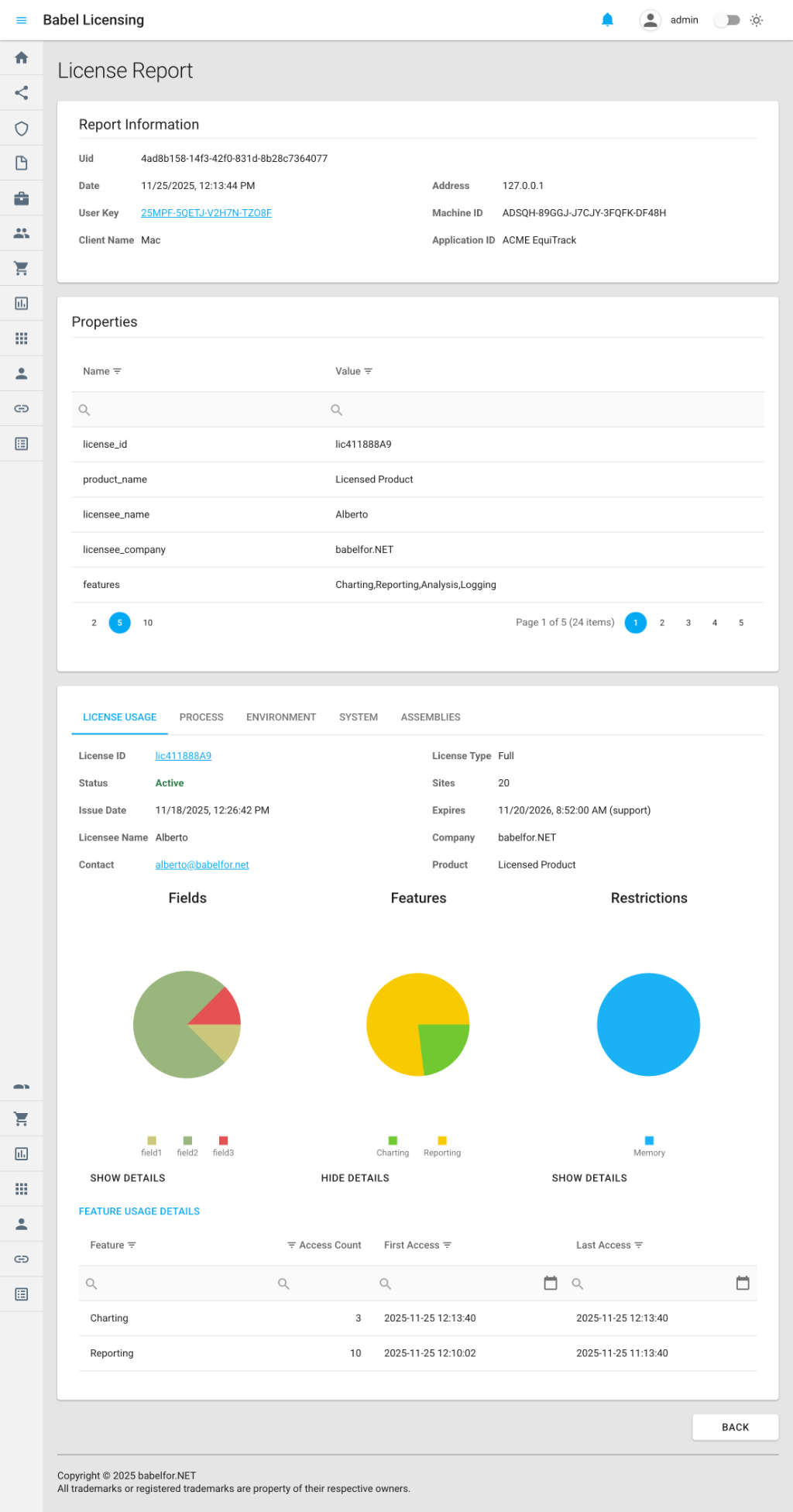
Ejemplo de informe de uso de licencia
El ejemplo console-licensing-report-example es una demostración práctica de cómo hacer el seguimiento del uso de las licencias y enviar informes al Babel Licensing Service. Al integrar el seguimiento de licencias en sus aplicaciones, puede supervisar la adopción de las funciones, validar el cumplimiento y tomar decisiones basadas en datos sobre su estrategia de licencias.
Activar el seguimiento de licencias
Para empezar a hacer el seguimiento del uso de las licencias, active el seguimiento antes de validar la licencia:
using Babel.Licensing.Reports;

// Enable tracking (must be called before license validation)
LicenseUsageTracking.Enable();

// Validate your license as usual
var license = licenseManager.Validate(key, type);

// Use licensed features - access is automatically tracked
var reportingFeature = license.Features["Reporting"];
var data = reportingFeature.Data;

var versionField = license.Fields["Version"];
var version = versionField.Value;
Enviar informes de uso de licencia
Una vez activado el seguimiento, puede enviar informes a su Babel Licensing Service:
using Babel.Licensing.Services;

// Initialize the reporting service
var reporting = new BabelReporting();
reporting.Configuration.ServiceUrl = "https://licensing.example.com";
reporting.Configuration.ClientId = "MyApplication";

// Send the license report
var result = await reporting.SendLicenseReportAsync(userKey);

if (result.Success)
{
    Console.WriteLine($"Report sent successfully: {result.ReportUid}");
}
else
{
    Console.WriteLine($"Failed to send report: {result.Error?.Message}");
}
Qué se registra
Seguimiento del acceso a funciones
Por cada función de la licencia a la que se accede:
// This access is automatically tracked
var feature = license.Features["Reporting"];
var data = feature.Data;  // Tracked: get_Data on Reporting feature
Información registrada:
- Nombre e id de la función
- Miembro al que se accede (por ejemplo,
get_Data,get_IsEnabled) - Número de accesos
- Marca de tiempo del primer acceso
- Marca de tiempo del último acceso
- Duración total del acceso (tiempo entre el primer acceso y el último)
Seguimiento del acceso a campos
Por cada campo de la licencia que se lee:
// This access is automatically tracked
var field = license.Fields["Version"];
var value = field.Value;  // Tracked: get_Value on Version field
Información registrada:
- Nombre del campo
- Valor del campo (truncado a 12 caracteres por privacidad)
- Miembro al que se accede (por ejemplo,
get_Value) - Número de accesos y marcas de tiempo
Seguimiento de la validación de restricciones
Por cada restricción que se comprueba:
// This validation is automatically tracked
var validation = license.Restrictions.Validate();
Información registrada:
- Nombre y tipo de la restricción
- Resultado de la validación (Pass/Fail)
- Miembro al que se accede
- Número de accesos y marcas de tiempo
Contenido del informe
Cada informe de uso de licencia incluye tres secciones principales:
1. Metadatos de la licencia
Información básica sobre la licencia de la que se hace el seguimiento:
{
  "license_id": "L-ABC-123",
  "license_type": "Standard",
  "issue_date": "2025-01-15",
  "expire_date": "2026-01-15",
  "support_expire_date": "2025-07-15",
  "licensee_name": "John Smith",
  "licensee_company": "ACME Corporation",
  "product_name": "EquiTrack",
  "product_version": "2.0"
}
2. Datos de seguimiento de uso
Estadísticas de acceso detalladas de todos los componentes registrados:
{
  "features": [
    {
      "id": "F-001",
      "name": "Reporting",
      "members": [
        {
          "member": "get_Data",
          "access_count": 15,
          "first_access": "2025-01-20T10:30:00Z",
          "last_access": "2025-01-20T14:45:00Z",
          "access_time": "04:15:00"
        }
      ]
    }
  ],
  "fields": [
    {
      "name": "Version",
      "value": "2.0.1",
      "members": [
        {
          "member": "get_Value",
          "access_count": 3,
          "first_access": "2025-01-20T10:00:00Z"
        }
      ]
    }
  ],
  "restrictions": [
    {
      "name": "MachineLock",
      "type": "Hardware",
      "members": [
        {
          "member": "Validate",
          "access_count": 1,
          "validation_result": "Pass",
          "first_access": "2025-01-20T10:00:00Z"
        }
      ]
    }
  ]
}
3. Información del entorno y del sistema
Contexto sobre la aplicación y el equipo (configurable):
- Nombre y versión de la aplicación y ensamblados cargados
- Detalles del sistema operativo
- Información de hardware (CPU, memoria, disco)
- Adaptadores de red
- Variables de entorno (filtradas)
- Procesos en ejecución (opcional)
Opciones de configuración
Personalice qué datos se incluyen en sus informes de uso de licencia:
var reporting = new BabelReporting();

// Configure license report options
reporting.Configuration.LicenseReportOptions = new LicenseReportOptions
{
    // What to track
    CollectFeaturesAccess = true,
    CollectFieldsAccess = true,
    CollectRestrictionsAccess = true,

    // Filter specific members (optional)
    CollectMembers = new List<string> { "get_Data", "get_IsEnabled" },

    // Environment information
    Environment = new EnvironmentReportOptions
    {
        CollectApplicationInformation = true,
        CollectLoadedAssemblies = true,
        CollectEnvironmentVariables = false,
        CollectProcessInformation = false
    },

    // System information
    System = new SystemReportOptions
    {
        CollectSystemInformation = true,
        CollectOsInformation = true,
        CollectProcessorInformation = true,
        CollectMemoryInformation = true,
        CollectDiskInformation = false,
        CollectDisplayInformation = false,
        CollectNetworkInformation = false
    },

    // Output options
    Formatted = true,  // Pretty-print JSON
    EncryptionKey = "my-secret-key"  // Optional encryption
};
Gestionar los datos registrados
Comprobar el estado del seguimiento
if (LicenseUsageTracking.IsEnabled)
{
    Console.WriteLine("License tracking is active");
}
Acceder a la información registrada
// Get all tracked licenses
foreach (var info in LicenseUsageTracking.TrackedLicenses)
{
    Console.WriteLine($"License: {info.LicenseId}");
    Console.WriteLine($"Product: {info.ProductName} v{info.ProductVersion}");

    // Feature access details
    foreach (var feature in info.TrackedFeatures)
    {
        Console.WriteLine($"  Feature {feature.Name}:");
        Console.WriteLine($"    Accesses: {feature.AccessCount}");
        Console.WriteLine($"    First: {feature.FirstAccessTime}");
        Console.WriteLine($"    Last: {feature.LastAccessTime}");
    }

    // Field access details
    foreach (var field in info.TrackedFields)
    {
        Console.WriteLine($"  Field {field.Name}: {field.AccessCount} accesses");
    }

    // Restriction validation details
    foreach (var restriction in info.TrackedRestrictions)
    {
        Console.WriteLine($"  Restriction {restriction.Name}: {restriction.AccessCount} checks");
    }
}
Obtener el seguimiento de una licencia concreta
var trackingInfo = LicenseUsageTracking.GetTrackingInfo("L-ABC-123");
if (trackingInfo != null)
{
    Console.WriteLine($"Tracking {trackingInfo.TrackedFeatures.Count()} features");
}
Borrar los datos de seguimiento
// Clear all tracked data without disabling tracking
LicenseUsageTracking.Clear();
Desactivar el seguimiento
// Disable tracking and clear all data
LicenseUsageTracking.Disable();
Personalizar los informes
Añada propiedades personalizadas a sus informes de uso de licencia con el evento BeforeSendReport:
reporting.BeforeSendReport += (s, e) =>
{
    // Add custom metadata
    e.Report.Properties.Add("application_mode", "production");
    e.Report.Properties.Add("user_count", activeUsers);
    e.Report.Properties.Add("deployment_id", deploymentId);

    // Cancel sending if needed
    if (shouldSkipReport)
    {
        e.Cancel = true;
    }
};
Combinación de informes
El Babel Licensing Service combina automáticamente los informes de uso de licencia del mismo cliente y del mismo equipo. Con ello se obtiene:
- Estadísticas acumuladas: los recuentos de accesos se suman
- Conservación de la cronología: se conservan el primer acceso más antiguo y el último acceso más reciente
- Análisis histórico: patrones de uso completos a lo largo del tiempo
- Almacenamiento eficiente: un único informe completo por licencia, equipo y cliente
Cuando llega un informe nuevo, el servidor:
- Identifica los informes existentes con el mismo id de licencia, id de equipo e id de cliente
- Combina los datos de seguimiento por nombre de componente y miembro
- Acumula los recuentos de accesos
- Actualiza los intervalos de tiempo de acceso
- Actualiza los metadatos con los valores más recientes
Control de errores
Gestione de forma controlada los fallos en el envío de informes:
reporting.AfterSendReport += (s, e) =>
{
    if (e.Error != null)
    {
        // Log the error
        logger.LogError(e.Error, "Failed to send license report");

        // Store report locally for retry
        SaveReportForRetry(e.Report);
    }
    else
    {
        logger.LogInformation($"Report sent: {e.Result.ReportUid}");
    }
};

var result = await reporting.SendLicenseReportAsync(userKey);
Prácticas recomendadas
1. Activar el seguimiento cuanto antes
Active el seguimiento antes de validar la licencia para capturar todos los accesos desde el principio:
// GOOD: Enable before validation
LicenseUsageTracking.Enable();
var license = licenseManager.Validate(key, type);

// BAD: Enable after validation (misses initial access)
var license = licenseManager.Validate(key, type);
LicenseUsageTracking.Enable();
2. Enviar periódicamente
Envíe los informes a intervalos regulares o al cerrar la aplicación:
// Option 1: Periodic reporting
var timer = new Timer(async _ =>
{
    if (LicenseUsageTracking.IsEnabled)
    {
        await reporting.SendLicenseReportAsync(userKey);
        LicenseUsageTracking.Clear();  // Reset for next period
    }
}, null, TimeSpan.FromHours(1), TimeSpan.FromHours(1));

// Option 2: On application shutdown
AppDomain.CurrentDomain.ProcessExit += async (s, e) =>
{
    await reporting.SendLicenseReportAsync(userKey);
};
3. Reducir al mínimo la recopilación de datos
Recopile solo los datos que necesite para reducir el tamaño del informe y el uso de la red:
reporting.Configuration.LicenseReportOptions = new LicenseReportOptions
{
    CollectFeaturesAccess = true,   // Essential
    CollectFieldsAccess = false,    // Skip if not needed
    CollectRestrictionsAccess = true,  // For compliance

    System = new SystemReportOptions
    {
        CollectSystemInformation = true,
        CollectDiskInformation = false,  // Skip to reduce size
        CollectDisplayInformation = false
    }
};
4. Prever los escenarios sin conexión
Guarde los informes localmente cuando no se pueda acceder al servidor:
var result = await reporting.SendLicenseReportAsync(userKey);

if (!result.Success)
{
    // Serialize and store report
    var reportJson = JsonSerializer.Serialize(result.Report);
    await File.WriteAllTextAsync("pending-reports/report-" + Guid.NewGuid() + ".json", reportJson);
}
5. Proteger los datos confidenciales
Use el cifrado en los informes que contengan información confidencial:
reporting.Configuration.EncryptionKey = Configuration["Reporting:EncryptionKey"];
reporting.Configuration.LicenseReportOptions.EncryptionKey = reporting.Configuration.EncryptionKey;
Ejemplo: seguimiento de licencias completo
Este es un ejemplo completo que muestra el seguimiento de licencias en una aplicación real:
using Babel.Licensing;
using Babel.Licensing.Reports;
using Babel.Licensing.Services;

public class LicenseManager
{
    private readonly BabelReporting _reporting;
    private readonly Timer _reportTimer;

    public LicenseManager(IConfiguration configuration)
    {
        // Initialize reporting service
        _reporting = new BabelReporting();
        _reporting.Configuration.ServiceUrl = configuration["Licensing:ServiceUrl"];
        _reporting.Configuration.ClientId = "EquiTrack v2.0";
        _reporting.Configuration.EncryptionKey = configuration["Licensing:EncryptionKey"];

        // Configure what to track
        _reporting.Configuration.LicenseReportOptions = new LicenseReportOptions
        {
            CollectFeaturesAccess = true,
            CollectFieldsAccess = true,
            CollectRestrictionsAccess = true,
            Environment = new EnvironmentReportOptions
            {
                CollectApplicationInformation = true,
                CollectLoadedAssemblies = true
            },
            System = new SystemReportOptions
            {
                CollectSystemInformation = true,
                CollectOsInformation = true,
                CollectProcessorInformation = true,
                CollectMemoryInformation = true
            },
            Formatted = false  // Compact JSON for network efficiency
        };

        // Add custom properties before sending
        _reporting.BeforeSendReport += (s, e) =>
        {
            e.Report.Properties.Add("environment", configuration["Environment"]);
            e.Report.Properties.Add("version", Assembly.GetExecutingAssembly().GetName().Version.ToString());
        };

        // Handle send results
        _reporting.AfterSendReport += (s, e) =>
        {
            if (e.Error != null)
            {
                Logger.Error($"Failed to send license report: {e.Error.Message}");
            }
            else
            {
                Logger.Info($"License report sent: {e.Result.ReportUid}");
            }
        };

        // Send reports every 24 hours
        _reportTimer = new Timer(
            async _ => await SendLicenseReportAsync(),
            null,
            TimeSpan.FromHours(24),
            TimeSpan.FromHours(24)
        );
    }

    public ILicense ValidateLicense(string userKey, LicenseKeyTypes keyType)
    {
        // Enable tracking before validation
        LicenseUsageTracking.Enable();

        // Validate license
        var licenseManager = new BabelLicensing();
        var license = licenseManager.Validate(userKey, keyType);

        return license;
    }

    public async Task SendLicenseReportAsync()
    {
        if (!LicenseUsageTracking.IsEnabled)
            return;

        try
        {
            var result = await _reporting.SendLicenseReportAsync(_userKey);

            if (result.Success)
            {
                // Clear tracking data after successful send
                LicenseUsageTracking.Clear();
            }
        }
        catch (Exception ex)
        {
            Logger.Error($"Exception sending license report: {ex.Message}");
        }
    }

    public void Shutdown()
    {
        // Send final report on shutdown
        SendLicenseReportAsync().Wait(TimeSpan.FromSeconds(10));

        // Cleanup
        _reportTimer?.Dispose();
        LicenseUsageTracking.Disable();
    }
}
Análisis en el servidor
Una vez que los informes llegan a su Babel Licensing Service, puede:
- Supervisar la adopción de las funciones: vea qué funciones se usan con más frecuencia
- Identificar funciones no utilizadas: encuentre las funciones a las que nunca se accede
- Seguir los patrones de uso: analice los tiempos y las frecuencias de acceso
- Validar el cumplimiento: asegúrese de que las restricciones se comprueban
- Planificar la estrategia de licencias: tome decisiones basadas en datos sobre cómo agrupar las funciones
Los informes se almacenan con todos sus metadatos y se pueden consultar mediante la API del Babel Licensing Service o ver en la interfaz de administración.
Temas relacionados
- Informes de excepción: envíe informes de cierres inesperados y de errores
- Informes personalizados: cree sus propios tipos de informe
- Licencia flotante: genere claves de usuario para los informes
- Activación de licencia: active licencias para el seguimiento