Informes personalizados
Además de los informes integrados de excepción y de uso de licencia, Babel Licensing permite crear informes personalizados adaptados a las necesidades concretas de su aplicación. Con los informes personalizados puede enviar cualquier dato estructurado a su Babel Licensing Service para recopilarlo, analizarlo y supervisarlo de forma centralizada.
Descripción general
Los informes personalizados son útiles para:
- Eventos de seguridad: detecte y notifique posibles intentos de ataque, accesos no autorizados o comportamientos sospechosos
- Métricas de la aplicación: haga el seguimiento de métricas personalizadas de rendimiento o de uso de la aplicación
- Eventos de negocio: notifique eventos o hitos de negocio importantes
- Diagnóstico: envíe datos de diagnóstico personalizados para la solución de problemas
- Pistas de auditoría: cree registros de auditoría para los requisitos de cumplimiento
Ejemplo de aplicación de consola
Para empezar con un ejemplo práctico, clone el repositorio console-custom-report-example, que muestra cómo crear y enviar informes personalizados con la funcionalidad de Babel Reporting.
Abrir un cliente Git
Abra el cliente Git que prefiera o la línea de comandos.
Clonar el repositorio
Clone el repositorio de GitHub con el comando siguiente:
git clone https://github.com/babelfornet/console-custom-report-example.gitIr al directorio del proyecto
Una vez clonado el repositorio, vaya al directorio del proyecto:
cd console-custom-report-exampleExaminar y ejecutar el ejemplo
Ya puede examinar y ejecutar el código de ejemplo.
El ejemplo console-custom-report-example muestra cómo integrar la biblioteca cliente de Babel Licensing en su aplicación para crear informes personalizados y enviarlos al Babel Licensing Service. A continuación se explica el código paso a paso:
- Inicialización de BabelReporting: el código de ejemplo inicializa un objeto
BabelReportingy lo configura con la URL del servicio y el identificador del cliente.
private BabelReporting CreateReportingClient()
{
    var reporting = new BabelReporting();

    reporting.Configuration.ClientId = ClientId;
    reporting.Configuration.ServiceUrl = ServiceUrl;
    reporting.Configuration.UseHttp(http => {
        http.Timeout = TimeSpan.FromSeconds(3);
        http.Handler = new HttpClientHandler() {
            ServerCertificateCustomValidationCallback = (message, cert, chain, errors) => true
        };
    });

    reporting.BeforeSendReport += (s, e) => {
        e.Report.Properties.Add("cmdline", Environment.CommandLine);
        e.Report.Properties.Add("username", Environment.UserName);
    };

    return reporting;
}-
Clave de usuario: el código de ejemplo usa una clave de usuario (
UserKey) que autoriza al cliente a enviar informes. Sustitúyala por una clave de usuario válida. Para generar una clave de usuario, consulte los apartados Licencia flotante o Activación de licencia. -
Clase de informe personalizado: la clase
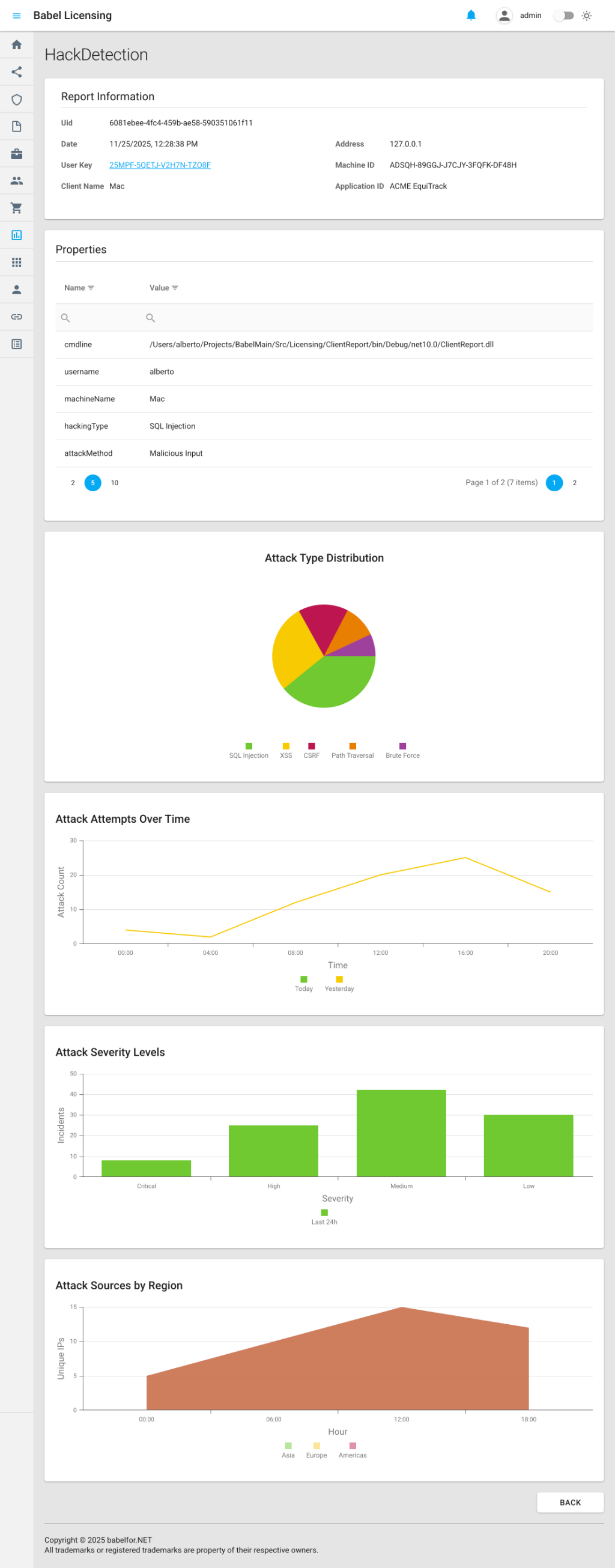
HackDetectionReporthereda deReporty define propiedades personalizadas para hacer el seguimiento de eventos de seguridad. UsaReportPlotpara crear gráficos interactivos que se muestran en la aplicación web:
class HackDetectionReport : Report
{
    public string HackingType { get; set; } = "unknown";
    public string AttackMethod { get; set; } = "unknown";
    public string HackDetails { get; set; } = "no_details";

    public HackDetectionReport() : base("HackDetection") { }

    public override void Build()
    {
        // Add custom hack detection information
        Properties.Add("machineName", Environment.MachineName);
        Properties.Add("hackingType", HackingType);
        Properties.Add("attackMethod", AttackMethod);
        Properties.Add("hackDetails", HackDetails);

        // Add attack distribution pie chart
        var attackDistribution = new ReportPlot(ReportPlotType.Pie, "Attack Type Distribution")
            .SetHeight(400)
            .AddSeries("Attacks", new List<object>
            {
                new { type = "SQL Injection", count = 45 },
                new { type = "XSS", count = 32 },
                new { type = "CSRF", count = 18 },
                new { type = "Path Traversal", count = 12 },
                new { type = "Brute Force", count = 8 }
            });
        attackDistribution.Series[0].ArgumentField = "type";
        attackDistribution.Series[0].ValueField = "count";
        Properties.Add("attackDistribution", attackDistribution.ToDictionary());

        // Add attack timeline line chart
        var attackTimeline = new ReportPlot(ReportPlotType.Line, "Attack Attempts Over Time")
            .SetAxisTitles("Time", "Attack Count")
            .SetHeight(350)
            .AddSeries("Today", new List<object>
            {
                new { hour = "00:00", attempts = 5 },
                new { hour = "04:00", attempts = 3 },
                new { hour = "08:00", attempts = 15 },
                new { hour = "12:00", attempts = 28 },
                new { hour = "16:00", attempts = 22 },
                new { hour = "20:00", attempts = 18 }
            })
            .AddSeries("Yesterday", new List<object>
            {
                new { hour = "00:00", attempts = 4 },
                new { hour = "04:00", attempts = 2 },
                new { hour = "08:00", attempts = 12 },
                new { hour = "12:00", attempts = 20 },
                new { hour = "16:00", attempts = 25 },
                new { hour = "20:00", attempts = 15 }
            });
        attackTimeline.Series[0].ArgumentField = "hour";
        attackTimeline.Series[0].ValueField = "attempts";
        attackTimeline.Series[1].ArgumentField = "hour";
        attackTimeline.Series[1].ValueField = "attempts";
        Properties.Add("attackTimeline", attackTimeline.ToDictionary());

        // Add severity bar chart
        var severityChart = new ReportPlot(ReportPlotType.Bar, "Attack Severity Levels")
            .SetAxisTitles("Severity", "Incidents")
            .SetHeight(350)
            .AddSeries("Last 24h", new List<object>
            {
                new { severity = "Critical", incidents = 8 },
                new { severity = "High", incidents = 25 },
                new { severity = "Medium", incidents = 42 },
                new { severity = "Low", incidents = 30 }
            });
        severityChart.Series[0].ArgumentField = "severity";
        severityChart.Series[0].ValueField = "incidents";
        Properties.Add("severityChart", severityChart.ToDictionary());

        // Add IP source area chart
        var ipSourceChart = new ReportPlot(ReportPlotType.Area, "Attack Sources by Region")
            .SetAxisTitles("Hour", "Unique IPs")
            .SetHeight(350)
            .AddSeries("Asia", new List<object>
            {
                new { hour = "00:00", ips = 12 },
                new { hour = "06:00", ips = 18 },
                new { hour = "12:00", ips = 25 },
                new { hour = "18:00", ips = 22 }
            })
            .AddSeries("Europe", new List<object>
            {
                new { hour = "00:00", ips = 8 },
                new { hour = "06:00", ips = 15 },
                new { hour = "12:00", ips = 20 },
                new { hour = "18:00", ips = 18 }
            })
            .AddSeries("Americas", new List<object>
            {
                new { hour = "00:00", ips = 5 },
                new { hour = "06:00", ips = 10 },
                new { hour = "12:00", ips = 15 },
                new { hour = "18:00", ips = 12 }
            });
        ipSourceChart.Series[0].ArgumentField = "hour";
        ipSourceChart.Series[0].ValueField = "ips";
        ipSourceChart.Series[1].ArgumentField = "hour";
        ipSourceChart.Series[1].ValueField = "ips";
        ipSourceChart.Series[2].ArgumentField = "hour";
        ipSourceChart.Series[2].ValueField = "ips";
        Properties.Add("ipSourceChart", ipSourceChart.ToDictionary());

        base.Build();
    }
}-
Evento BeforeSendReport: el ejemplo se suscribe al evento
BeforeSendReport, que permite añadir más propiedades a los informes antes de enviarlos. En este controlador de eventos se añaden propiedades personalizadas comocmdline(línea de comandos) yusername(nombre del usuario actual). -
Envío del informe: el método
SendAsyncenvía el informe personalizado al Babel Licensing Service:
private async Task SendHackDetectionReportAsync()
{
    var hackReport = new HackDetectionReport
    {
        HackingType = "SQL Injection",
        AttackMethod = "Malicious Input",
        HackDetails = "Detected SQL keywords in user input"
    };
    await _reporting.SendAsync(UserKey, hackReport);
    Console.WriteLine("HackDetectionReport sent.");
}
Ejemplo de informe personalizado
El ejemplo console-custom-report-example es una demostración práctica de cómo crear tipos de informe personalizados y enviarlos al Babel Licensing Service. Al integrar informes personalizados en sus aplicaciones, puede hacer el seguimiento de eventos de seguridad, métricas de la aplicación, eventos de negocio y cualquier otro dato estructurado que sea relevante para su aplicación.
Crear un informe personalizado
Para crear un informe personalizado, herede de la clase base Report:
using Babel.Licensing.Reports;

public class HackDetectionReport : Report
{
    // Custom properties for your report
    public string HackingType { get; set; } = "unknown";
    public string AttackMethod { get; set; } = "unknown";
    public string HackDetails { get; set; } = "no_details";

    // Constructor: specify report name
    public HackDetectionReport() : base("HackDetection")
    {
    }

    // Build method: populate report properties
    public override void Build()
    {
        // Add custom properties to the report
        Properties.Add("machine_name", Environment.MachineName);
        Properties.Add("hacking_type", HackingType);
        Properties.Add("attack_method", AttackMethod);
        Properties.Add("detection_details", HackDetails);
        Properties.Add("detected_at", DateTime.UtcNow);

        // Call base to generate final JSON structure
        base.Build();
    }
}
La clase base Report
La clase Report es la base de todos los informes:
Propiedades principales
- Name: identificador único del tipo de informe (por ejemplo, «HackDetection», «PerformanceMetrics»)
- Content: datos del informe serializados en JSON (generados por
Build()) - Version: versión del formato del informe (actualmente «1.0»)
- Date: marca de tiempo de la creación del informe
- Encrypted: indicador de si el contenido está cifrado
- Properties: diccionario para datos personalizados de clave y valor
Métodos principales
- Build(): invalide este método para rellenar sus propiedades personalizadas
- Create(string report, string password): deserializa un informe a partir de JSON
- FromException(Exception ex, ExceptionReportOptions options): método de fábrica para los informes de excepción
Enviar informes personalizados
Una vez creada la clase del informe personalizado, envíelo con BabelReporting:
using Babel.Licensing.Services;

// Initialize reporting service
var reporting = new BabelReporting();
reporting.Configuration.ServiceUrl = "https://licensing.example.com";
reporting.Configuration.ClientId = "MyApplication";

// Create and configure your custom report
var hackReport = new HackDetectionReport
{
    HackingType = "SQL Injection",
    AttackMethod = "Malicious Input",
    HackDetails = "Detected SQL keywords in user input: ' OR '1'='1"
};

// Send the report
var result = await reporting.SendAsync(userKey, hackReport);

if (result.Success)
{
    Console.WriteLine($"Report sent: {result.ReportUid}");
}
else
{
    Console.WriteLine($"Failed: {result.Error?.Message}");
}
Ejemplos reales
Ejemplo 1: informe de eventos de seguridad
Detecte y notifique posibles amenazas de seguridad:
public class SecurityEventReport : Report
{
    public string EventType { get; set; }
    public string Severity { get; set; }
    public string SourceIP { get; set; }
    public string UserAgent { get; set; }
    public string RequestPath { get; set; }
    public Dictionary<string, string> AdditionalData { get; set; }

    public SecurityEventReport() : base("SecurityEvent")
    {
        AdditionalData = new Dictionary<string, string>();
    }

    public override void Build()
    {
        Properties.Add("event_type", EventType);
        Properties.Add("severity", Severity);
        Properties.Add("source_ip", SourceIP);
        Properties.Add("user_agent", UserAgent);
        Properties.Add("request_path", RequestPath);
        Properties.Add("timestamp", DateTime.UtcNow);
        Properties.Add("machine_id", GetMachineId());

        // Add all additional data
        foreach (var kvp in AdditionalData)
        {
            Properties.Add(kvp.Key, kvp.Value);
        }

        base.Build();
    }

    private string GetMachineId()
    {
        // Implementation to get unique machine identifier
        return Environment.MachineName;
    }
}

// Usage
public async Task ReportSuspiciousLogin(string ipAddress, string userAgent)
{
    var report = new SecurityEventReport
    {
        EventType = "SuspiciousLogin",
        Severity = "High",
        SourceIP = ipAddress,
        UserAgent = userAgent,
        RequestPath = "/api/auth/login"
    };

    report.AdditionalData.Add("failed_attempts", "5");
    report.AdditionalData.Add("time_window", "60s");

    await _reporting.SendAsync(_userKey, report);
}
Ejemplo 2: informe de métricas de rendimiento
Haga el seguimiento de las métricas de rendimiento de la aplicación:
public class PerformanceMetricsReport : Report
{
    public double AverageResponseTime { get; set; }
    public double PeakResponseTime { get; set; }
    public int TotalRequests { get; set; }
    public int FailedRequests { get; set; }
    public double CpuUsage { get; set; }
    public double MemoryUsage { get; set; }
    public TimeSpan Uptime { get; set; }

    public PerformanceMetricsReport() : base("PerformanceMetrics")
    {
    }

    public override void Build()
    {
        Properties.Add("average_response_time_ms", AverageResponseTime);
        Properties.Add("peak_response_time_ms", PeakResponseTime);
        Properties.Add("total_requests", TotalRequests);
        Properties.Add("failed_requests", FailedRequests);
        Properties.Add("error_rate", CalculateErrorRate());
        Properties.Add("cpu_usage_percent", CpuUsage);
        Properties.Add("memory_usage_mb", MemoryUsage);
        Properties.Add("uptime_hours", Uptime.TotalHours);
        Properties.Add("collection_time", DateTime.UtcNow);

        base.Build();
    }

    private double CalculateErrorRate()
    {
        if (TotalRequests == 0) return 0;
        return (double)FailedRequests / TotalRequests * 100;
    }
}

// Usage with periodic reporting
public class MetricsCollector
{
    private readonly BabelReporting _reporting;
    private readonly Timer _timer;
    private readonly PerformanceMonitor _monitor;

    public MetricsCollector(BabelReporting reporting, string userKey)
    {
        _reporting = reporting;
        _monitor = new PerformanceMonitor();

        // Report metrics every hour
        _timer = new Timer(async _ =>
        {
            var metrics = _monitor.GetCurrentMetrics();
            var report = new PerformanceMetricsReport
            {
                AverageResponseTime = metrics.AvgResponseTime,
                PeakResponseTime = metrics.PeakResponseTime,
                TotalRequests = metrics.TotalRequests,
                FailedRequests = metrics.FailedRequests,
                CpuUsage = metrics.CpuUsage,
                MemoryUsage = metrics.MemoryUsage,
                Uptime = metrics.Uptime
            };

            await _reporting.SendAsync(userKey, report);
        }, null, TimeSpan.FromHours(1), TimeSpan.FromHours(1));
    }
}
Ejemplo 3: informe de eventos de negocio
Haga el seguimiento de los eventos de negocio importantes:
public class BusinessEventReport : Report
{
    public string EventCategory { get; set; }
    public string EventAction { get; set; }
    public string UserId { get; set; }
    public string EntityType { get; set; }
    public string EntityId { get; set; }
    public decimal? TransactionAmount { get; set; }
    public Dictionary<string, object> Metadata { get; set; }

    public BusinessEventReport() : base("BusinessEvent")
    {
        Metadata = new Dictionary<string, object>();
    }

    public override void Build()
    {
        Properties.Add("event_category", EventCategory);
        Properties.Add("event_action", EventAction);
        Properties.Add("user_id", UserId);
        Properties.Add("entity_type", EntityType);
        Properties.Add("entity_id", EntityId);
        Properties.Add("timestamp", DateTime.UtcNow);

        if (TransactionAmount.HasValue)
        {
            Properties.Add("transaction_amount", TransactionAmount.Value);
        }

        // Add metadata
        foreach (var kvp in Metadata)
        {
            Properties.Add(kvp.Key, kvp.Value);
        }

        base.Build();
    }
}

// Usage
public async Task ReportPurchase(string userId, string orderId, decimal amount)
{
    var report = new BusinessEventReport
    {
        EventCategory = "Sales",
        EventAction = "Purchase",
        UserId = userId,
        EntityType = "Order",
        EntityId = orderId,
        TransactionAmount = amount
    };

    report.Metadata.Add("payment_method", "CreditCard");
    report.Metadata.Add("currency", "USD");

    await _reporting.SendAsync(_userKey, report);
}
Ejemplo 4: informe de diagnóstico
Envíe información de diagnóstico detallada:
public class DiagnosticReport : Report
{
    public string Component { get; set; }
    public string Status { get; set; }
    public string ErrorMessage { get; set; }
    public Dictionary<string, string> ConfigurationSettings { get; set; }
    public Dictionary<string, string> HealthChecks { get; set; }

    public DiagnosticReport() : base("Diagnostic")
    {
        ConfigurationSettings = new Dictionary<string, string>();
        HealthChecks = new Dictionary<string, string>();
    }

    public override void Build()
    {
        Properties.Add("component", Component);
        Properties.Add("status", Status);
        Properties.Add("error_message", ErrorMessage ?? "None");
        Properties.Add("timestamp", DateTime.UtcNow);
        Properties.Add("application_version", GetApplicationVersion());

        // Add configuration settings
        var configJson = JsonSerializer.Serialize(ConfigurationSettings);
        Properties.Add("configuration", configJson);

        // Add health check results
        var healthJson = JsonSerializer.Serialize(HealthChecks);
        Properties.Add("health_checks", healthJson);

        base.Build();
    }

    private string GetApplicationVersion()
    {
        return Assembly.GetExecutingAssembly().GetName().Version.ToString();
    }
}

// Usage
public async Task ReportDatabaseConnectionIssue()
{
    var report = new DiagnosticReport
    {
        Component = "Database",
        Status = "Error",
        ErrorMessage = "Connection timeout after 30 seconds"
    };

    report.ConfigurationSettings.Add("connection_string", "Server=***;Database=***");
    report.ConfigurationSettings.Add("timeout", "30");
    report.ConfigurationSettings.Add("retry_count", "3");

    report.HealthChecks.Add("database_ping", "Failed");
    report.HealthChecks.Add("dns_resolution", "Success");
    report.HealthChecks.Add("network_connectivity", "Success");

    await _reporting.SendAsync(_userKey, report);
}
Añadir información del entorno y del sistema
Puede completar sus informes personalizados con información del entorno y del sistema mediante los recopiladores integrados:
using Babel.Licensing.Reports;
using Babel.Licensing.Reports.Collectors;

public class EnhancedCustomReport : Report
{
    private readonly EnvironmentReportOptions _envOptions;
    private readonly SystemReportOptions _sysOptions;

    public string CustomData { get; set; }

    public EnhancedCustomReport() : base("EnhancedCustom")
    {
        // Configure what environment/system info to collect
        _envOptions = new EnvironmentReportOptions
        {
            CollectApplicationInformation = true,
            CollectLoadedAssemblies = true,
            CollectEnvironmentVariables = false
        };

        _sysOptions = new SystemReportOptions
        {
            CollectOsInformation = true,
            CollectProcessorInformation = true,
            CollectMemoryInformation = true
        };
    }

    public override void Build()
    {
        // Add your custom properties
        Properties.Add("custom_data", CustomData);

        // Add environment information
        var envCollector = new EnvironmentCollector(Properties, _envOptions);
        envCollector.Collect();

        // Add system information
        var sysCollector = new SystemCollector(Properties, _sysOptions);
        sysCollector.Collect();

        base.Build();
    }
}
Añadir gráficos a los informes
Los informes personalizados pueden incluir gráficos interactivos que la aplicación web de Babel Licensing muestra automáticamente. Use la clase ReportPlot para crear visualizaciones de los datos de sus informes.
Tipos de gráfico
La enumeración ReportPlotType admite cuatro tipos de gráfico:
- Pie: muestra datos de distribución en un gráfico circular
- Line: muestra tendencias a lo largo del tiempo con gráficos de líneas
- Bar: compara datos por categorías con gráficos de barras
- Area: representa datos acumulados con gráficos de áreas
Crear un gráfico circular
Los gráficos circulares son idóneos para mostrar la distribución por categorías:
using Babel.Licensing.Reports;

// Create a pie chart for attack type distribution
var attackDistribution = new ReportPlot(ReportPlotType.Pie, "Attack Type Distribution")
    .SetHeight(400)
    .AddSeries("Attacks", new List<object>
    {
        new { type = "SQL Injection", count = 45 },
        new { type = "XSS", count = 32 },
        new { type = "CSRF", count = 18 },
        new { type = "Path Traversal", count = 12 },
        new { type = "Brute Force", count = 8 }
    });

// Configure which fields to use for the chart
attackDistribution.Series[0].ArgumentField = "type";  // Category labels
attackDistribution.Series[0].ValueField = "count";    // Values

// Add to report properties
Properties.Add("attackDistribution", attackDistribution.ToDictionary());
Crear un gráfico de líneas
Los gráficos de líneas son muy adecuados para mostrar tendencias a lo largo del tiempo:
// Create a line chart comparing attack attempts over time
var attackTimeline = new ReportPlot(ReportPlotType.Line, "Attack Attempts Over Time")
    .SetAxisTitles("Time", "Attack Count")
    .SetHeight(350)
    .AddSeries("Today", new List<object>
    {
        new { hour = "00:00", attempts = 5 },
        new { hour = "04:00", attempts = 3 },
        new { hour = "08:00", attempts = 15 },
        new { hour = "12:00", attempts = 28 },
        new { hour = "16:00", attempts = 22 },
        new { hour = "20:00", attempts = 18 }
    })
    .AddSeries("Yesterday", new List<object>
    {
        new { hour = "00:00", attempts = 4 },
        new { hour = "04:00", attempts = 2 },
        new { hour = "08:00", attempts = 12 },
        new { hour = "12:00", attempts = 20 },
        new { hour = "16:00", attempts = 25 },
        new { hour = "20:00", attempts = 15 }
    });

// Configure field mappings for each series
attackTimeline.Series[0].ArgumentField = "hour";
attackTimeline.Series[0].ValueField = "attempts";
attackTimeline.Series[1].ArgumentField = "hour";
attackTimeline.Series[1].ValueField = "attempts";

Properties.Add("attackTimeline", attackTimeline.ToDictionary());
Crear un gráfico de barras
Los gráficos de barras sirven para comparar categorías discretas:
// Create a bar chart for severity levels
var severityChart = new ReportPlot(ReportPlotType.Bar, "Attack Severity Levels")
    .SetAxisTitles("Severity", "Incidents")
    .SetHeight(350)
    .AddSeries("Last 24h", new List<object>
    {
        new { severity = "Critical", incidents = 8 },
        new { severity = "High", incidents = 25 },
        new { severity = "Medium", incidents = 42 },
        new { severity = "Low", incidents = 30 }
    });

severityChart.Series[0].ArgumentField = "severity";
severityChart.Series[0].ValueField = "incidents";

Properties.Add("severityChart", severityChart.ToDictionary());
Crear un gráfico de áreas
Los gráficos de áreas son útiles para mostrar datos acumulados de varias series:
// Create an area chart for attack sources by region
var ipSourceChart = new ReportPlot(ReportPlotType.Area, "Attack Sources by Region")
    .SetAxisTitles("Hour", "Unique IPs")
    .SetHeight(350)
    .AddSeries("Asia", new List<object>
    {
        new { hour = "00:00", ips = 12 },
        new { hour = "06:00", ips = 18 },
        new { hour = "12:00", ips = 25 },
        new { hour = "18:00", ips = 22 }
    })
    .AddSeries("Europe", new List<object>
    {
        new { hour = "00:00", ips = 8 },
        new { hour = "06:00", ips = 15 },
        new { hour = "12:00", ips = 20 },
        new { hour = "18:00", ips = 18 }
    })
    .AddSeries("Americas", new List<object>
    {
        new { hour = "00:00", ips = 5 },
        new { hour = "06:00", ips = 10 },
        new { hour = "12:00", ips = 15 },
        new { hour = "18:00", ips = 12 }
    });

// Configure field mappings for all series
foreach (var series in ipSourceChart.Series)
{
    series.ArgumentField = "hour";
    series.ValueField = "ips";
}

Properties.Add("ipSourceChart", ipSourceChart.ToDictionary());
Referencia de la API de ReportPlot
Constructor
new ReportPlot(ReportPlotType type, string title)Métodos
| Método | Descripción |
|---|---|
SetHeight(int height) | Establece la altura del gráfico en píxeles |
SetAxisTitles(string xAxis, string yAxis) | Establece las etiquetas de los ejes X e Y |
AddSeries(string name, List<object> data) | Añade una serie de datos al gráfico |
ToDictionary() | Convierte el gráfico en un diccionario para las propiedades del informe |
Propiedades de las series
| Propiedad | Descripción |
|---|---|
ArgumentField | Nombre del campo de los objetos de datos que se usa para los valores del eje X (categorías) |
ValueField | Nombre del campo de los objetos de datos que se usa para los valores del eje Y (medidas) |
Ejemplo completo con varios gráficos
Esta es una clase de informe personalizado completa que incluye varias visualizaciones:
public class SecurityDashboardReport : Report
{
    public SecurityDashboardReport() : base("SecurityDashboard") { }

    public override void Build()
    {
        // Basic properties
        Properties.Add("generated_at", DateTime.UtcNow);
        Properties.Add("machine_name", Environment.MachineName);

        // Pie chart: Attack distribution
        var attackTypes = new ReportPlot(ReportPlotType.Pie, "Attack Types")
            .SetHeight(400)
            .AddSeries("Types", GetAttackTypeData());
        attackTypes.Series[0].ArgumentField = "type";
        attackTypes.Series[0].ValueField = "count";
        Properties.Add("attackTypes", attackTypes.ToDictionary());

        // Line chart: Attacks over time
        var timeline = new ReportPlot(ReportPlotType.Line, "Attack Timeline")
            .SetAxisTitles("Time", "Attacks")
            .SetHeight(350)
            .AddSeries("Attacks", GetTimelineData());
        timeline.Series[0].ArgumentField = "time";
        timeline.Series[0].ValueField = "count";
        Properties.Add("timeline", timeline.ToDictionary());

        // Bar chart: Severity breakdown
        var severity = new ReportPlot(ReportPlotType.Bar, "Severity Distribution")
            .SetAxisTitles("Level", "Count")
            .SetHeight(350)
            .AddSeries("Severity", GetSeverityData());
        severity.Series[0].ArgumentField = "level";
        severity.Series[0].ValueField = "count";
        Properties.Add("severity", severity.ToDictionary());

        base.Build();
    }

    private List<object> GetAttackTypeData() => new List<object>
    {
        new { type = "SQL Injection", count = 45 },
        new { type = "XSS", count = 32 },
        new { type = "CSRF", count = 18 }
    };

    private List<object> GetTimelineData() => new List<object>
    {
        new { time = "08:00", count = 15 },
        new { time = "12:00", count = 28 },
        new { time = "16:00", count = 22 }
    };

    private List<object> GetSeverityData() => new List<object>
    {
        new { level = "Critical", count = 8 },
        new { level = "High", count = 25 },
        new { level = "Medium", count = 42 }
    };
}
Cuando este informe se abre en la aplicación web de Babel Licensing, todos los gráficos se muestran como visualizaciones interactivas, lo que permite analizar visualmente los datos del informe personalizado.
Cifrado de informes
Proteja con cifrado los datos confidenciales de sus informes personalizados:
var reporting = new BabelReporting();
reporting.Configuration.EncryptionKey = "your-secret-encryption-key";

var report = new SecurityEventReport
{
    EventType = "DataBreach",
    Severity = "Critical",
    // ... sensitive data
};

// Report will be automatically encrypted before transmission
var result = await reporting.SendAsync(userKey, report);
Para descifrar el informe, el servidor debe estar configurado con la misma clave de cifrado.
Personalizar antes del envío
Modifique cualquier informe (incluidos los personalizados) antes de enviarlo:
reporting.BeforeSendReport += (s, e) =>
{
    // Add global properties to all reports
    e.Report.Properties.Add("environment", "production");
    e.Report.Properties.Add("region", "us-east-1");
    e.Report.Properties.Add("deployment_id", DeploymentId);

    // Add conditional logic
    if (e.Report.Name == "SecurityEvent")
    {
        e.Report.Properties.Add("security_version", SecurityFrameworkVersion);
    }

    // Validate before sending
    if (!IsValidReport(e.Report))
    {
        e.Cancel = true;  // Don't send invalid reports
    }
};
Estructura del informe
Todos los informes siguen la misma estructura JSON:
{
  "name": "HackDetection",
  "version": "1.0",
  "date": "2025-01-22T10:30:00Z",
  "encrypted": false,
  "content": {
    "properties": {
      "machine_name": "DESKTOP-ABC123",
      "hacking_type": "SQL Injection",
      "attack_method": "Malicious Input",
      "detection_details": "Detected SQL keywords in user input",
      "detected_at": "2025-01-22T10:30:00Z"
    }
  }
}
Procesamiento en el servidor
Cuando su informe personalizado llega al Babel Licensing Service:
- Validación: se validan el nombre y el contenido del informe
- Descifrado: el contenido cifrado se descifra con la clave configurada
- Análisis sintáctico: se extraen las propiedades del contenido
- Almacenamiento: el informe se guarda en la base de datos con sus metadatos
- Indexación: las propiedades se indexan para poder buscarlas
- Webhooks: se envían eventos
ReportCreatedpara las integraciones externas
Puede consultar los informes personalizados mediante la API del Babel Licensing Service:
GET /api/reports?name=HackDetection&from=2025-01-01&to=2025-01-31Prácticas recomendadas
1. Elegir nombres de informe descriptivos
Use nombres descriptivos y coherentes para sus tipos de informe:
// GOOD: Clear and specific
public class UserAuthenticationFailureReport : Report
{
    public UserAuthenticationFailureReport() : base("UserAuthFailure") { }
}

// BAD: Generic and unclear
public class CustomReport1 : Report
{
    public CustomReport1() : base("Report1") { }
}
2. Incluir marcas de tiempo
Incluya siempre marcas de tiempo para el análisis temporal:
public override void Build()
{
    Properties.Add("timestamp", DateTime.UtcNow);
    Properties.Add("event_time", eventOccurredAt);
    base.Build();
}
3. Añadir información de contexto
Incluya contexto suficiente para que se pueda actuar a partir del informe:
Properties.Add("user_id", userId);
Properties.Add("session_id", sessionId);
Properties.Add("request_id", requestId);
Properties.Add("correlation_id", correlationId);
4. Usar datos estructurados
Prefiera los datos estructurados al texto libre para facilitar el análisis:
// GOOD: Structured
Properties.Add("response_time_ms", 1250);
Properties.Add("status_code", 200);
Properties.Add("endpoint", "/api/users");

// BAD: Unstructured
Properties.Add("message", "Request to /api/users took 1250ms and returned 200");
5. Gestionar los errores de forma controlada
No deje que los fallos de los informes afecten al funcionamiento de la aplicación:
try
{
    var report = new CustomReport { /* ... */ };
    await _reporting.SendAsync(_userKey, report);
}
catch (Exception ex)
{
    // Log error but don't throw
    _logger.LogWarning(ex, "Failed to send custom report");
}
6. Agrupar los eventos relacionados
En lugar de enviar muchos informes individuales, agrupe los eventos relacionados:
public class BatchEventReport : Report
{
    public List<EventData> Events { get; set; } = new List<EventData>();

    public BatchEventReport() : base("BatchEvent") { }

    public override void Build()
    {
        Properties.Add("event_count", Events.Count);
        Properties.Add("events", JsonSerializer.Serialize(Events));
        Properties.Add("batch_time", DateTime.UtcNow);
        base.Build();
    }
}
7. Sanear los datos confidenciales
No incluya nunca contraseñas, claves API ni información de identificación personal:
public override void Build()
{
    // GOOD: Sanitized
    Properties.Add("username", SanitizeUsername(username));
    Properties.Add("email", HashEmail(email));

    // BAD: Sensitive data
    // Properties.Add("password", password);  // NEVER DO THIS
    // Properties.Add("credit_card", cardNumber);  // NEVER DO THIS

    base.Build();
}

private string SanitizeUsername(string username)
{
    // Return first 3 chars + asterisks
    if (username.Length <= 3) return "***";
    return username.Substring(0, 3) + new string('*', username.Length - 3);
}
Ejemplo completo
Este es un ejemplo completo que combina informes personalizados con un control de errores y una configuración adecuados:
using Babel.Licensing.Reports;
using Babel.Licensing.Services;
using Microsoft.Extensions.Logging;

public class ApplicationReportingService
{
    private readonly BabelReporting _reporting;
    private readonly ILogger<ApplicationReportingService> _logger;
    private readonly string _userKey;

    public ApplicationReportingService(
        IConfiguration configuration,
        ILogger<ApplicationReportingService> logger)
    {
        _logger = logger;
        _userKey = configuration["Licensing:UserKey"];

        _reporting = new BabelReporting();
        _reporting.Configuration.ServiceUrl = configuration["Licensing:ServiceUrl"];
        _reporting.Configuration.ClientId = "EquiTrack v2.0";
        _reporting.Configuration.EncryptionKey = configuration["Licensing:EncryptionKey"];

        _reporting.BeforeSendReport += OnBeforeSendReport;
        _reporting.AfterSendReport += OnAfterSendReport;
    }

    private void OnBeforeSendReport(object sender, BeforeSendReportEventArgs e)
    {
        // Add global context to all reports
        e.Report.Properties["application_version"] = GetApplicationVersion();
        e.Report.Properties["environment"] = GetEnvironment();
    }

    private void OnAfterSendReport(object sender, AfterSendReportEventArgs e)
    {
        if (e.Error != null)
        {
            _logger.LogError(e.Error, "Failed to send {ReportType} report", e.Report.Name);
        }
        else
        {
            _logger.LogInformation("Sent {ReportType} report: {ReportId}",
                e.Report.Name, e.Result.ReportUid);
        }
    }

    public async Task ReportSecurityEvent(
        string eventType,
        string severity,
        string details)
    {
        try
        {
            var report = new SecurityEventReport
            {
                EventType = eventType,
                Severity = severity,
                SourceIP = GetClientIpAddress(),
                UserAgent = GetUserAgent(),
                RequestPath = GetCurrentRequestPath()
            };

            report.AdditionalData["details"] = details;

            var result = await _reporting.SendAsync(_userKey, report);

            if (!result.Success)
            {
                _logger.LogWarning("Security event report failed: {Error}",
                    result.Error?.Message);
            }
        }
        catch (Exception ex)
        {
            _logger.LogError(ex, "Exception sending security event report");
        }
    }

    private string GetApplicationVersion() =>
        Assembly.GetExecutingAssembly().GetName().Version.ToString();

    private string GetEnvironment() =>
        Environment.GetEnvironmentVariable("ASPNETCORE_ENVIRONMENT") ?? "Production";

    private string GetClientIpAddress() => /* implementation */;
    private string GetUserAgent() => /* implementation */;
    private string GetCurrentRequestPath() => /* implementation */;
}
Temas relacionados
- Informes de excepción: informes de excepción integrados
- Informes de uso de licencia: haga el seguimiento del uso de las licencias
- Licencia flotante: genere claves de usuario para los informes